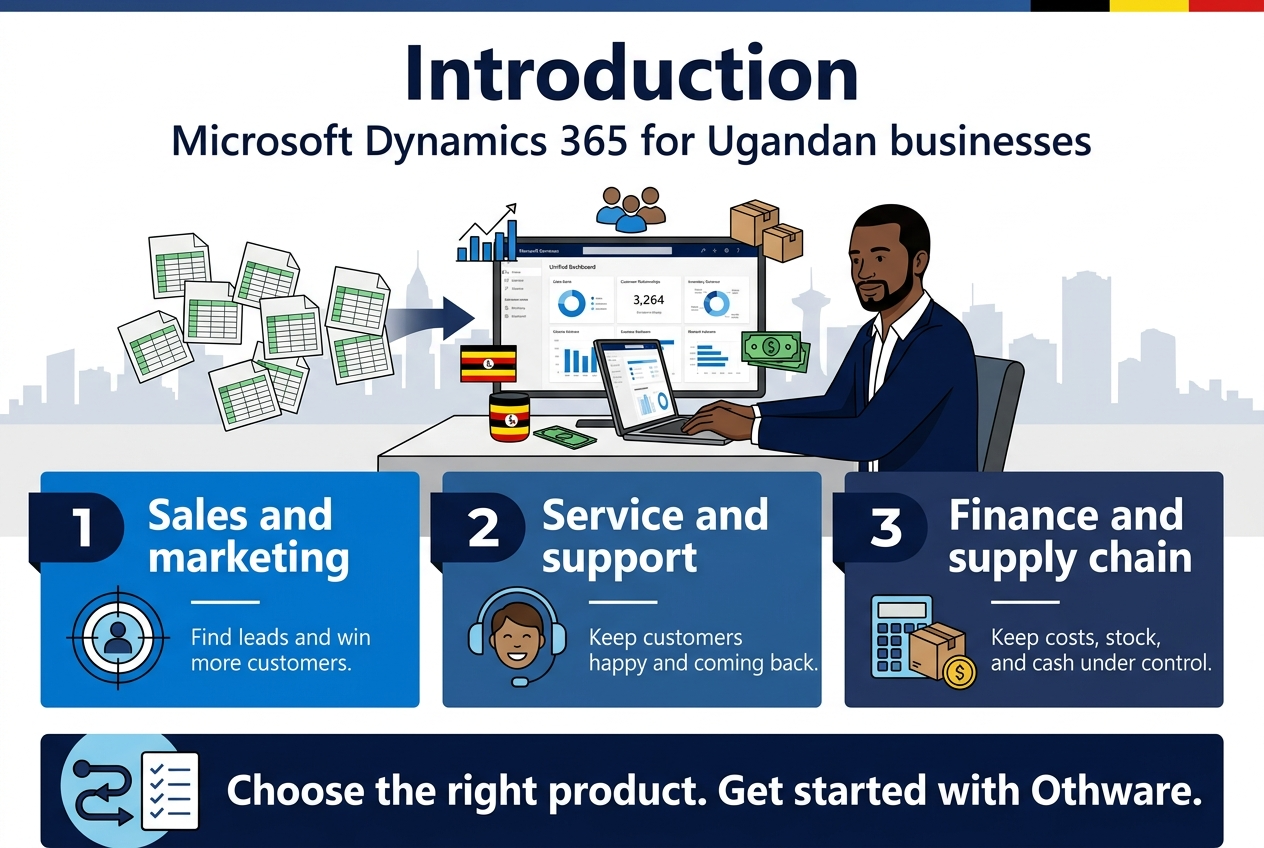
Running a business in Uganda means juggling sales, customers, stock, and money, often in too many spreadsheets. Microsoft Dynamics 365 puts those pieces in one system, but the product list can feel confusing.
This guide is for Ugandan business owners, managers, and IT leads who want to know what Dynamics 365 does and which parts fit their business.
Here’s what we’ll cover:
- Sales and marketing tools: how they help you find leads and win more customers.
- Service and support solutions: how they help you keep customers happy and coming back.
- Finance and supply chain tools: how they help you keep costs, stock, and cash under control.
We’ll also show you how to pick the right product and get started with Othware.
Understand How Dynamics 365 Powers Ugandan Business Growth
See What Dynamics 365 Is in Plain Language
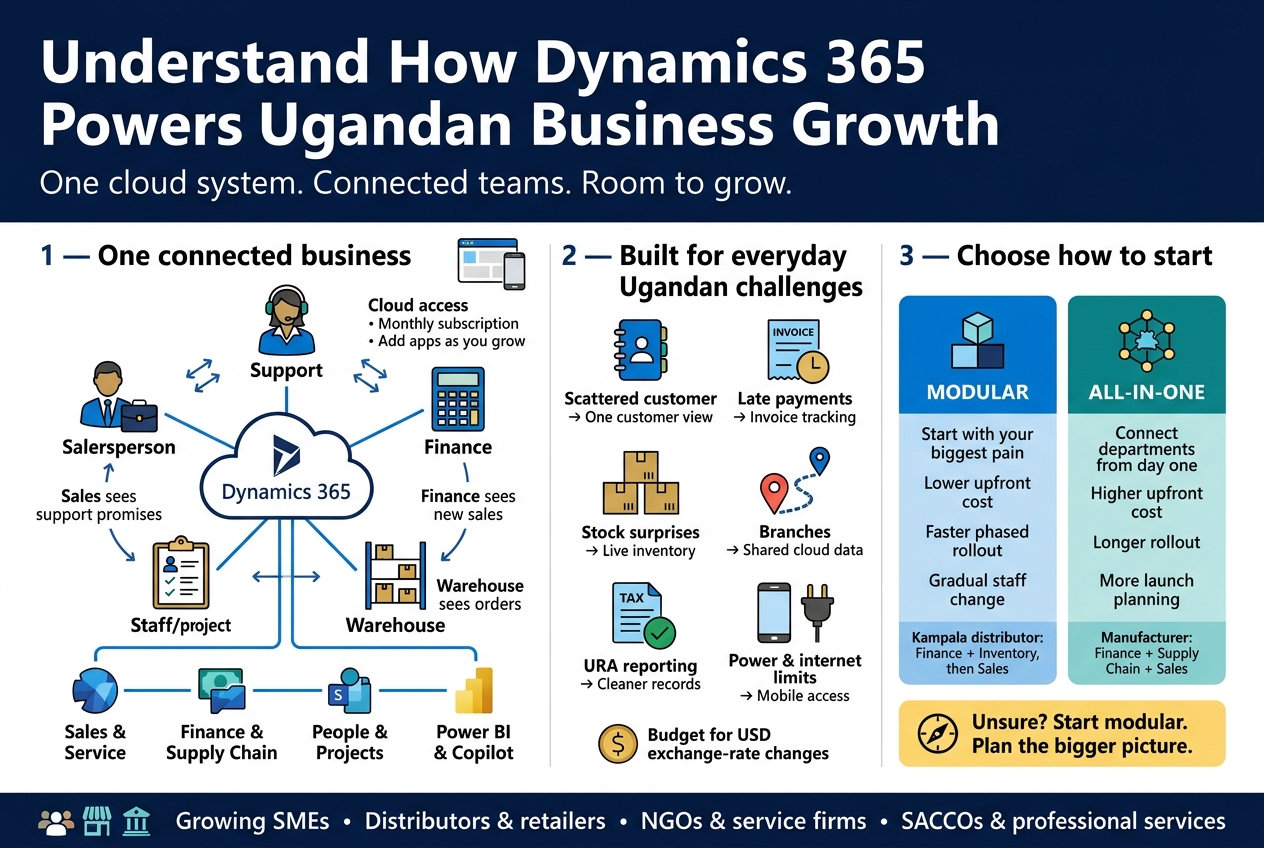
Dynamics 365 is Microsoft’s family of business apps that run in the cloud. Think of it as a set of tools that each handle one part of your business: selling, customer support, accounting, stock, staff, projects. They share the same data, so your teams stop working in separate silos.
Here’s what that looks like day to day:
- Sales sees what support has promised a customer.
- Finance sees what sales has just closed.
- Warehouse sees what’s been ordered before the customer calls to ask.
Instead of five spreadsheets, a notebook, and a WhatsApp group, you get one connected system.
A few basics worth knowing:
- It’s cloud-based. You log in through a browser or app. No server room needed in your office.
- It’s subscription-based. You pay per user, per month, for the apps you pick.
- It works with tools you already use. Outlook, Excel, Teams, and Power BI connect directly.
- It grows with you. You can add users, apps, and features as the business expands.
The main product families are:
| Area | Example apps | What they help with |
|---|---|---|
| Customer-facing | Sales, Marketing, Customer Service | Leads, campaigns, tickets |
| Finance and operations | Finance, Supply Chain Management, Business Central | Accounting, inventory, purchasing |
| People and projects | Human Resources, Project Operations | Staff records, billing, project tracking |
| Data and AI | Copilot, Power BI, Power Automate | Reports, automation, insights |
Connect Cloud Business Apps to Everyday Local Challenges
Ugandan businesses deal with realities that generic software guides often ignore. The good news is that Dynamics 365 fits many of them well.
Common challenges and how the tools respond
- Scattered customer information. Contacts live in phones, notebooks, and inboxes. A CRM app puts every conversation, quote, and follow-up in one place, so a sales rep leaving doesn’t take the client list with them.
- Cash flow pressure and late payments. Finance tools track invoices, send reminders, and show who owes you what, in real time.
- Stock surprises. Whether you run a distribution business, a pharmacy chain, or a manufacturing plant, inventory tools show what’s on the shelf, what’s in transit, and what to reorder.
- Multiple branches and upcountry teams. Cloud access means your Gulu or Mbarara branch sees the same numbers as head office in Kampala.
- Tax and reporting demands. Cleaner records make it much easier to prepare for URA filings and audits. Local tax setups usually need configuration with a partner who knows the rules.
- Unreliable power and internet. Because data sits in the cloud, a power cut at the office doesn’t wipe out your records. Mobile apps also let staff keep working from a phone, and you can plan around connectivity limits during setup.
- Cost of the shilling versus the dollar. Subscriptions are priced in dollars, so budget for exchange rate swings. The upside is that you avoid big upfront hardware and server costs.
Who gets the most from it
- Growing SMEs that have outgrown Excel and basic accounting packages
- Distributors, retailers, and manufacturers juggling stock across locations
- NGOs and service firms that must track projects, grants, and staff time
- Banks, SACCOs, and professional services that need tight customer follow-up
Choose Between Modular and All-in-One Adoption
You don’t have to buy everything at once. Most Ugandan businesses start small, and that’s usually the smart move.
Modular: start with your biggest pain
Pick one or two apps that fix your most expensive problem, then add more later.
Good fit if:
- Your budget is tight or you want to prove value first
- One department is clearly struggling (say, sales follow-up or stock control)
- Your team needs time to get comfortable with new tools
Example: A Kampala distributor starts with Business Central for finance and inventory, then adds Sales a year later when the accounts run smoothly.
All-in-one: connect everything from day one
Roll out several apps together so all departments share one system from the start.
Good fit if:
- You’re replacing several old systems anyway
- You have multiple branches or complex operations
- Leadership wants a single view of the whole business
Example: A fast-growing manufacturer launches Finance, Supply Chain, and Sales together so orders, production, and invoices flow in one chain.
Side-by-side comparison
| Factor | Modular | All-in-one |
|---|---|---|
| Upfront cost | Lower | Higher |
| Rollout time | Faster per phase | Longer |
| Risk | Lower | Higher, needs strong planning |
| Data connection | Grows over time | Connected from the start |
| Staff change load | Gradual | Heavy at launch |
A simple rule of thumb
If you’re unsure, go modular but plan the bigger picture. Choose apps that connect easily, keep your data clean from day one, and map out which modules come next. That way you grow without having to rebuild later.
Win More Customers with Sales and Marketing Tools
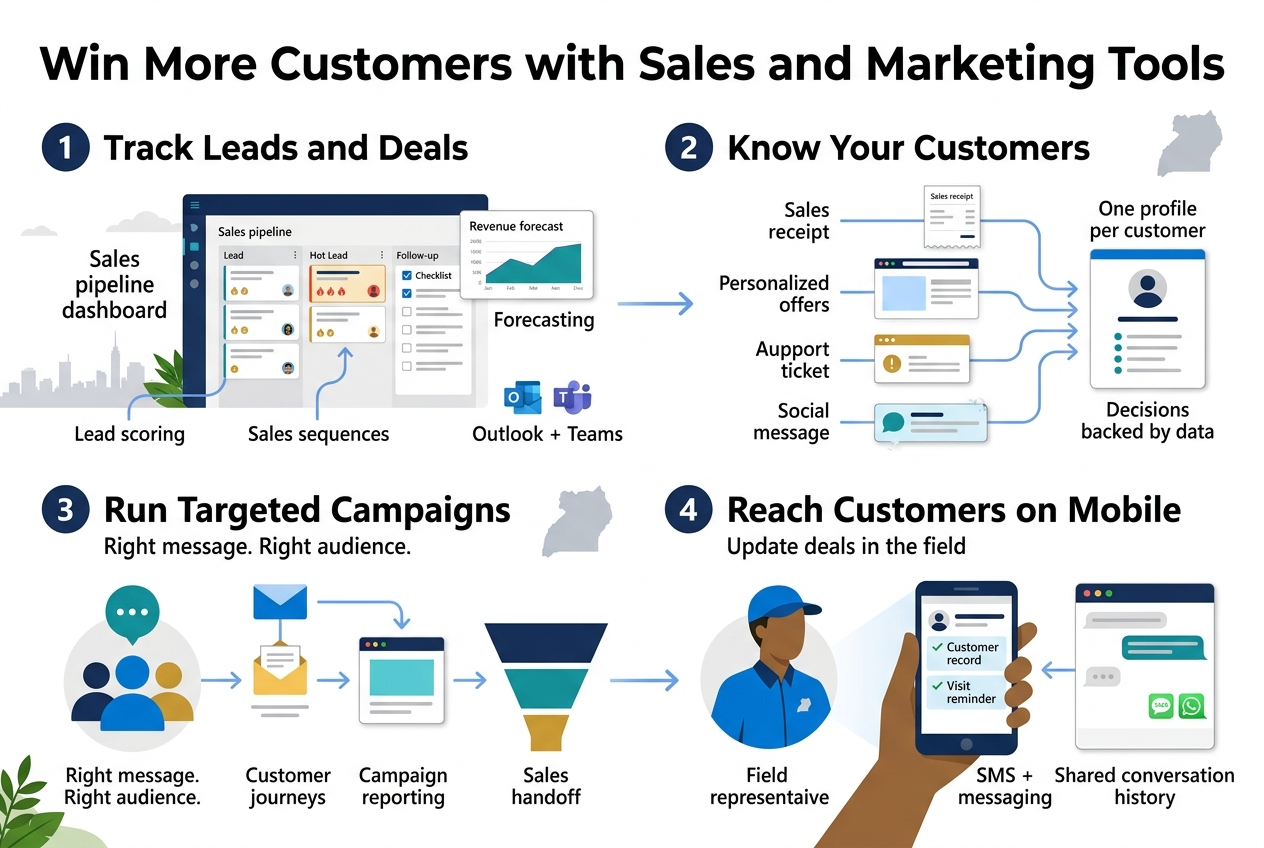
Track Leads and Deals with Dynamics 365 Sales
Think about how most sales teams in Kampala keep track of deals: a notebook, a few Excel sheets, and a lot of WhatsApp chats. It works until someone goes on leave, a lead goes cold, or the boss asks, “How much are we closing this quarter?”
Dynamics 365 Sales puts everything in one place. Here’s what you get:
- Lead and opportunity tracking: See every prospect, where they are in the pipeline, and what happens next.
- Lead scoring: Your team calls the hottest leads first instead of guessing.
- Sales sequences: Set step-by-step routines, like “call on day 1, email on day 3, follow up on day 7,” so nothing slips.
- Forecasting: Managers see expected revenue by person, team, or product without chasing spreadsheets.
- Outlook and Teams integration: Reps work from the tools they already use. Emails and meetings link to the right customer record.
A distributor in Ntinda selling to 200 retailers, for example, can see which shops reorder every month, which have gone quiet, and which deals are stuck at the quotation stage. That’s real money you stop leaving on the table.
Build Stronger Relationships Through Customer Insights
Closing one sale is good. Getting the customer to come back is better. That’s where customer insights come in.
Dynamics 365 Customer Insights pulls data from different places, such as sales records, website visits, support tickets, and social engagement. It then builds one clear profile for each customer.
You can answer questions like:
- Who are my top 20 customers by lifetime value?
- Which customers haven’t bought in 90 days?
- What do my best customers have in common?
- Who is likely to leave, and why?
What this looks like day to day
| Without insights | With insights |
|---|---|
| Customer data scattered across Excel, email, and phone contacts | One profile per customer |
| Same offer sent to everyone | Offers matched to buying habits |
| You find out a customer left after they’re gone | Early warnings for at-risk accounts |
| Gut-feel decisions | Decisions backed by real numbers |
For a Ugandan bank, SACCO, insurer, or retailer with thousands of customers, this shift matters. You stop treating everyone the same and start treating people like individuals, which is how loyalty gets built.
Run Targeted Campaigns with Dynamics 365 Marketing
Blasting the same message to your whole contact list gets you ignored. Dynamics 365 Marketing helps you send the right message to the right people at the right time.
Key features include:
- Customer segmentation: Group contacts by location, behavior, industry, purchase history, or interest. For example, “farmers in Mbarara who bought inputs last season.”
- Customer journeys: Build automated paths. Someone downloads your price list, gets a thank-you email, then a follow-up two days later, and your sales rep gets an alert if they click through.
- Email, event, and landing page tools: Run webinars, product launches, and sign-up pages from one platform.
- Lead handoff: When a lead is ready, the system passes it straight to Dynamics 365 Sales with the full history attached.
- Campaign reporting: See which messages brought in real business, not just clicks.
Why it matters for Ugandan businesses
Marketing budgets are rarely huge. Knowing which campaign worked, and which one burned airtime and cash for nothing, lets you spend smarter. Your marketing and sales teams also stop arguing over lead quality, because both see the same data.
Reach Customers on Mobile and WhatsApp-Friendly Channels
In Uganda, business happens on phones. Mobile money, SMS, and WhatsApp are how people buy, ask questions, and pay. Your CRM has to fit that reality.
Mobile access for your team
The Dynamics 365 mobile app lets your field reps:
- Check customer details before walking into a meeting
- Log visits and update deals on the spot
- Capture new leads in the field, even with patchy connectivity
- Get reminders for follow-ups
Your team in Gulu or Mbale doesn’t need to wait until they’re back at a desk to update records.
Messaging channels customers already use
Dynamics 365 works with SMS and messaging channels through the Customer Service and Contact Center tools, along with partner connectors and third-party integrations. WhatsApp is the big one here. Through approved providers and the WhatsApp Business platform, you can:
- Send order updates, appointment reminders, and payment notices
- Keep chat history linked to the customer’s record
- Let several team members handle conversations without losing context
Setup usually needs a local partner who knows the integration options, message approval rules, and costs involved. Done right, a customer’s WhatsApp question, SMS reply, and email thread all land in one record, so nobody has to repeat themselves.
Delight Customers with Service and Support Solutions
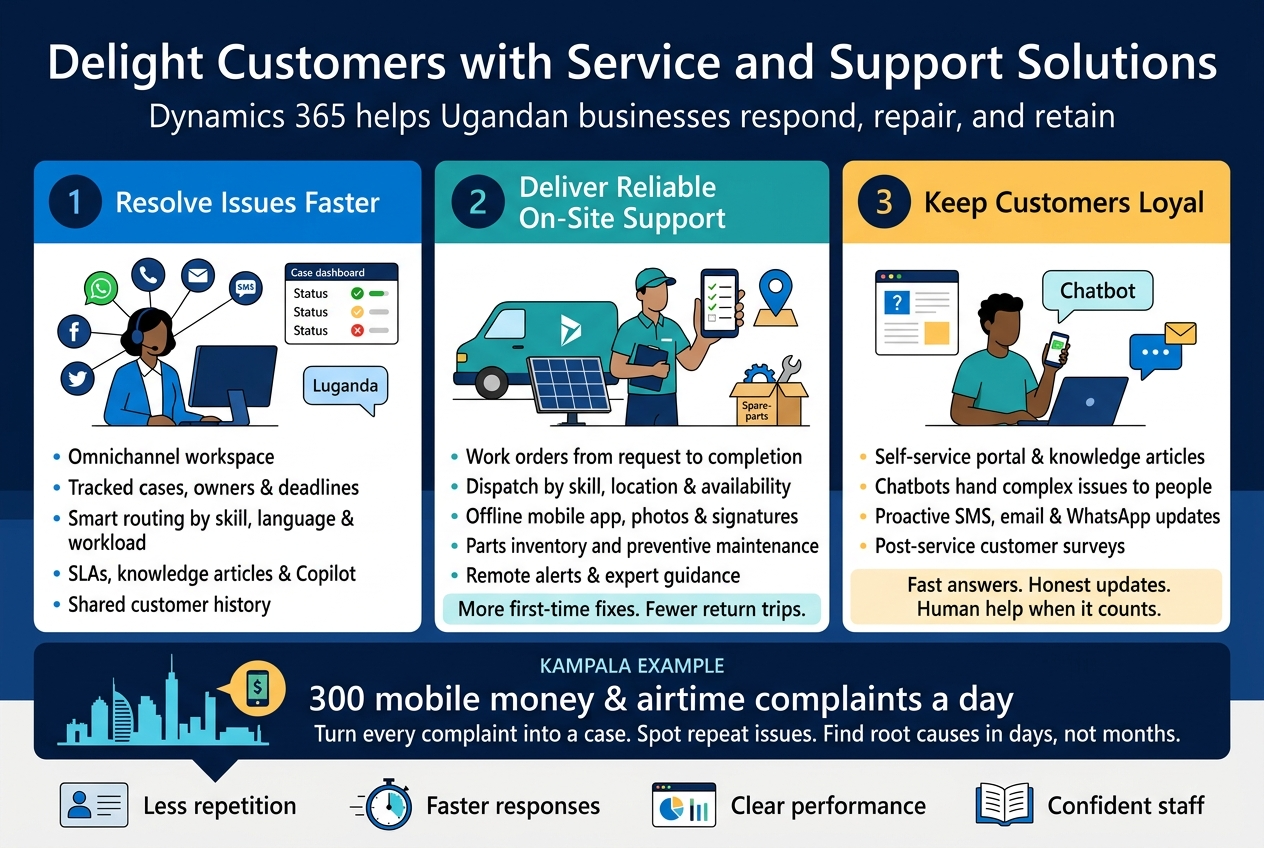
Resolve Issues Faster with Dynamics 365 Customer Service
Customers in Uganda reach out through WhatsApp, phone calls, email, SMS, and social media, often all in the same week. Dynamics 365 Customer Service pulls those channels into one workspace so your agents don’t hop between tools or ask people to repeat themselves.
Here’s what helps most day to day:
- Omnichannel in one screen: Agents handle calls, chat, and messages from one place, with the customer’s full history right beside the conversation.
- Case management: Every complaint becomes a tracked case with an owner, a priority, and a deadline. Nothing slips through because someone forgot to reply.
- Smart routing: Cases go to the right agent based on skill, language, or workload. A customer who speaks Luganda can reach an agent who speaks it too.
- Service level agreements (SLAs): Set response and resolution targets, and get alerts before a deadline is missed.
- Knowledge base: Agents get suggested articles while they work, so a new hire can answer like a ten-year veteran.
- Copilot assistance: AI can summarize long case threads, draft replies, and suggest next steps, which cuts down handling time.
A quick example: A telecom reseller in Kampala gets 300 mobile money and airtime complaints a day. Without a system, they live in spreadsheets and WhatsApp groups. With Customer Service, each complaint becomes a case, repeat issues show up in reports, and managers spot the root cause, such as a failing network partner, within days instead of months.
Where it pays off:
| Challenge | How Customer Service helps |
|---|---|
| Customers repeating their story | Unified customer history across channels |
| Slow first response | Auto-routing and automated acknowledgments |
| Unclear team performance | Dashboards showing resolution time and satisfaction scores |
| Staff turnover | Built-in knowledge and guided scripts |
If you already use Dynamics 365 Sales, your service team sees the same customer record, so they know whether the person calling is your biggest account or a new lead.
Deliver Reliable On-Site Support with Field Service
Some problems can’t be fixed over the phone. A generator stops, a solar panel fails, a water pump needs servicing, or a POS terminal goes dark. Dynamics 365 Field Service helps you send the right technician, with the right parts, at the right time.
What it does:
- Work order management: Create, assign, and track jobs from request to completion.
- Scheduling and dispatch: The scheduling board matches technicians by skill, location, and availability. It also considers travel time, which matters when Kampala traffic or rough rural roads can wreck a day’s plan.
- Mobile app for technicians: Technicians see job details, customer history, checklists, and manuals on their phones. They can capture photos, collect signatures, and log parts used. The app works offline, which is a big deal when network coverage drops outside town.
- Inventory on the van: Track parts in warehouses and in technician vehicles, so no one drives 80 km without the right spare.
- Preventive maintenance: Schedule recurring visits for equipment, so you fix things before they break.
- IoT and remote assistance: Connected equipment can raise alerts automatically. Technicians can also use mixed reality tools to get remote guidance from a senior expert.
Who benefits most in Uganda:
- Solar and energy installers
- Agricultural equipment suppliers
- Telecom and internet service providers
- Construction and facilities management firms
- Medical equipment distributors
- Elevator, HVAC, and generator service companies
The business win: Better first-time fix rates mean fewer return trips, and fuel and technician time are expensive. Customers also get arrival windows and updates instead of “he’s on the way” phone tag.
Keep Customers Loyal with Self-Service Options
Not everyone wants to call. Many customers would rather check an order status or find an answer at 10 pm on their own. Self-service gives them that option and frees your agents for the tough cases.
Options in the Dynamics 365 toolkit:
- Customer self-service portals: Customers log in to view cases, submit requests, track progress, and read articles.
- Knowledge articles: Publish how-to guides, FAQs, and troubleshooting steps. Customers find answers through search, and the same articles help your agents.
- Chatbots and virtual agents: Built with Copilot Studio, they handle common questions like “Where is my order?” or “What are your service hours?” and pass complex issues to a human, with the full chat transcript attached.
- Proactive updates: Send automatic messages by SMS, email, or WhatsApp when a case changes status or a technician is on the way.
- Customer surveys: Collect feedback right after a case closes to spot problems early.
Tips to make self-service work:
- Start with your top five most common questions and cover those first.
- Write articles in plain language, and add local languages where your customers need them.
- Always offer a clear “talk to a person” option.
- Keep content fresh. An outdated article does more harm than none.
- Review chatbot conversations monthly to find gaps.
Why it builds loyalty: People stay with businesses that make life easy. When customers get quick answers, honest updates, and a human when it counts, they come back and tell others. That kind of word-of-mouth is gold in Uganda’s tight-knit business circles.
Control Finances and Operations with Finance and Supply Chain Tools
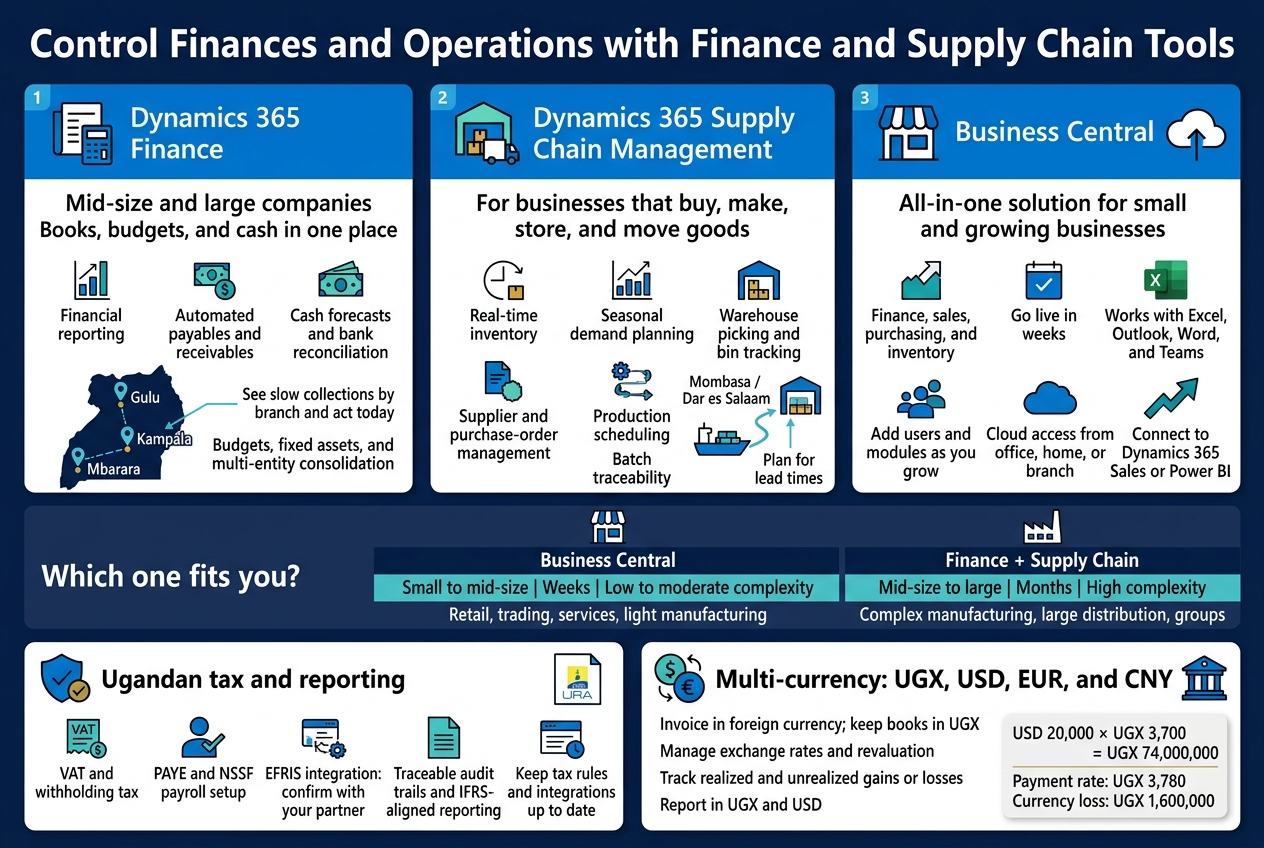
Manage Money Smarter with Dynamics 365 Finance
Dynamics 365 Finance suits mid-size and large Ugandan companies that have outgrown spreadsheets and basic accounting packages. It puts your books, budgets, and cash position in one place, so you stop chasing numbers across departments.
What you get:
- General ledger and financial reporting: Close your books faster and pull reports without rebuilding them by hand each month.
- Accounts payable and receivable: Automate invoice matching, payment reminders, and supplier payments.
- Cash and bank management: Reconcile bank statements automatically and see your cash forecast in real time.
- Budgeting and fixed assets: Track budgets against actuals and manage depreciation for vehicles, machinery, and buildings.
- Multi-entity consolidation: Combine results from several subsidiaries, such as a Kampala head office plus branches in Gulu, Mbarara, or Nairobi.
A distributor with three branches, for example, can see which branch is slow on collections and fix it that day, not at quarter end.
Streamline Stock and Logistics with Supply Chain Management
Dynamics 365 Supply Chain Management is built for businesses that buy, make, store, and move goods. Think manufacturers, wholesalers, agro-processors, and importers.
Key capabilities:
- Inventory visibility: Know what’s in each warehouse, what’s on order, and what’s about to run out.
- Demand planning: Use past sales and seasonal trends to decide how much to buy. This matters for products tied to harvest cycles or festive peaks.
- Warehouse management: Guide pickers, track bins, and cut mix-ups and shrinkage.
- Procurement: Compare suppliers, approve purchase orders, and track deliveries from port to shelf.
- Production planning: Schedule machines, materials, and labor so lines don’t sit idle.
- Traceability: Follow batches from supplier to customer, which helps in food, beverage, and pharmaceutical businesses.
If imports through Mombasa or Dar es Salaam often run late, the system helps you build in lead-time buffers and reorder earlier.
Simplify Growth with Business Central for SMEs
Business Central is the all-in-one option for small and growing businesses. It covers finance, sales, purchasing, inventory, and light manufacturing without the weight of a full enterprise system.
Why SMEs like it:
- Quick to roll out: Many companies go live in weeks, not months.
- Familiar feel: It works with Excel, Outlook, Word, and Teams, so staff pick it up fast.
- Pay as you grow: Add users and modules when you need them.
- Cloud-based: Work from the office, home, or a branch with an internet connection.
- Room to expand: Link it to Dynamics 365 Sales or Power BI later.
Which one fits you?
| Factor | Business Central | Finance + Supply Chain |
|---|---|---|
| Typical size | Small to mid-size | Mid-size to large |
| Setup time | Weeks | Months |
| Complexity | Low to moderate | High |
| Multi-country operations | Supported | Strong, built for scale |
| Best for | Retail, trading, services, light manufacturing | Complex manufacturing, large distribution, groups |
Stay Compliant with Ugandan Tax and Reporting Needs
Tax compliance takes real time for Ugandan finance teams. Dynamics 365 helps by keeping transactions clean and traceable, so reporting is less painful.
Areas where it helps:
- VAT and withholding tax: Set up tax codes and rates so they apply automatically on sales and purchases. Reports are ready for your URA returns.
- PAYE and NSSF: Payroll can be configured to handle statutory deductions through Dynamics 365 Human Resources or a localized payroll add-on.
- EFRIS readiness: URA’s Electronic Fiscal Receipting and Invoicing Solution requires fiscal invoices. Many Ugandan partners offer integrations that connect Dynamics 365 to EFRIS, so invoices are validated without double entry. Confirm this with your partner before go-live.
- Audit trails: Every entry shows who posted it, when, and why. Auditors love that.
- IFRS-aligned reporting: Build financial statements that follow IFRS or IFRS for SMEs standards.
Tax rules change, so the system needs ongoing updates. A local partner who follows URA announcements saves you from nasty surprises.
Handle Multiple Currencies Including UGX and USD
Plenty of Ugandan businesses price in dollars, buy in euros or yuan, and pay salaries and rent in shillings. Dynamics 365 is built for that mix.
How it handles currency:
- Multiple currencies per transaction: Invoice a customer in USD while your books stay in UGX.
- Exchange rate management: Load rates manually, or pull them in automatically from a provider. Set them daily, weekly, or monthly.
- Realized and unrealized gains and losses: The system calculates what you made or lost when rates move, both on settled payments and open balances.
- Revaluation: Revalue foreign currency balances such as USD bank accounts and supplier invoices at month end.
- Dual reporting currency: Report in UGX for local needs and USD for donors, parent companies, or lenders.
A quick example
You import goods worth USD 20,000 when the rate is 3,700. By payment day it’s 3,780. The system records the extra UGX 1.6 million as a currency loss, so your margin reports show the real cost, not a guess.
For NGOs and export businesses, the dual-currency setup also makes donor and investor reporting much cleaner.
Empower Your Team with People and Project Tools
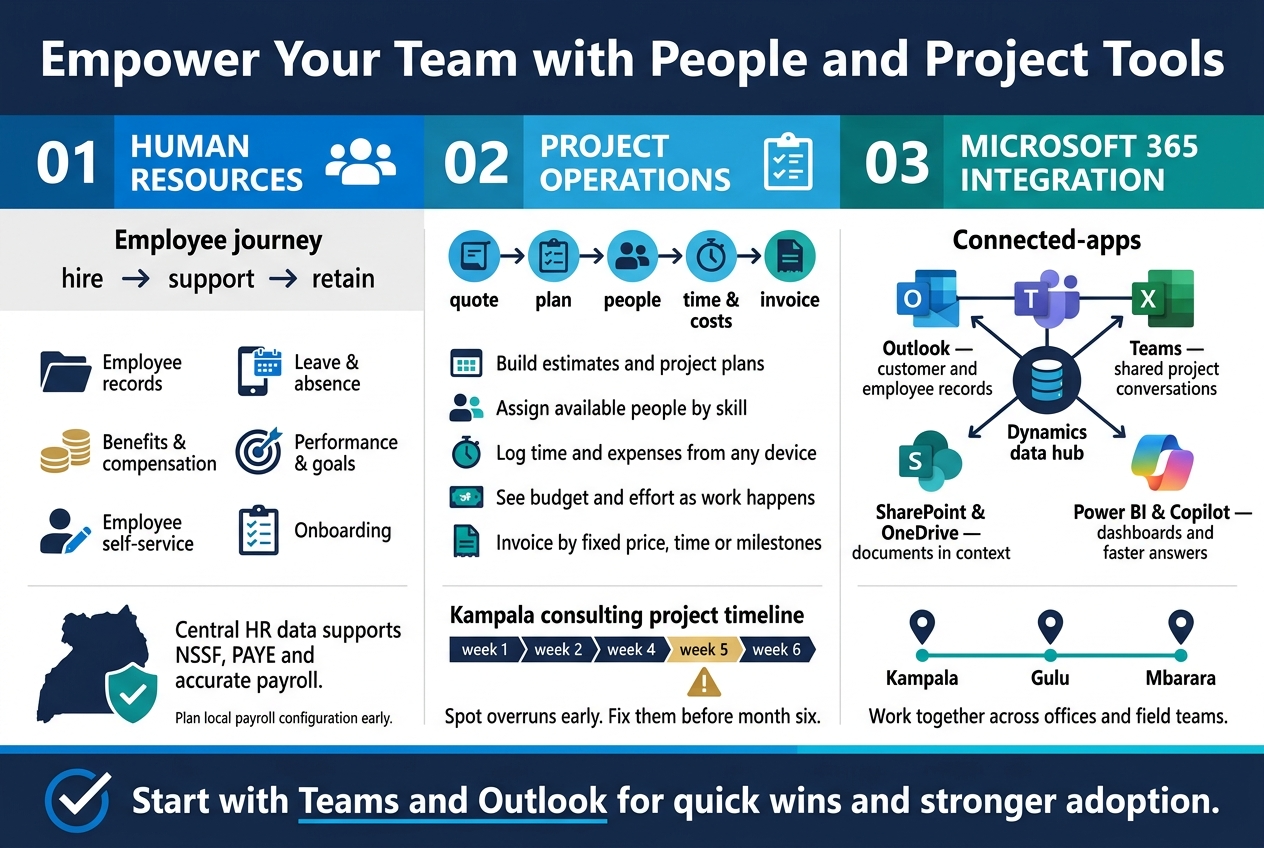
Attract and Retain Talent with Dynamics 365 Human Resources
Hiring good people in Uganda is hard. Keeping them is harder. Dynamics 365 Human Resources gives your HR team one place to manage the whole employee journey, so they spend less time chasing paper and more time with people.
What it covers:
- Employee records: Contracts, personal details, job history and documents live in one system, not scattered across Excel files and filing cabinets.
- Leave and absence: Staff request leave from their phones. Managers approve in a click. Balances update on their own.
- Benefits and compensation: Set up pay grades, allowances and benefit plans, and track them consistently.
- Performance and goals: Run reviews, set goals and collect feedback during the year, not just in a frantic December rush.
- Self-service: Employees update their own details and see their own leave balances, which cuts down on “Can you check for me?” requests.
- Onboarding: New hires get a checklist of tasks, from signing contracts to collecting laptops, so day one isn’t chaos.
Why it matters locally: Growing Ugandan companies often juggle NSSF contributions, PAYE and multiple branches or field teams. Clean, central HR data makes it much easier to stay compliant and feed payroll accurately. Payroll setups usually need local configuration or a connected payroll tool, so it’s worth planning that early with your implementation partner.
Retention improves too. When people can see their goals, get timely feedback and sort out simple requests quickly, they feel looked after. That’s often what separates a team that stays from one that leaves.
Deliver Projects on Time and on Budget with Project Operations
If your business sells work by the project, such as construction, consulting, NGO programmes, IT rollouts or engineering, you know how fast budgets slip. Dynamics 365 Project Operations connects the sales deal, the project plan, the team’s time and the final invoice in one flow.
What you can do with it:
- Quote and plan: Build estimates from the same data you’ll use to run the project, so what you promised matches what you deliver.
- Assign the right people: See who’s available, who has the right skills and who is already overloaded before you commit them.
- Track time and expenses: Team members log hours and costs from any device, including from the field.
- Watch the budget live: Compare planned and actual cost and effort as the work happens, not after it’s over.
- Bill accurately: Invoice on a fixed price, time and materials, or milestones, with fewer disputes and less revenue leakage.
A quick example: A Kampala consulting firm wins a six-month contract. In Project Operations, the sales team’s quote becomes the project plan. Consultants log hours daily. The manager spots that one phase is burning through budget in week five, and fixes it then, not in month six.
| Without a project tool | With Project Operations |
|---|---|
| Hours tracked on spreadsheets | Time logged in one system |
| Overruns found at project end | Overruns flagged as they happen |
| Invoices built by hand | Invoices drawn from approved time and milestones |
| Resource clashes discovered late | Availability visible up front |
Donor-funded and multi-project organisations get extra value. Reporting against budget lines and grant requirements is far easier when costs are tagged to the right project from the start.
Boost Productivity with Microsoft 365 and Teams Integration
Tools only help if people actually use them. That’s why Dynamics 365’s link to Microsoft 365 matters so much. Your team stays in the apps they already know, such as Outlook, Teams, Excel and SharePoint, while Dynamics works behind the scenes.
Where the integration helps:
- Outlook: See customer or employee records right beside an email, and log conversations without copying and pasting.
- Teams: Chat about a deal, a project or a customer record inside Teams, and pull Dynamics data into the conversation. Everyone sees the same information.
- Excel: Export, edit and analyse Dynamics data in a spreadsheet your finance team already loves, then refresh it from the source.
- SharePoint and OneDrive: Store contracts, proposals and project documents against the right record, so nobody hunts through email for the latest version.
- Power BI and Copilot: Turn the same data into dashboards, and use Copilot to summarise records, draft emails and answer questions faster.
Why this suits Ugandan teams: Many offices already run on Microsoft 365. Staff working across Kampala, Gulu or Mbarara, or out in the field, can collaborate in real time without learning a whole new interface. Adoption is usually where ERP and CRM projects stall, so familiar tools give you a real head start.
Practical tip: Start with Teams and Outlook integration during rollout. These two deliver quick wins, and when people feel the benefit in their first week, they stick with the system long after go-live.
Unlock Smarter Decisions with Data, AI, and Automation
Gain Clear Insights with Power BI Dashboards
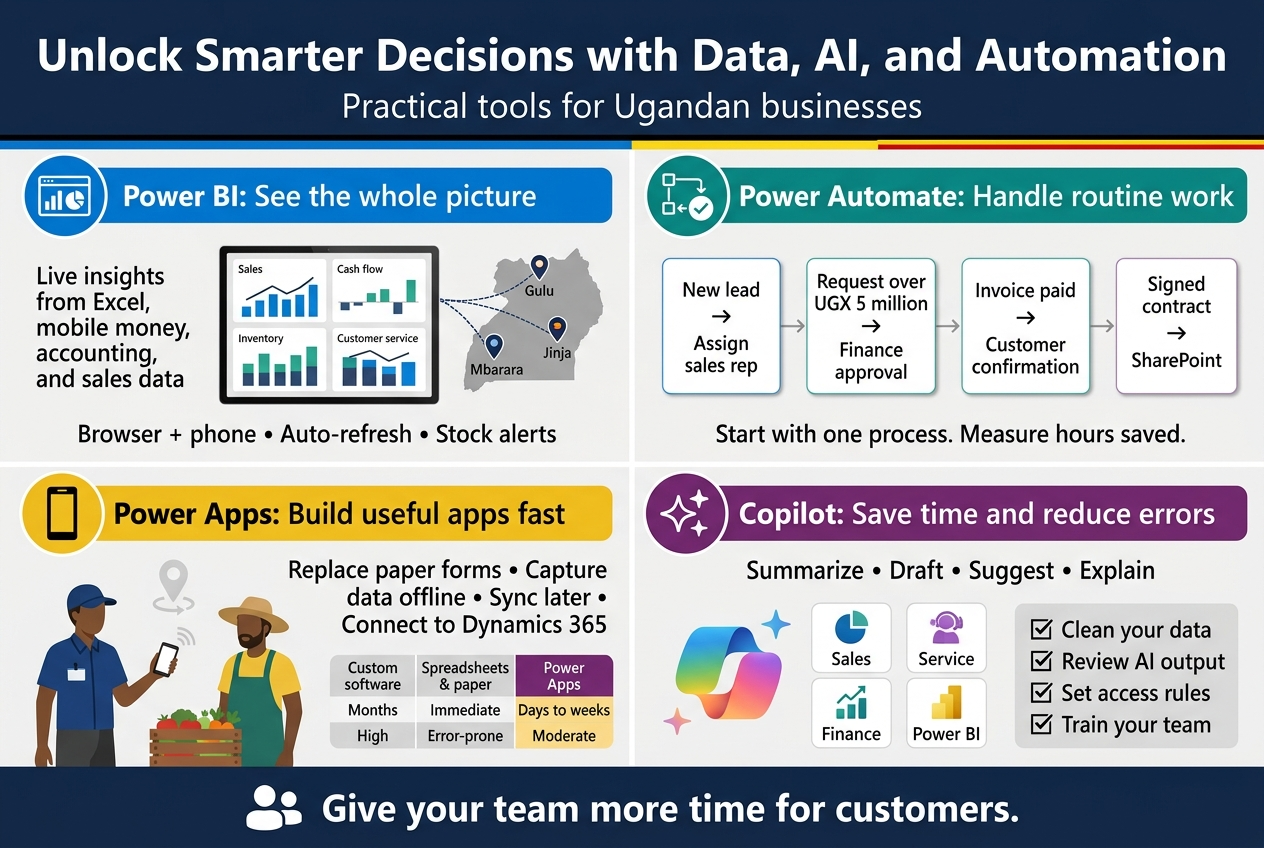
Most Ugandan businesses already have the data they need. It’s just scattered across Excel sheets, mobile money statements, your accounting system, and your sales team’s notebooks. Power BI pulls it all into one place and turns it into live dashboards you can read in seconds.
Connect it to Dynamics 365 and you can see things like:
- Sales: Which products, branches, or reps are pulling their weight this month
- Cash flow: Who owes you, how old the invoices are, and what’s due this week
- Inventory: Fast movers, slow movers, and stock sitting too long in the warehouse
- Customer service: Ticket volumes, response times, and repeat complaints
A distributor in Kampala, for example, could compare sales across Mbarara, Gulu, and Jinja on one screen, then drill down to the exact product dragging a region down. No more waiting for month-end reports.
Why it works well locally:
- It runs in the browser and on a phone, so managers can check numbers on the road
- You can set alerts, such as “tell me when stock for this item drops below 50 units”
- Reports refresh automatically, so you stop arguing about whose spreadsheet is right
Automate Routine Tasks with Power Automate
Think about how many hours your team spends copying data, chasing approvals, and sending the same reminder emails. Power Automate takes over that repetitive work using simple “if this happens, do that” flows.
Everyday examples:
- A new lead comes in from your website, and it’s automatically added to Dynamics 365 Sales and assigned to the right rep
- A purchase request over UGX 5 million goes straight to the finance director for approval on Teams or email
- An invoice gets paid, and the customer receives a confirmation message right away
- Signed contracts are saved to the correct SharePoint folder without anyone dragging files around
You don’t need a developer for most of these. The builder is visual, and there are hundreds of ready-made templates. It also connects to Outlook, Excel, Teams, and many other tools you probably already use.
Quick win: Start with one process that annoys everyone, like leave approvals or expense claims. Automate it, measure the hours saved, then move to the next one.
Build Custom Apps Quickly with Power Apps
Off-the-shelf software rarely fits every process. Maybe you run field inspections, track boda boda deliveries, or collect farmer data in rural areas. Power Apps lets you build the exact app you need, often in days instead of months.
You can create apps that:
- Capture data on a phone or tablet, even with weak connectivity, and sync later
- Replace paper forms, such as site visit reports, stock counts, or delivery confirmations
- Plug straight into Dynamics 365, so the data lands where it belongs
| Approach | Typical timeline | Cost | Best for |
|---|---|---|---|
| Fully custom software | Months | High | Very unique, complex needs |
| Spreadsheets and paper | Immediate | Low upfront, costly in errors | Tiny operations |
| Power Apps | Days to weeks | Moderate | Specific workflows that need to connect to your data |
An agribusiness could give field officers a simple app to register farmers, capture GPS locations, and log produce purchases. By evening, head office sees everything in Power BI.
Use Copilot to Save Time and Reduce Errors
Copilot is Microsoft’s AI assistant, built right into Dynamics 365, Power Platform, and Microsoft 365. Think of it as a sharp colleague who reads, writes, and summarizes faster than anyone on your team.
What it can do across your business:
- Sales: Summarize a long customer email thread, draft follow-up emails, and prepare you for a meeting with account highlights
- Customer service: Suggest answers to support queries and summarize cases so agents don’t start from scratch
- Finance: Flag unusual entries, help with collections, and explain variances in plain language
- Power BI: Ask “Which region had the biggest drop in sales last quarter?” and get a report built for you
- Power Apps and Power Automate: Describe what you want in everyday words, and Copilot builds a first draft
Where it saves you from mistakes:
- Fewer typos and missed details in customer communication
- Less manual data entry, which means fewer wrong numbers
- Consistent case notes that anyone can pick up and understand
A few practical tips before you switch it on:
- Clean up your data first. Copilot is only as good as what it reads.
- Always review what it writes before sending, especially for client-facing messages.
- Set clear access rules so people only see data they should.
- Train your team with short, hands-on sessions using real examples from your business.
Used well, Copilot doesn’t replace your people. It gives them back hours every week to spend on customers, which is where your growth comes from.
Match the Right Dynamics 365 Product to Your Business
Identify Solutions for Retail, Agriculture, Manufacturing, and Services
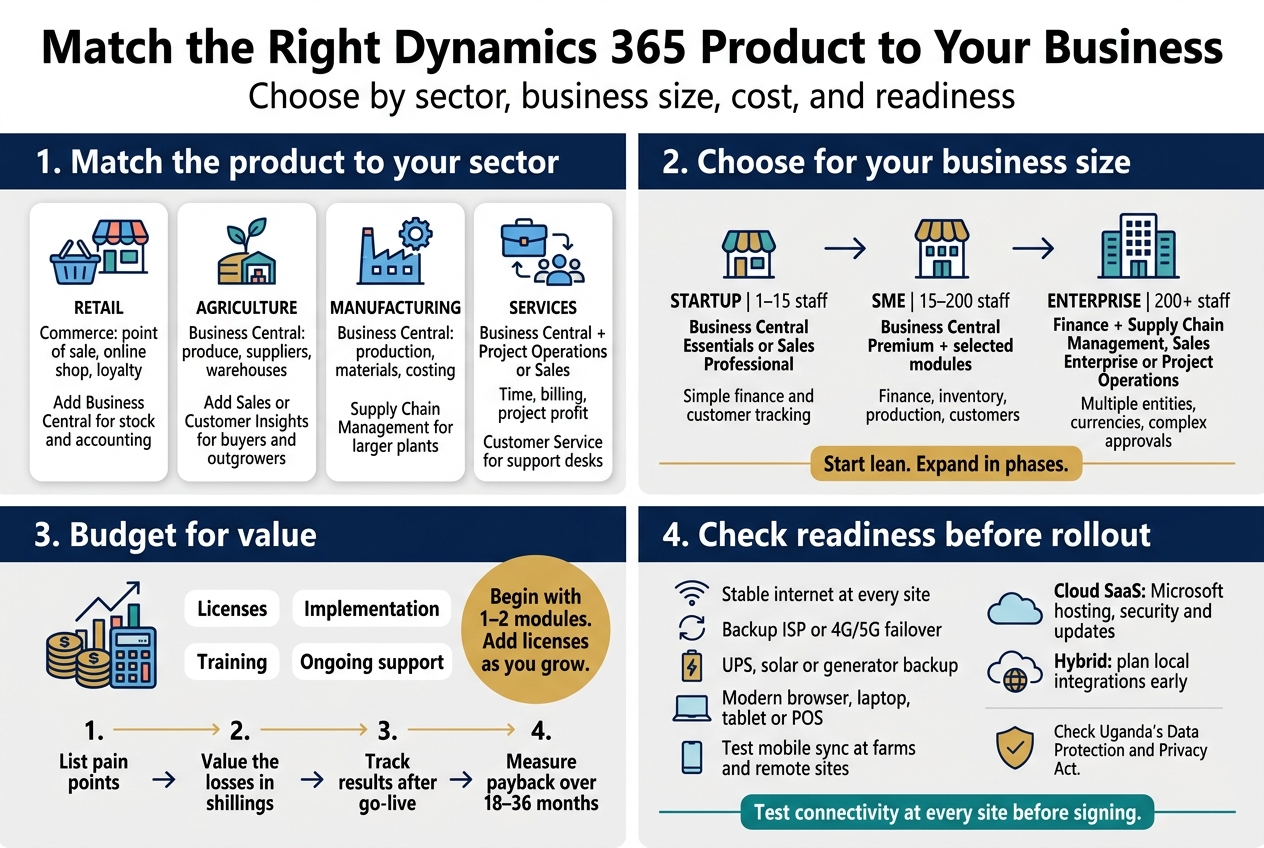
Start with how your business makes money, then pick the tools that fit.
- Retail: Dynamics 365 Commerce handles point of sale, online shops, and loyalty programs. Pair it with Business Central for stock and accounting. A supermarket chain in Kampala can see stock levels across branches and run mobile money promotions without juggling spreadsheets.
- Agriculture: Business Central works well for agribusinesses, exporters, and cooperatives. It tracks produce purchases, supplier payments, and stock by warehouse. Add Sales or Customer Insights if you manage lots of buyers or outgrowers.
- Manufacturing: Business Central covers production orders, bills of materials, and costing for small to mid-sized factories. Larger plants can look at Supply Chain Management for planning, quality control, and warehouse automation.
- Services: Consultancies, NGOs, schools, and contractors usually do best with Business Central plus Project Operations or Dynamics 365 Sales. You get time tracking, billing, and project profitability in one place. Customer Service helps if you run a support desk or call center.
Compare Options for Startups, SMEs, and Large Enterprises
Size matters because complexity costs money. Buy what you need now and leave room to grow.
| Business Size | Best Starting Point | Why It Fits |
|---|---|---|
| Startup (1–15 staff) | Business Central Essentials or Sales Professional | Simple setup, finance and customer tracking without heavy customization |
| SME (15–200 staff) | Business Central Premium plus Sales, Customer Service, or Commerce | Covers finance, inventory, production, and customer-facing teams |
| Large enterprise (200+ staff) | Finance, Supply Chain Management, Sales Enterprise, Project Operations | Handles multiple entities, currencies, and complex approvals |
A few rules of thumb:
- Startups: Don’t start with the biggest platform. Get your books, invoicing, and customer pipeline in order first.
- SMEs: Business Central is usually the sweet spot. It’s a single system that you can extend with Power Platform apps as needs grow.
- Enterprises: Expect a phased rollout across branches or subsidiaries. Start with finance, then add supply chain or customer modules.
Weigh Costs, Licensing, and Return on Investment
Dynamics 365 is licensed per user, per month, and billed in US dollars. With the shilling moving against the dollar, build some buffer into your budget.
What you’ll pay for:
- Licenses: Full users cost more than team members, who only need light access such as approvals, time entry, or reports. Giving the right license to the right person can cut your bill noticeably.
- Implementation: Setup, data migration, configuration, and integrations often equal or exceed the first year’s licensing for mid-sized deployments.
- Training: Skip this and adoption suffers, which wastes everything else you spent.
- Support: Budget for ongoing help, updates, and tweaks after go-live.
How to think about ROI:
- List your current pain points: late invoices, stock mismatches, slow month-end close, lost leads.
- Put a shilling value on each one. How many hours do staff lose? How much stock goes missing?
- Track a few clear numbers after go-live, like days to collect payment, stock accuracy, or quote-to-order time.
- Look at payback over 18 to 36 months, not just the first quarter.
Tip: Start with one or two modules, prove the value, then add more. Licenses can be added later, so there’s no need to buy everything on day one.
Check Internet, Hosting, and Infrastructure Readiness
Dynamics 365 runs in the cloud, so your connection matters as much as your software.
Quick readiness checklist:
- Bandwidth: Each branch needs a stable connection. Fiber or a reliable business-grade link is ideal. A small office can manage with a good dedicated line, but shared home-style connections can cause headaches.
- Backup connectivity: Have a second ISP or a 4G/5G failover. Power and network outages happen, and your team shouldn’t stop selling because of them.
- Power: UPS units and solar or generator backup for servers, routers, and POS terminals keep tills running during load shedding.
- Devices: Modern browsers and reasonably recent laptops, tablets, or POS hardware are enough. You don’t need expensive machines.
- Remote sites: Farms, depots, and field teams can use mobile apps that work with limited connectivity and sync when they’re back online. Test this in real field conditions before rollout.
Hosting choices:
- Cloud (SaaS): The default and simplest option. Microsoft handles hosting, security, and updates. Data sits in Microsoft’s regional datacenters, so check how that fits with Uganda’s Data Protection and Privacy Act.
- Hybrid or partner-hosted: Some businesses keep certain data or integrations local, such as bank links, mobile money, or URA tax systems. Plan these integrations early.
Run a connectivity test at every site before you sign anything. It’s cheap, quick, and saves you from nasty surprises later.
Implement Dynamics 365 Successfully in Uganda with Othware
Working with Othware, the Official Microsoft Dynamics 365 Partner for Uganda
Buying the software is the easy part. Getting it to fit how your business runs is where most projects stall. A local partner closes that gap.
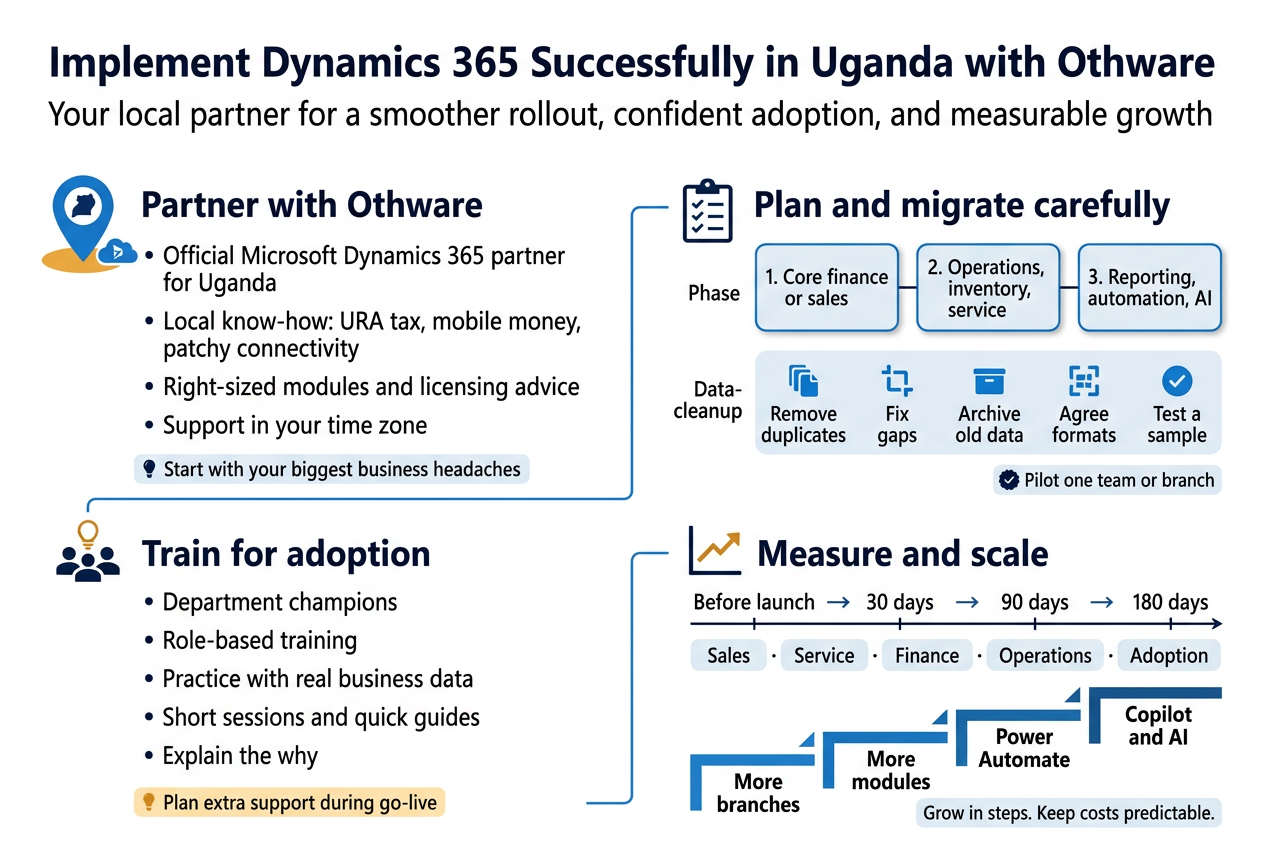
Othware is the official Microsoft Dynamics 365 partner for Uganda, so you get someone who knows both the product and the market. Here’s what that means for you:
- Local know-how: They understand things like URA tax requirements, mobile money payments, and the reality of patchy connectivity in some areas.
- Right-sized advice: They’ll tell you if you need Business Central alone or a mix of Sales, Customer Service, and Finance.
- Licensing guidance: They help you avoid paying for modules you won’t touch for a year.
- Support close by: When something breaks on a Monday morning, you talk to a team in your own time zone.
Start with a discovery call. Bring your biggest headaches, such as slow month-end closing, lost leads, or stock that never matches the books. A good partner builds the plan around those problems, not around a feature list.
Plan a Smooth Rollout and Data Migration
Most failed rollouts trace back to rushed planning and messy data. Slow down at the start so you can move fast later.
Map your processes first
Write down how work really happens today: how a quote becomes an invoice, how stock gets reordered, how leave gets approved. Then decide what to keep, fix, or drop. Don’t copy a broken process into a new system.
Phase the rollout
Trying to switch everything on at once overloads your team. A phased approach works better:
| Phase | Focus | Typical goal |
|---|---|---|
| 1 | Core finance or sales | Get the backbone working |
| 2 | Operations, inventory, service | Connect departments |
| 3 | Reporting, automation, AI | Get smarter insights |
Clean your data before moving it
Moving bad data into a shiny new system just gives you bad data faster. Before migration:
- Remove duplicates: Merge repeat customer and supplier records.
- Fix gaps: Fill in missing phone numbers, TINs, and addresses.
- Archive the old: Leave out dead accounts and ancient transactions you’ll never need.
- Agree on formats: Settle on one way to write dates, names, and product codes.
- Test with a sample: Run a trial import, check the results, then do the full load.
Run a pilot
Pick one team or branch and let them use the system for a few weeks. They’ll find the quirks while the stakes are low. Fix what they flag, then roll out wider.
Train Your Staff for Quick Adoption
A system nobody uses is just an expensive subscription. People adopt tools they understand and trust, so train early and keep at it.
- Get champions on board: Pick one respected person per department. They answer quick questions and calm nerves.
- Train by role: Your sales rep doesn’t need the finance module walkthrough. Show people only what they do every day.
- Use real examples: Practice with your own customers, products, and invoices, not generic demo data.
- Keep sessions short: Two 90-minute sessions beat one exhausting full day.
- Leave guides behind: Short how-to sheets and recorded sessions help people who forget a step a week later.
- Explain the why: Staff who see how the system saves them time resist it far less.
Expect a dip in speed during the first few weeks. That’s normal. Plan for extra support during go-live, such as a help desk, daily check-ins, or a partner on call.
Measure Results and Scale with Confidence
Decide what success looks like before you go live, then check it regularly. Otherwise you’re guessing.
Track a handful of numbers
Pick metrics tied to the problems you set out to solve:
- Sales: Lead conversion rate, average deal cycle, quote turnaround time
- Service: First response time, resolution time, customer satisfaction scores
- Finance: Days to close the month, invoice collection time, reporting errors
- Operations: Stock accuracy, order fulfillment time, stockouts
- Adoption: Active users, records updated, reports used
Record your baseline numbers before launch. Without a “before,” the “after” doesn’t prove much.
Review and adjust
Hold a review at 30, 90, and 180 days. Ask your team what’s working, what’s clunky, and what they’re still doing in spreadsheets. Those spreadsheet workarounds point to the next improvement.
Scale in steps
Once the first phase is paying off, add more:
- Extend to more branches or departments.
- Add modules like Customer Service, Project Operations, or Power BI dashboards.
- Bring in automation with Power Automate to cut repetitive tasks.
- Explore Copilot and AI features once your data is solid.
Growing in steps keeps costs predictable and lets the team stay comfortable. With a partner like Othware checking in as you expand, Dynamics 365 grows alongside your business instead of ahead of it.
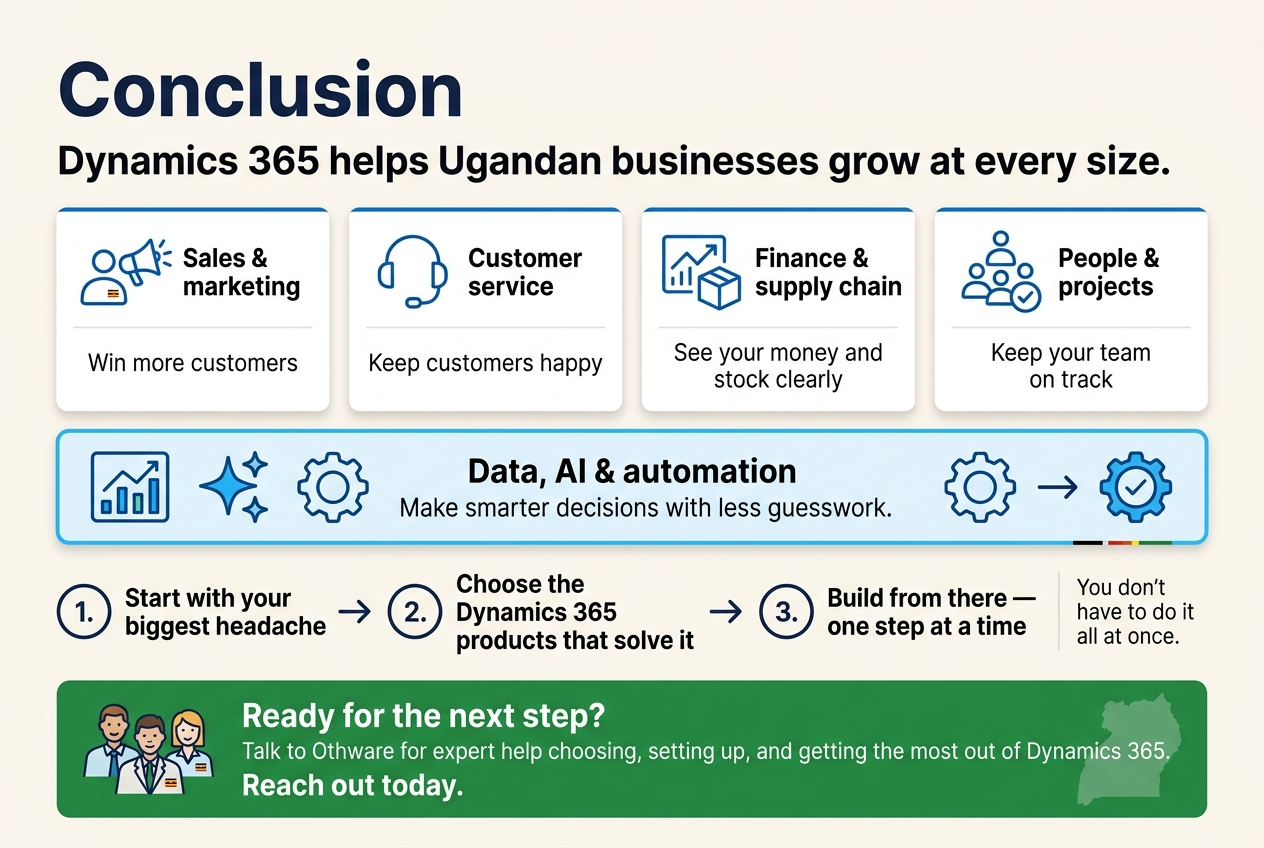
Dynamics 365 isn’t just big-company software. It’s a set of tools that can help Ugandan businesses grow, whatever your size. Sales and marketing tools help you win more customers. Service tools keep them happy. Finance and supply chain tools give you a clear view of your money and stock. People and project tools keep your team on track. And with data, AI, and automation, you can make smarter calls without all the guesswork.
The trick is to start with your biggest headache, not the longest feature list. Pick the Dynamics 365 products that fix that problem first, then build from there. You don’t have to do it all at once.
If you’re ready to take the next step, talk to the team at Othware. They know the Ugandan market and can help you choose, set up, and get the most out of Dynamics 365. Reach out today and see how much easier running your business can be.

Tech Evangelist and Business Developer.
I love connecting with nature