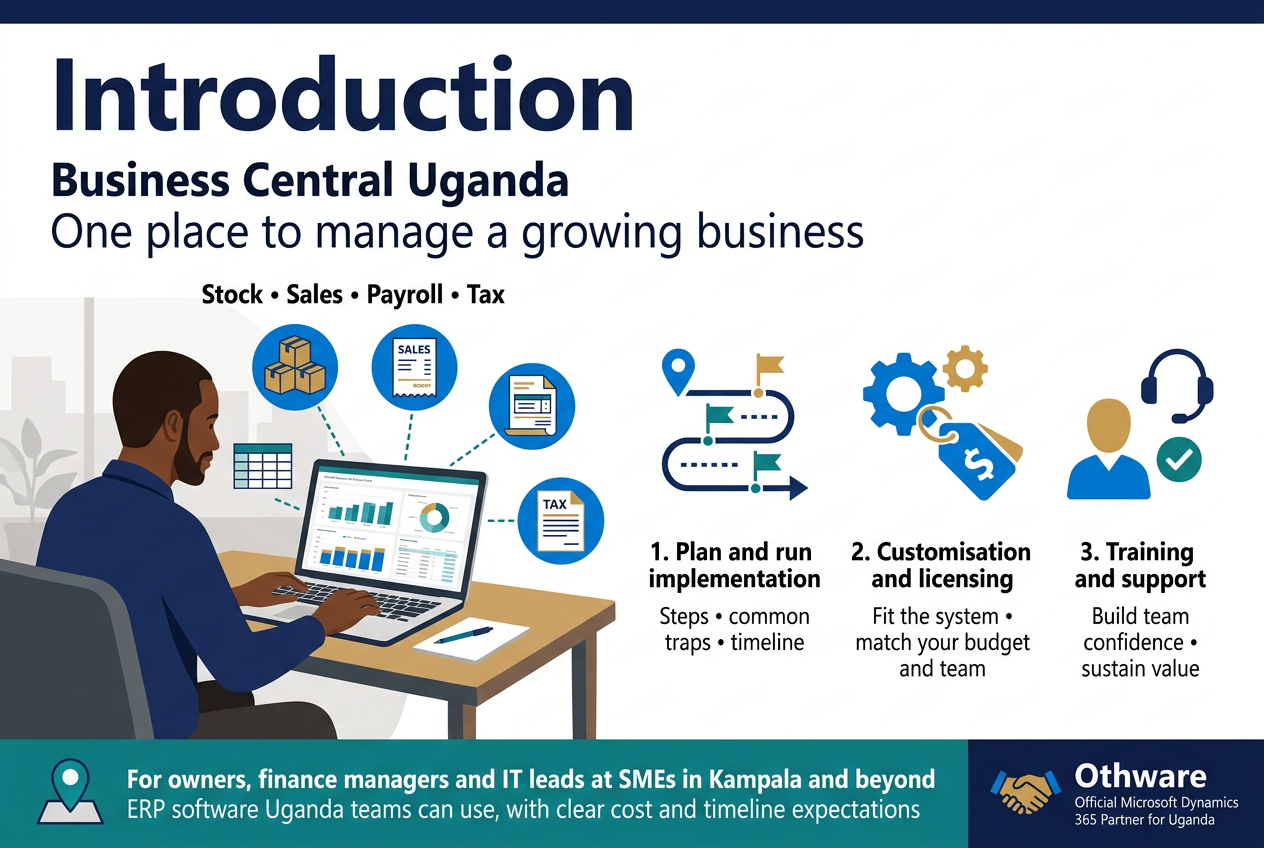
Running a growing business in Uganda means juggling stock, sales, payroll, and tax, often in spreadsheets that don’t talk to each other. Microsoft Dynamics 365 Business Central puts it all in one place. If you’re searching for Business Central Uganda options, this guide is for you.
It’s written for owners, finance managers, and IT leads at small and medium businesses in Kampala and beyond. These are people who want ERP software Uganda teams can actually use, without surprises on cost or timeline.
Here’s what we’ll cover:
- How to plan and run a smooth implementation: the steps, the common traps, and what to expect from a Dynamics 365 Business Central partner Uganda like Othware, an Official Microsoft Dynamics 365 Partner for Uganda.
- How customisation and licensing work: making the system fit your business, and picking a plan that matches your budget and headcount.
- How training and support keep things running: getting your team confident so the system keeps paying off long after go-live.
Let’s get into it.
Why Business Central Fits Ugandan Businesses
Streamline Finance, Sales, and Operations in One Platform
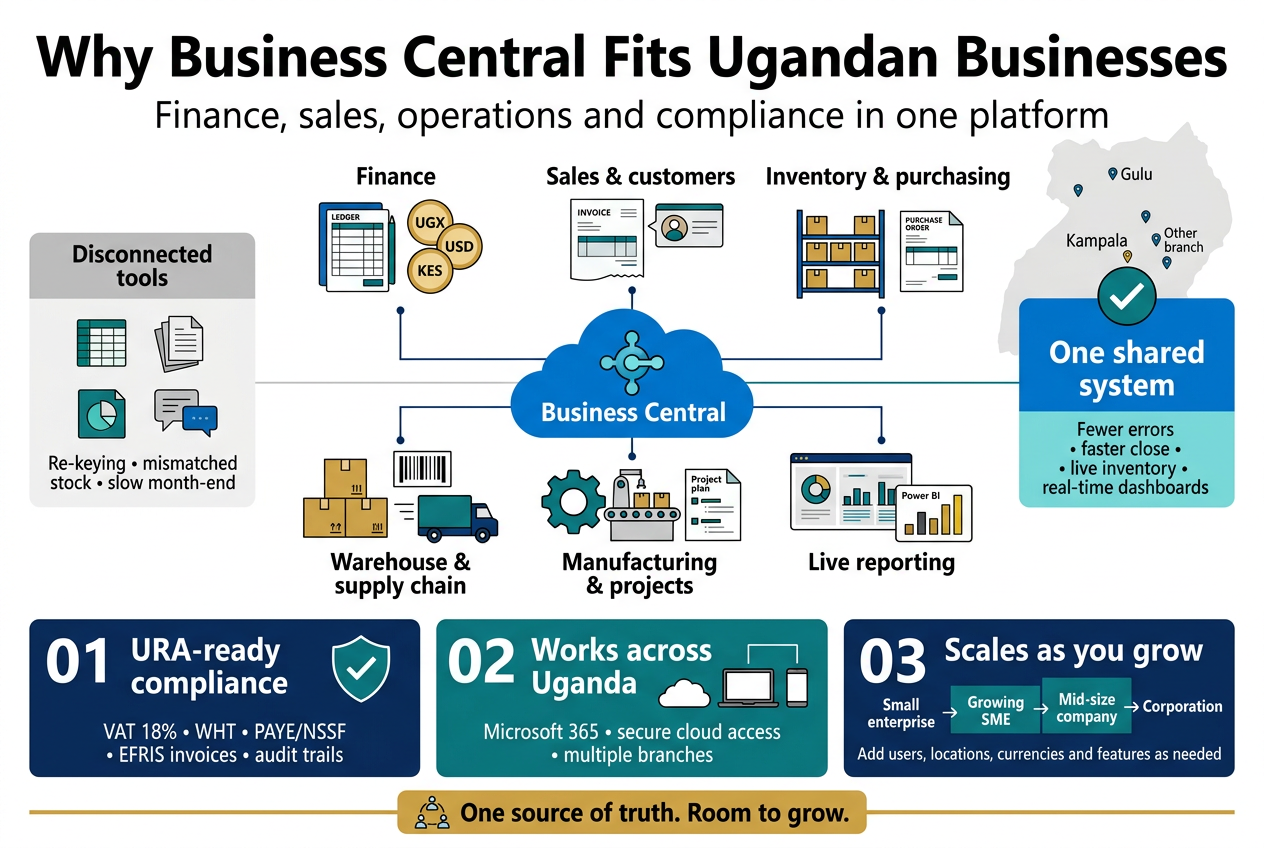
Many Ugandan businesses run on a patchwork: QuickBooks or Tally for accounts, Excel for stock, WhatsApp for orders, and a paper file for everything else. It works until it doesn’t. Month-end takes a week, nobody trusts the stock count, and the boss keeps asking why the numbers in finance don’t match the numbers in sales.
Microsoft Dynamics 365 Business Central fixes this by putting your core processes in one system, with one set of data. It’s the ERP software Uganda’s small and mid-sized companies increasingly pick because it covers a lot of ground without the weight of a giant enterprise system.
What you get in a single system
- Financial management: general ledger, accounts payable and receivable, bank reconciliation, fixed assets, budgeting, and multi-currency support (handy when you deal in UGX, USD, and KES).
- Sales and customer management: quotes, orders, invoices, credit limits, and customer history, all tied back to finance automatically.
- Purchasing and inventory: purchase orders, vendor tracking, stock levels across multiple warehouses or shops, and item tracking by batch or serial number.
- Warehouse and supply chain: receiving, put-away, picking, and shipping, plus reorder alerts so you stop running out of fast-moving items.
- Manufacturing and projects: bills of materials, production orders, job costing, and resource planning for light manufacturers, contractors, and service firms.
- Reporting and insight: live dashboards and Power BI integration, so you see cash position, top customers, and slow stock without waiting for someone to build a spreadsheet.
Why “one platform” matters in practice
When a salesperson posts an invoice, the stock drops, the receivable is recorded, and the ledger updates. Nobody re-types anything. That means fewer errors, faster closes, and a finance team that spends time analysing instead of chasing figures.
Here’s a quick picture of the difference:
| Task | Disconnected tools | Business Central |
|---|---|---|
| Month-end close | Days of reconciling spreadsheets | Hours, with data already matched |
| Stock accuracy | Counts differ between store and books | One live inventory record |
| Customer credit checks | Phone calls and guesswork | Automatic credit limit warnings |
| Management reporting | Manually compiled | Real-time dashboards |
| Multi-branch visibility | Separate files per branch | Consolidated view across locations |
Works with the tools your team already uses
Business Central connects with Microsoft 365, so your team can open a customer record from Outlook, export a report to Excel, or approve a purchase order through Teams. For staff who already live in Word, Excel, and Outlook, the learning curve is gentler than with most ERP systems. That’s a big deal for adoption, and adoption is where many implementations succeed or fail.
It’s also cloud-based, which suits Uganda well. You don’t need to maintain a server room, fight with power cuts to keep a machine running, or worry about a single point of failure at the office. Your team in Kampala, your branch in Gulu, and your accountant working from home can all see the same data securely.
Meet Local Tax and Compliance Needs, Including URA Requirements
Software that looks great in a demo but ignores local tax rules becomes a headache fast. In Uganda, compliance with the Uganda Revenue Authority (URA) isn’t optional, and it touches almost every transaction you post.
Business Central gives you a strong tax engine that can be configured to match how Uganda actually works. A good Dynamics 365 Business Central partner in Uganda sets this up properly from day one, so you aren’t patching it later.
Handling VAT, withholding tax, and other levies
Out of the box, Business Central supports flexible tax setups. With correct configuration, you can manage:
- VAT (18% standard rate): separate handling for standard-rated, zero-rated, and exempt supplies, with clean input and output VAT reporting.
- Withholding tax (WHT): deducting and tracking WHT on supplier payments and recording WHT certificates on customer receipts.
- PAYE and NSSF: payroll-related calculations and liabilities, through localised setups or integrated payroll tools.
- Excise duty and other levies: for businesses in beverages, tobacco, telecoms, or fuel, where specific duties apply.
- Multi-currency tax treatment: correct handling of foreign-currency invoices and exchange gains and losses.
Staying aligned with URA’s EFRIS
URA’s Electronic Fiscal Receipting and Invoicing Solution (EFRIS) requires many taxpayers to issue fiscal invoices and receipts through URA’s system. Doing this manually, by typing each invoice twice, is slow and error-prone.
Business Central can be integrated with EFRIS through customisation or connector solutions, so invoices raised in the ERP are submitted to URA and come back with the required fiscal data, such as the verification code and QR code. Credit notes and stock updates can follow the same route. The result: fewer rejected invoices, less duplicate work, and a lower risk of penalties.
A local partner such as Othware Uganda, an official Microsoft Dynamics 365 partner for Uganda, understands these requirements because they deal with them daily. That local knowledge matters more than any feature list.
Audit trails and financial reporting
Compliance isn’t only about tax returns. Auditors, banks, donors, and investors all want clean records. Business Central helps by providing:
- Full audit trails: every posting shows who did it and when.
- Approval workflows: purchase orders, payments, and journal entries can require sign-off from the right people.
- Standard financial statements: balance sheet, income statement, and cash flow reports that follow IFRS-friendly structures.
- Dimension-based reporting: track income and costs by project, donor, department, or branch, which NGOs and donor-funded organisations in Uganda value highly.
- Role-based security: limit who can see or change sensitive data like payroll and bank details.
Quick compliance checklist for Ugandan companies
Before you commit to any ERP, ask your vendor whether it can:
- Produce URA-ready VAT and WHT reports.
- Integrate with EFRIS for fiscal invoicing.
- Handle UGX alongside foreign currencies.
- Support multi-entity or multi-branch reporting.
- Keep a reliable, tamper-resistant audit trail.
- Be supported locally when URA rules change.
If the answer to any of these is “not sure,” keep asking questions.
Scale Confidently from Small Enterprise to Growing Corporation
Choosing an ERP is a bit like buying a vehicle for a business. Pick something too small and you’ll outgrow it in two years. Pick something too big and you pay for features you never use. Business Central sits in a sweet spot, which is why Microsoft Dynamics 365 for small and medium businesses has become such a common conversation in Kampala boardrooms.
Start small, add as you grow
You don’t have to switch everything on at once. A trading company might begin with finance, sales, and inventory. Six months later, it adds warehouse management. A year after that, it opens a second branch and consolidates reporting. Business Central handles that path without forcing you to migrate to a new system.
Typical growth stages look like this:
| Business stage | Common needs | How Business Central supports it |
|---|---|---|
| Small enterprise (1 location, few users) | Accounting, invoicing, basic stock | Essentials-level functionality with a small number of users |
| Growing SME (multiple branches or product lines) | Inventory control, approvals, better reporting | Add users, locations, workflows, and dashboards |
| Established mid-size company | Manufacturing, projects, multi-currency, EFRIS | Premium features, integrations, and tailored extensions |
| Corporation or group | Multiple legal entities, consolidation, governance | Multi-company setup, consolidated financials, advanced security |
Licensing that grows with you
Business Central licensing is per user, per month, with different plans (Essentials and Premium, plus Team Members for light users). That means you pay for the people who actually use the system. As your team grows, you add licences. If a seasonal team leaves, you can scale down. A conversation about Business Central pricing in Uganda should always start with how many people need full access and how many only need to view reports or approve requests.
Built to be extended, not replaced
Every business has quirks: a unique pricing structure, an approval chain, a special report for a regulator. Business Central is designed to be extended through apps and customisation, without breaking the core system. This means:
- You can add industry-specific apps from Microsoft AppSource.
- Your partner can build custom extensions, such as EFRIS connectors or mobile sales tools.
- Microsoft’s regular updates won’t wipe out your tailored features.
For companies searching for Business Central customisation services, that’s the key point. You get a system shaped around your processes, and it still stays upgradable.
Industries that benefit most in Uganda
Business Central fits a wide range of local sectors:
- Wholesale and retail: multi-shop inventory, pricing, and fast stock turnover.
- Manufacturing and agro-processing: production orders, costing, and traceability.
- Distribution and logistics: route sales, delivery tracking, and fleet-related costs.
- NGOs and donor-funded organisations: grant tracking, fund accounting, and donor reporting.
- Construction and professional services: job costing, time tracking, and project billing.
- Education and healthcare providers: fee management, supplies, and budget control.
Growth without growing pains
The real value shows up when you hit that next level: a new branch, a new product, a regional expansion into Rwanda or Kenya. Instead of rebuilding your systems, you add a company, a currency, or a location. Your data, history, and reports stay intact.
For a business owner, that means fewer surprises. For a finance manager, it means a system that keeps pace. And for anyone searching for the right ERP implementation services in Kampala, it means choosing a platform you won’t have to replace in three years.
Plan a Successful Implementation
Assess Business Needs and Set Clear Goals
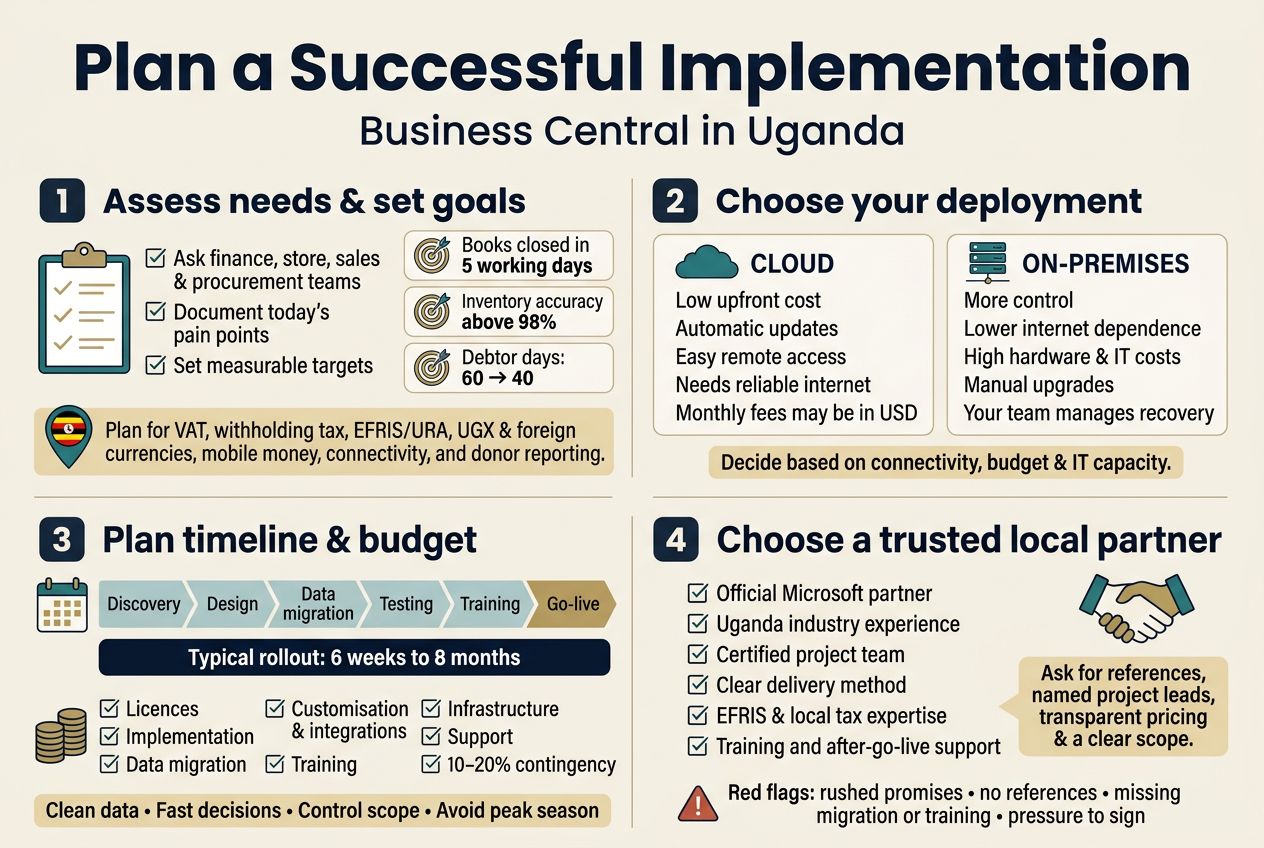
Before you look at a demo or ask for a quote, get clear on what’s broken today. Most Ugandan businesses that move to Business Central are escaping the same things: spreadsheets that never match, stock counts that are wrong by Friday, and month-end closes that eat a week.
Map your current pain points
Sit down with the people who do the work, not just the directors. Ask your finance clerk, storekeeper, sales rep and procurement officer what slows them down. You’ll hear things like:
- “I re-type the same invoice into three places.”
- “I can’t tell if we have stock in the Mbarara branch without calling.”
- “URA returns take days because the numbers sit in different files.”
- “Customers are chasing us for statements.”
Write these down. They become your requirements list.
Turn pain points into measurable goals
Vague goals like “be more efficient” don’t help anyone. Tie each problem to a number you can check later.
| Pain point | Clear goal |
|---|---|
| Slow month-end close | Close books within 5 working days |
| Stock mismatches | Inventory accuracy above 98% |
| Late customer payments | Cut average debtor days from 60 to 40 |
| Manual VAT and PAYE reporting | Generate returns from the system in under a day |
| No branch visibility | Real-time stock and sales across all locations |
Cover the Uganda-specific needs
Your Business Central Uganda project should account for local realities from day one:
- Tax compliance: VAT, withholding tax, and EFRIS integration with URA.
- Multi-currency: UGX, USD, and often KES or EUR for imports and donor-funded work.
- Mobile money and bank reconciliation: MTN MoMo, Airtel Money, and local bank feeds.
- Power and connectivity: Think about what happens when the internet drops at a branch.
- Donor and project reporting: Essential for NGOs that need grant-level tracking.
Decide what’s in scope for phase one
Trying to do everything at once is how projects stall. Pick the core modules first, usually Finance, Sales, Purchasing and Inventory. Park the nice-to-haves like service management, advanced manufacturing or custom dashboards for phase two. Rank each requirement as must have, should have or nice to have. This ranking saves arguments later.
Get leadership and users on board early
Name a project owner inside your company, someone with enough authority to make decisions quickly. Add a few “super users” from each department. They’ll test the system, shape the workflows and later help colleagues who get stuck. Projects without an internal champion drift, no matter how good the consultant is.
Choose the Right Deployment: Cloud or On-Premises
Business Central runs in the cloud or on your own servers. Both work in Uganda, but the right pick depends on your internet, budget and how much IT you want to manage.
Cloud (Microsoft-hosted SaaS)
Microsoft runs the infrastructure. You log in through a browser, desktop app or mobile device.
Good for you if:
- You don’t have an in-house IT team.
- You want automatic updates and security patches.
- You have staff working across branches, upcountry or remotely.
- You prefer paying a predictable monthly subscription over buying hardware.
Watch out for:
- Reliable internet is non-negotiable. A backup connection (a second ISP or a 4G failover router) is smart.
- Monthly costs are often billed in USD, so exchange rate swings matter.
On-premises
You install Business Central on your own servers and manage everything yourself.
Good for you if:
- Your connectivity is patchy, such as remote sites or factories.
- You have strict data-residency or internal policy needs.
- You already own server hardware and have IT staff to run it.
Watch out for:
- You carry the cost of servers, backups, cooling, power backup and security.
- Upgrades are your responsibility and can be costly or delayed.
- Some newer features and integrations arrive in the cloud version first.
Side-by-side comparison
| Factor | Cloud | On-premises |
|---|---|---|
| Upfront cost | Low | High (hardware and setup) |
| Ongoing cost | Monthly subscription | Licences, maintenance, IT staff |
| Updates | Automatic | Manual, planned |
| Internet dependence | High | Lower |
| Scalability | Add users any time | Needs hardware planning |
| Remote access | Built in | Needs VPN or extra setup |
| Disaster recovery | Handled by Microsoft | Your responsibility |
A quick rule of thumb
For most small and medium businesses in Kampala, Entebbe, Jinja and other towns with decent connectivity, cloud is the easier and cheaper route. If you run heavy operations in areas with unreliable internet, talk to your Dynamics 365 Business Central partner in Uganda about a hybrid setup or on-premises option. A good partner will assess your actual bandwidth before recommending anything.
Build a Realistic Timeline and Budget
Most implementation headaches come from rosy estimates. Plan honestly and add a buffer.
Typical timeline
The timeline depends on size and complexity, but these ranges are common for ERP implementation services in Kampala:
| Business type | Typical duration |
|---|---|
| Small business, standard setup (Finance, Sales, Purchasing) | 6 to 10 weeks |
| Mid-sized business, multiple modules and some customisation | 3 to 5 months |
| Multi-branch or complex operations with integrations | 5 to 8 months |
The usual phases
- Discovery and planning (1–3 weeks): Requirements, scope, project team, success measures.
- Design and configuration (2–6 weeks): Chart of accounts, workflows, user roles, templates.
- Data migration (2–4 weeks, overlapping): Cleaning and loading customers, vendors, items and opening balances.
- Testing (2–3 weeks): User acceptance testing with real scenarios.
- Training (1–2 weeks): Role-based sessions for each team.
- Go-live and hypercare (2–4 weeks): Close support while people adjust.
What causes delays
- Dirty data: duplicate customers, missing item codes, unreconciled balances.
- Slow decisions from busy managers.
- Scope creep: “can we also add…” requests mid-project.
- Key staff unavailable for testing or training.
- Choosing a go-live date during year-end or peak season.
Pick a go-live that avoids your busiest period. Starting at the beginning of a financial quarter or fiscal year makes opening balances much cleaner.
Budget: what to include
Don’t just look at licences. Your total cost has several parts:
- Software licences: Monthly per-user fees (Essentials or Premium plans).
- Implementation services: Consulting, configuration and project management.
- Data migration: Cleaning and importing historical data.
- Customisation and integrations: Local tax tools like EFRIS, payment gateways, e-commerce or reporting extras.
- Training: Initial and refresher sessions.
- Infrastructure: Internet upgrades, backup power, devices (and servers if on-premises).
- Support: Ongoing helpdesk and maintenance.
- Contingency: Set aside 10–20% for surprises.
Budget tips
- Ask for a fixed-scope quote with a clear list of what’s included and excluded.
- Request pricing in the currency you’ll pay in, and understand how exchange rate changes are handled.
- Start with fewer modules and add more once the core is stable. This keeps early costs lower and reduces risk.
- Count the cost of doing nothing too: lost time, errors, missed sales and compliance penalties add up quickly.
When comparing Business Central pricing in Uganda, line up each quote on the same basis. A cheap quote with no training, no data migration and no support often costs more in the end.
Select a Trusted Local Implementation Partner
Business Central is only as good as the team setting it up. The partner you pick shapes your experience more than any feature on the spec sheet.
Why local matters
A Microsoft Dynamics 365 Business Central partner in Uganda understands things a distant vendor can miss:
- URA tax rules, EFRIS and statutory reporting.
- How Ugandan businesses actually operate, from cash-heavy retail to donor-funded NGOs.
- Time zone alignment and quick on-site support when something breaks.
- Local language and culture in training sessions.
- Relationships with local banks, mobile money providers and ISPs.
What to look for
- Official Microsoft partner status: Confirm they’re certified and in good standing. Othware Uganda, for example, is an official Microsoft Dynamics 365 partner for Uganda.
- Proven local experience: Ask for case studies in your industry, whether that’s manufacturing, distribution, retail, NGOs, or services.
- Certified consultants: Check who will actually work on your project, not just who’s in the sales meeting.
- Clear methodology: They should walk you through a structured plan covering discovery, testing, training and go-live.
- Customisation skills: Can they build extensions and integrations, or only do basic setup?
- After-go-live support: Look for a responsive helpdesk, defined response times and options for ongoing support.
- Transparent pricing: No vague “to be confirmed” line items.
Questions to ask before signing
- How many Business Central projects have you completed in Uganda?
- Can I speak to two or three current clients?
- Who will lead my project, and will they stay through go-live?
- How do you handle EFRIS and local tax compliance?
- What happens if we go over scope or timeline?
- What does your support package include after launch?
- How do you approach data migration and user training?
Red flags
- Promises of a full rollout in a few days.
- No references or reluctance to share them.
- A quote that ignores training or data migration.
- Pushy pressure to sign quickly.
- Little interest in understanding your processes before pitching a solution.
Treat it as a partnership
The best implementations feel like teamwork. Your partner brings the product knowledge, and you bring the business knowledge. Meet regularly, share problems early and keep decisions moving. That’s how you end up with a system your team actually wants to use.
Execute a Smooth Implementation Process
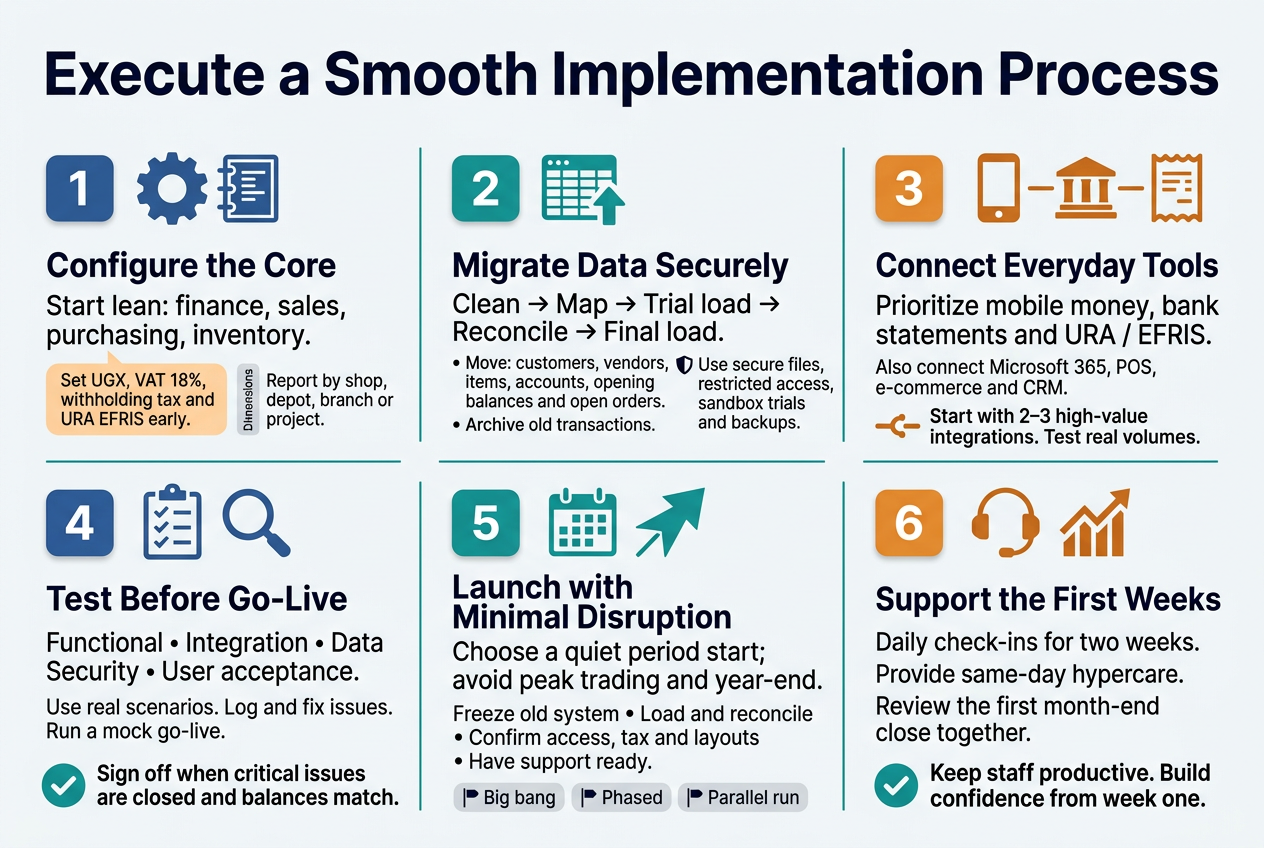
Configure Core Modules for Faster Results
Start with the modules that move money and stock. Trying to switch on everything in week one is the quickest way to stall a project. Most Ugandan SMEs get the best return by going live with a lean core and adding extras later.
A typical first-phase setup covers:
- Financial Management: chart of accounts, dimensions (branch, department, project), bank accounts, and posting groups.
- Sales and Receivables: customers, price lists, invoicing, and credit limits.
- Purchasing and Payables: vendors, purchase orders, approvals, and payment terms.
- Inventory and Warehouse: items, units of measure, locations, and costing method.
Get the local details right from day one:
- Set UGX as your local currency and add USD (and KES or EUR if you trade across borders) with a clear exchange rate routine.
- Configure VAT at 18%, withholding tax, and any excise duty so they post automatically.
- Set up your URA e-invoicing (EFRIS) requirements early. Fixing tax setup after go-live is painful.
- Build dimensions around how you actually report, such as by shop, depot, donor, or project.
A good Business Central partner in Uganda will use a template-based setup, often called a “rapid start” approach, to load your standard configuration quickly. Then you refine it in workshops with your finance and operations people instead of starting from a blank screen.
Quick Tip
Write down your top ten reports before you configure anything. If the system can’t produce them, you want to know now, not after go-live.
Migrate Data Accurately and Securely
Bad data in means bad reports out. Data migration is where many ERP projects lose weeks, so treat it as its own mini-project with an owner on your side.
What to Migrate (and What to Leave Behind)
| Data Type | Migrate? | Notes |
|---|---|---|
| Customers and vendors | Yes | Remove duplicates and dormant accounts first |
| Items and prices | Yes | Standardise names, units, and categories |
| Chart of accounts | Yes | Map old accounts to new ones |
| Opening balances | Yes | Load as of a clean period end |
| Open invoices and purchase orders | Yes | Keep them tied to the right customer or vendor |
| Years of old transactions | Usually no | Archive in a reporting file instead |
A Simple Migration Process
- Clean your source data in Excel or your old system. Fix spellings, merge duplicates, and fill missing TINs and phone numbers.
- Map each old field to its Business Central field.
- Load a trial batch into a test company using configuration packages or Excel import.
- Reconcile trial balances, stock values, and aged debtors against your old system.
- Repeat until the numbers match, then do the final load close to go-live.
Keep It Secure
- Share data files only through secured channels, not personal email or WhatsApp.
- Limit who can see payroll, bank, and customer data during the project.
- Use a sandbox for trials so live records stay untouched.
- Keep a backup of every source file used for the final load.
Integrate with Existing Tools and Local Payment Systems
Business Central works best when it talks to the tools your team already uses. In Uganda, that mostly means mobile money, banks, and tax systems.
Local Payment and Compliance Connections
- Mobile money (MTN MoMo and Airtel Money): customers and field staff pay this way daily. Integration lets you match payments to invoices automatically instead of retyping from statements.
- Bank feeds and statement imports: import bank statements for fast reconciliation. Many local banks provide formats that can be mapped into Business Central.
- Bulk payments: generate supplier and salary payment files in the format your bank accepts.
- URA / EFRIS: connect invoicing so fiscal receipts are generated as you sell.
Everyday Tools
- Microsoft 365: Excel, Outlook, Teams, and Power BI connect natively. Finance teams love editing data in Excel and publishing it straight back.
- Power Automate and Power Apps: automate approvals and build simple mobile apps for field sales or stock counts.
- E-commerce, POS, and CRM: connect your online shop, retail tills, or sales tools through APIs and ready-made connectors.
Integration Rules of Thumb
- Start with the two or three integrations that save the most manual work.
- Use standard connectors before ordering custom code. They’re cheaper to maintain.
- Test every integration with real transaction volumes, not just one sample.
Test Thoroughly Before Go-Live
Testing is where you find out whether the system fits your business or just fits the demo. Don’t squeeze it to save time. Fixing an issue in testing costs a fraction of fixing it after customers are affected.
Types of Testing to Plan For
- Functional testing: does each process work as designed, from quote to cash and requisition to payment?
- Integration testing: do mobile money, bank, and EFRIS links behave correctly?
- Data validation: do migrated balances, stock quantities, and open items match the source?
- Security testing: can people see and do only what their role allows?
- User acceptance testing (UAT): your real users run their real daily tasks and sign off.
Run UAT the Right Way
- Build test scripts from actual scenarios: a credit sale with partial payment, a stock transfer between branches, a supplier invoice with withholding tax.
- Let end users, not just managers or IT, do the testing.
- Log every issue, rank it as critical, important, or minor, and track it to closure.
- Set clear sign-off criteria, such as “no critical issues open and trial balance matches.”
Also run a mock go-live: do the full data load and cutover steps once in a test environment. It shows how long the real thing will take and exposes surprises early.
Launch with Minimal Business Disruption
A smooth launch is mostly good timing and good preparation.
Pick the Right Moment
- Go live at the start of a month or financial period so opening balances are clean.
- Avoid peak trading periods, audits, and year-end closing.
- Plan around public holidays and staff leave.
Go-Live Checklist
- Freeze transactions in the old system at a set time.
- Load final balances and open items, then reconcile them.
- Confirm user logins, roles, and printers are ready.
- Check that tax, invoice, and receipt layouts are correct.
- Have the implementation team on-site (or on call) for the first days.
Choose Your Approach
| Approach | How It Works | Best For |
|---|---|---|
| Big bang | Everyone switches on one date | Smaller teams with simple processes |
| Phased | Modules or branches go live in stages | Multi-branch or complex operations |
| Parallel run | Old and new run side by side briefly | Finance teams wanting extra assurance, though it doubles workload |
After the Switch
- Hold short daily check-ins during the first two weeks to catch problems quickly.
- Set up a hypercare window where questions get same-day answers.
- Review your first month-end close together and fix anything that slowed it down.
With an experienced Dynamics 365 Business Central partner in Uganda guiding the cutover, staff stay productive, customers barely notice the change, and your team starts trusting the new system from the first week.
Tailor the System with Customisation
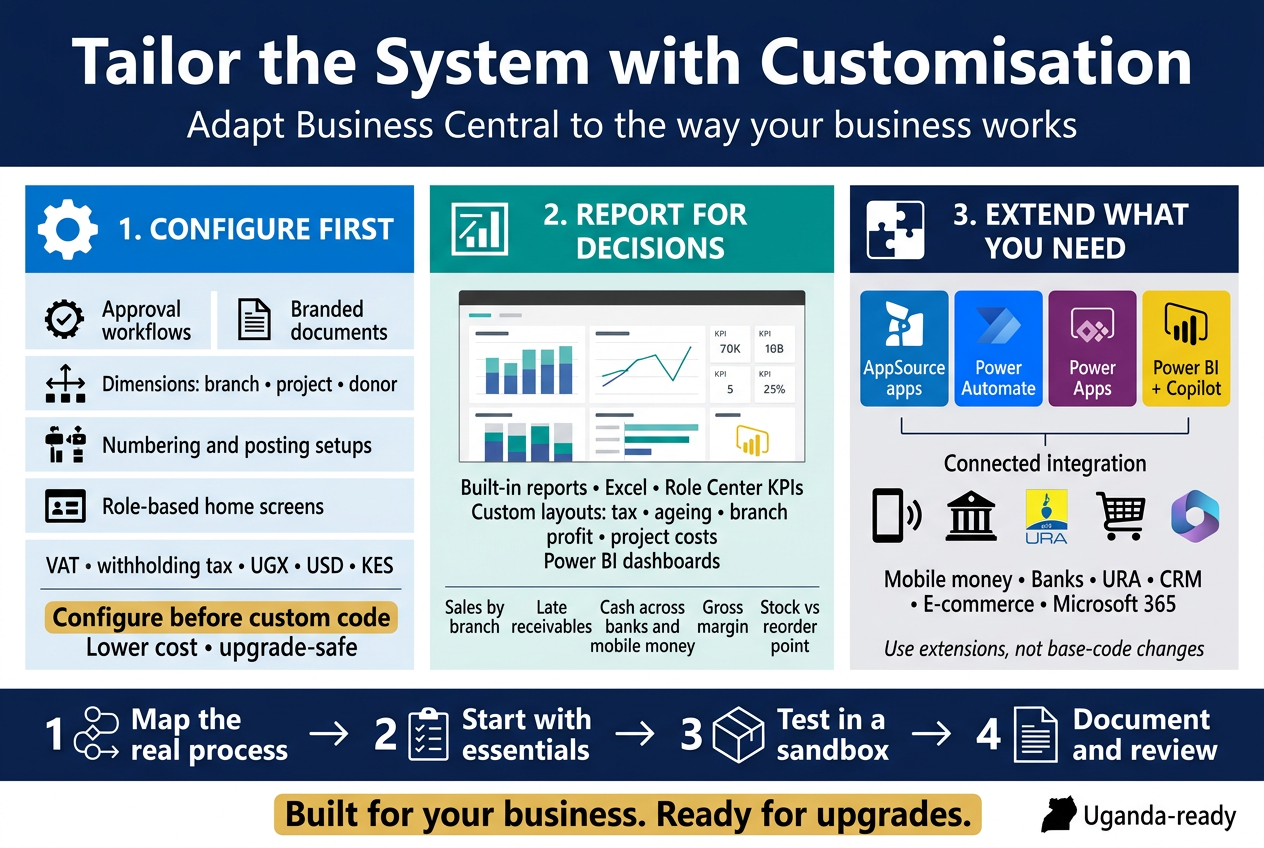
Adapt Workflows to Match How You Work
Every business in Kampala, Jinja, or Mbarara runs a little differently. A distributor handling mobile money collections doesn’t work like a manufacturer buying raw materials in bulk or an NGO tracking donor-restricted funds. Business Central bends to fit these realities, and most of the change happens through configuration, not code.
Here’s where most Ugandan companies start:
- Approval workflows: Set rules so purchase orders above a certain UGX amount go to the finance manager, and bigger ones go to the director. Approvals can arrive by email or inside Teams, so nobody has to chase a signature.
- Document templates: Adjust invoices, quotes, delivery notes, and receipts to carry your branding, TIN, and VAT details.
- Dimensions: Tag every transaction by branch, department, project, or donor. This gives you cost tracking by location or grant without a messy chart of accounts.
- Number series and posting setups: Match your existing document numbering and account mapping, so your team recognises what they see on day one.
- Role Centers: Give each person a home screen that fits their job. A sales clerk sees open quotes. An accountant sees bank reconciliations and overdue invoices.
- Tax and currency setup: Configure VAT, withholding tax, and multi-currency handling for UGX, USD, and KES transactions, including exchange rate updates.
Configuration First, Code Second
A good rule of thumb: configure before you customise. Configuration is cheaper, survives version upgrades, and doesn’t need a developer. Only move to custom development when a real process gap shows up that settings can’t close.
| Approach | Best for | Upgrade impact | Cost |
|---|---|---|---|
| Configuration | Approvals, dimensions, templates, role centers | None | Low |
| Personalisation | Individual user layouts | None | Minimal |
| Extensions (AL code) | Unique business rules, new fields, integrations | Low, if built properly | Medium |
| Heavy modification of base code | Not recommended | High | High |
Map the Process Before You Change It
A reputable Dynamics 365 Business Central partner in Uganda will sit down with your team and walk through how work actually gets done. They’ll ask things like:
- Who raises a requisition, and who signs it off?
- How do you handle customer credit limits and part payments?
- What happens when stock arrives short or damaged?
- Which reports does management expect by the fifth of each month?
Those answers shape the setup. Sometimes the smarter move is to change a clunky process rather than copy it into the system. A good consultant will tell you when that’s the case.
Create Custom Reports and Dashboards for Better Decisions
Many owners tell us the same thing: “I have data, but I can’t see what’s going on.” Business Central fixes that when reports are built around the questions you ask every week.
Start with the Built-In Tools
Business Central ships with plenty of reporting out of the box:
- Financial Report Definitions (formerly Account Schedules) for balance sheets, income statements, and cash flow, laid out your way
- Analysis Views to slice figures by dimension, such as profit by branch or by product line
- Excel integration to open any list in Excel, refresh live data, and share it
- Role Center KPIs and charts showing sales trends, outstanding receivables, and cash position at a glance
Go Further with Custom Reports
When standard layouts don’t cut it, partners can build tailored ones using Word, RDLC, or Excel layouts. Common examples in Uganda include:
- URA-friendly VAT and withholding tax summaries
- Customer statements showing ageing in UGX and foreign currency
- Branch-level profit and loss for retail chains
- Project cost-versus-budget reports for contractors and NGOs
- Donor reports showing spend against grant restrictions
- Stock valuation and slow-moving inventory lists for wholesalers
Power BI for Live Dashboards
Power BI connects directly to Business Central. You get interactive dashboards that update automatically and work on a phone, which suits owners who are often on the road between sites.
A simple dashboard might show:
- Daily sales by branch or salesperson
- Receivables ageing with the biggest late payers highlighted
- Cash balance across bank and mobile money accounts
- Gross margin by product
- Stock levels against reorder points
Tips for Reports That People Use
- Pick five to ten numbers that drive your business, then build around those.
- Keep one version of the truth. If sales and finance quote different figures, fix the source data.
- Schedule reports to land in inboxes automatically.
- Review the dashboards monthly. If nobody opens a report, drop it.
Extend Functionality with Apps and Power Platform
No ERP covers everything out of the box, and that’s fine. Business Central is built to grow through extensions, so you add what you need without touching the core system.
Microsoft AppSource Apps
AppSource has hundreds of ready-made apps that plug into Business Central. Typical picks include:
- Advanced warehouse and barcode scanning
- Payroll and HR add-ons
- Fixed asset and maintenance tracking
- E-commerce connectors
- Document capture and OCR for supplier invoices
- Payment and bank integration tools
Before building something custom, check whether an app already does the job. It’s usually faster and cheaper. Make sure the app is supported locally, since a tool that doesn’t fit Ugandan tax or banking practice will cost you later.
Power Platform: Automate and Build Without Heavy Coding
Business Central works closely with Microsoft’s Power Platform, which lets your own staff build useful tools with little code.
| Tool | What it does | Example use |
|---|---|---|
| Power Automate | Automates tasks between systems | Send a Teams message when a large order is posted; push approved invoices to SharePoint |
| Power Apps | Builds simple mobile and web apps | Field sales app for capturing orders on a phone, even in low-connectivity areas |
| Power BI | Visualises data | Executive dashboards across companies and branches |
| Copilot and AI features | Speeds up routine work | Draft product descriptions, summarise data, suggest bank reconciliation matches |
Integrations That Matter Locally
Ugandan businesses often want Business Central to talk to other tools. Common requests include:
- Mobile money and bank platforms for faster payment reconciliation
- URA systems for tax compliance and e-invoicing needs
- CRM and e-commerce sites to sync customers, orders, and stock
- Microsoft 365 (Outlook, Excel, Teams) so staff work in tools they already know
Business Central uses standard APIs and web services, so these connections stay stable and are easier to maintain than old-style custom hacks.
Keep Customisation Healthy
Customising smartly protects you at upgrade time. Follow these habits:
- Use extensions, not base code changes. Microsoft updates Business Central twice a year, and extensions survive those updates.
- Document every change. Write down what was built, why, and who owns it.
- Test in a sandbox first. Try changes in a copy of your environment before going live.
- Start small. Launch with the essentials, then add enhancements once your team is comfortable.
- Work with an experienced partner. A certified Business Central customisation services provider such as Othware Uganda, an official Microsoft Dynamics 365 partner for Uganda, knows local requirements and can keep your system clean as it grows.
Done right, customisation turns Business Central from a good ERP into one that feels built for your business, without the heavy price or upgrade headaches.
Choose the Right Licensing Plan
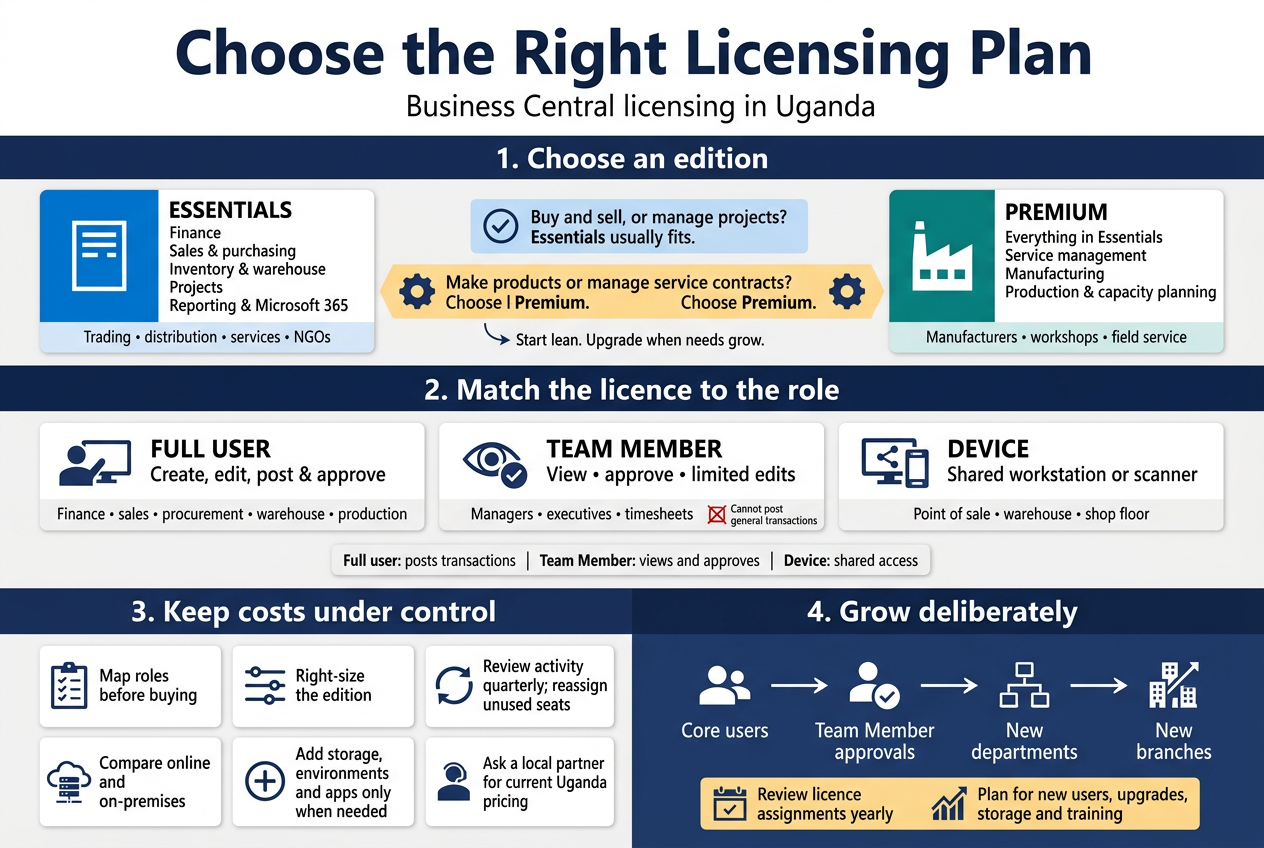
Compare Essentials and Premium Editions
Business Central comes in two main editions. Picking between them is the first licensing decision, and it shapes everything else.
Essentials covers the core of what most growing companies need:
- Financial management (general ledger, accounts payable and receivable, bank reconciliation, fixed assets)
- Sales and purchasing
- Inventory and warehouse basics
- Project management
- Basic supply chain and reporting
- Integration with Microsoft 365, Power BI and Power Platform
Premium includes everything in Essentials, plus:
- Service management (service orders, contracts, and item tracking for after-sales work)
- Manufacturing (production orders, bills of materials, routings, capacity planning, and supply planning)
| Feature | Essentials | Premium |
|---|---|---|
| Finance and accounting | Yes | Yes |
| Sales, purchasing, inventory | Yes | Yes |
| Project management | Yes | Yes |
| Warehouse management | Yes | Yes |
| Service management | No | Yes |
| Manufacturing | No | Yes |
| Best for | Trading, distribution, services, NGOs | Manufacturers, workshops, field-service firms |
A simple way to decide: if you make products from raw materials, or you run repair and maintenance jobs with service contracts, you need Premium. If you buy and sell, provide professional services, or run projects and grants, Essentials usually does the job.
Many Ugandan companies in trading, retail, logistics, education and NGO work do fine on Essentials. Agro-processors, bottlers, furniture makers and engineering workshops tend to need Premium for production orders and capacity planning.
You can also move up later. Starting on Essentials and upgrading when you add manufacturing is much cheaper than buying Premium for features you won’t touch for two years. Your Dynamics 365 Business Central partner in Uganda can check your processes against each edition before you sign anything.
Understand Full Users versus Team Member Users
Business Central is licensed per user, per month. Not everyone in your company needs the same type of licence, and this is where many businesses either overspend or end up non-compliant.
Full Users (Essentials or Premium)
Full users can do everything their role permits. They create, edit, post and approve transactions, and they can access any part of the system.
Typical full users:
- Finance managers and accountants
- Procurement and sales staff who raise orders and invoices
- Warehouse and inventory controllers
- Production planners
- Operations managers who configure and manage data
Team Member Users
Team Members get a much cheaper licence for lighter use. They can:
- Read data across Business Central
- Approve or reject workflows (such as purchase requests or leave approvals)
- Edit certain existing records, such as updating a customer’s contact details
- Enter and edit time sheets, and create or edit a limited set of data such as expenses
They cannot create or post general transactions like invoices, journals or purchase orders.
Typical Team Member users:
- Department heads who approve requisitions
- Executives who view dashboards and reports
- Staff who submit timesheets or expenses
- Branch managers who check stock and sales figures
Device Users
If several people share a workstation, such as a point-of-sale terminal, a warehouse scanner or a shop-floor tablet, a Device licence can cover the device instead of licensing each person. It works for specific tasks but costs more than a Team Member licence, so it only makes sense where shifts or shared stations would otherwise mean lots of licences.
| Licence type | Can post transactions | Can approve and view | Best for |
|---|---|---|---|
| Full user | Yes | Yes | Daily operators |
| Team Member | No | Yes, plus limited edits | Approvers, executives, timesheet users |
| Device | Yes (on a shared device) | Yes | Shared terminals and scanners |
Licence prices are set by Microsoft in US dollars and change from time to time. For a current Business Central pricing Uganda quote, including the effect of exchange rates and taxes, ask a Microsoft partner such as Othware Uganda for up-to-date figures rather than relying on old price lists.
Optimise Licence Costs to Avoid Overspending
A few habits can keep your monthly bill sensible without limiting what your team can do.
Map Roles Before You Buy
List every person who will touch the system and write down what they actually do in it. Ask three questions for each:
- Do they create or post transactions?
- Do they only approve or view?
- How often do they log in?
People who only approve or view are Team Member candidates. This one exercise often cuts the licence count for full users noticeably.
Right-Size the Edition
Don’t buy Premium for the whole company because one department needs production planning. Check with your partner what’s possible for your setup, and weigh the cost against simply starting with the edition you need now.
Avoid Paying for Unused Seats
- Review user activity every quarter
- Remove licences for staff who have left or changed roles
- Reassign licences instead of buying new ones
- Check that nobody shares a login, which breaks licence terms and weakens your audit trail
Compare Cloud and On-Premises Options
Most Ugandan businesses go for Business Central online because there are no servers to buy, power backups to manage or IT staff to hire for maintenance. Subscription pricing spreads the cost monthly. If your internet is unreliable or you have strict data requirements, talk through hosting options with your partner before choosing.
Add Extras Only When You Need Them
Additional costs can include:
- Extra database, file or log storage capacity
- Extra production environments for testing
- Third-party apps from Microsoft AppSource
- Customisation work (see the customisation section above)
Don’t sign up for add-ons “just in case”. Add them when a real business need shows up.
Work With a Local Partner
An official partner can advise on the best fit and handle billing, support and renewals. A trusted Dynamics 365 Business Central partner in Uganda, such as Othware Uganda, also knows local requirements, from URA tax compliance to how Ugandan SMEs actually work day to day, so you pay for what suits you.
Plan for Adding Users as You Grow
Licensing is flexible. One advantage of the subscription model is that you can add or reduce licences as your business changes, usually monthly or at renewal depending on your agreement.
Start Lean, Grow Deliberately
A common approach for small and medium businesses is:
- Go live with core users. Licence the finance team, key sales and procurement staff, and inventory controllers.
- Add Team Members for approvals and reporting. Bring in managers and executives cheaply.
- Expand to new departments. Add full users as new teams move off spreadsheets.
- Open new branches or entities. Licence staff at each location as you roll out.
Watch For Triggers That Mean You Need More Licences
- New branches or warehouses in Kampala, Mbarara, Gulu or Mbale
- A new product line that needs production or service management
- Moving approvals from email to workflows
- Growing finance, sales or support teams
- Integrations with e-commerce, mobile money platforms or banks
Budget for Growth
When planning year-one costs, set aside room for:
- Extra licences you expect to add within 12 months
- Possible upgrade from Essentials to Premium
- Extra storage as your data grows
- Training for new users, so they’re productive from day one
Keep Compliance Simple
Review your licence assignments at least once a year. Match each person’s actual activity to the correct licence type. If someone starts doing more than a Team Member licence allows, upgrade them promptly.
Talk to your partner about growth plans from the start. Sharing your three-year outlook, such as branches, headcount and new product lines, helps them recommend a licensing structure that won’t need to be rebuilt every time you expand.
Empower Your Team with Training and Support
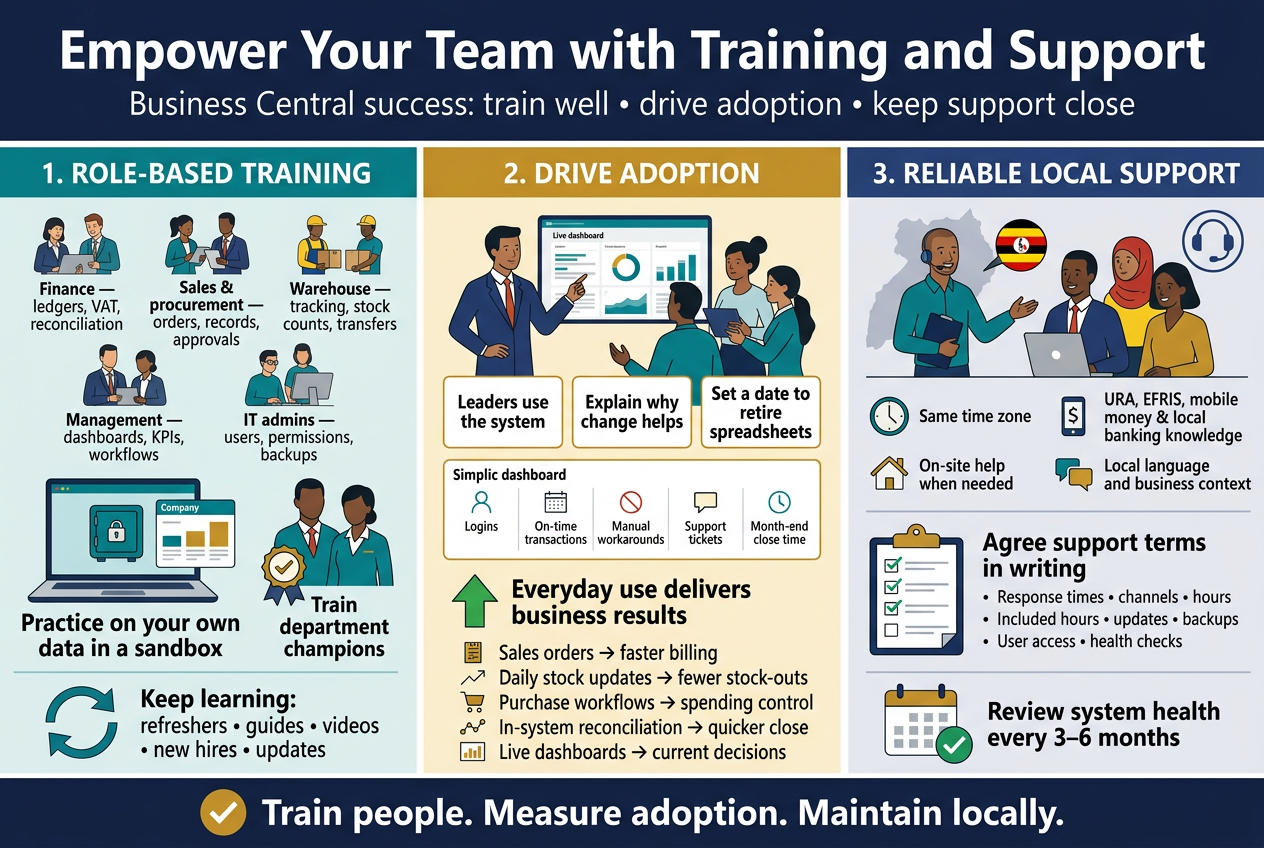
Equip Staff with Role-Based Training
A finance manager and a warehouse clerk use Business Central in very different ways. Putting them in the same two-day classroom session wastes everyone’s time. Role-based training fixes that by teaching each person only what they need for their daily work.
Match training to the job
Here’s how a typical Ugandan SME might split it up:
| Role | Focus areas | Format that works best |
|---|---|---|
| Finance team | General ledger, bank reconciliation, VAT and withholding tax setup, fixed assets, financial reports | Hands-on workshops with real company data |
| Sales and procurement | Quotes, sales orders, purchase orders, vendor and customer records, approvals | Scenario-based sessions |
| Warehouse and inventory | Item tracking, stock counts, transfers between branches, receiving goods | On-site practice at the store |
| Management | Dashboards, KPIs, Power BI reports, approval workflows | Short executive briefings |
| IT and system admins | User setup, permissions, data backups, integrations | Technical deep-dive |
Train on your own data, not a demo company
Generic demo data feels distant. When your team practises with your own chart of accounts, your own price lists and your own suppliers, things click much faster. A good Dynamics 365 Business Central partner in Uganda will set up a training environment (a sandbox) loaded with your real setup, so people can make mistakes without touching live records.
Build a few champions
Pick one or two “super users” in each department. They get extra training early, test the system during implementation, and become the first stop when a colleague is stuck. This takes pressure off your partner and builds confidence inside the team.
Keep learning going after go-live
One training week isn’t enough. Plan for:
- Refresher sessions 30 to 60 days after go-live, when real questions start showing up
- Quick reference guides written around your own processes, such as “How to raise a purchase order” or “How to post a supplier payment”
- Short video walkthroughs staff can replay anytime
- Onboarding for new hires, so staff turnover doesn’t leave gaps
- Update sessions when Microsoft releases new features in its twice-yearly release waves
Drive Adoption to Maximise Return on Investment
You can have a perfectly configured system and still lose money if people keep working in Excel on the side. Adoption is where the return on your ERP investment is won or lost.
Get leadership visibly involved
Staff watch what the boss does. If managers still ask for reports in spreadsheets, the team will keep producing them. When leaders pull numbers straight from Business Central, approve requests inside the system and ask for dashboards in meetings, the message is clear.
Explain the “why” early
Resistance usually comes from fear: “Will this replace me?” or “Will I look slow?” Talk openly about what changes and what gets easier. Show the accountant how month-end closing drops from a week to a few days. Show the sales team how quickly they can check stock before promising a delivery.
Retire the old ways
Set a firm date after which old spreadsheets and manual registers stop being used for official records. Running two systems side by side for too long creates double work and confusion.
Track adoption with real numbers
Measure what matters so you can step in early:
- Login frequency by department
- Transactions posted on time, such as invoices raised within 24 hours
- Number of manual workarounds still in use
- Support tickets by topic, which show where more training is needed
- Month-end close time, before and after go-live
Link adoption to business results
| Adoption behaviour | Business payoff |
|---|---|
| Invoices raised straight from sales orders | Faster billing and better cash flow |
| Stock movements recorded daily | Fewer stock-outs and less shrinkage |
| Purchase approvals handled in workflow | Clear audit trail and tighter spending control |
| Bank reconciliations done in-system | Quicker, more accurate month-end |
| Reports pulled live from dashboards | Decisions based on today’s numbers, not last month’s |
When staff see these wins in their own work, adoption stops feeling like a project and starts feeling like the normal way of doing things.
Access Reliable Local Support and Maintenance
Go-live is the start of the relationship, not the end. Issues will come up: a new tax rule, a forgotten permission, a report that needs tweaking. Having a responsive partner nearby makes a big difference to how quickly you recover.
Why local support matters
- Same time zone and working hours. No waiting overnight for a reply from a support desk overseas.
- Knowledge of Ugandan requirements. URA tax rules, EFRIS e-invoicing, mobile money payments and local banking formats all need people who understand them.
- On-site visits when needed. Some problems are much faster to fix with someone sitting beside your team.
- Language and context. Explanations land better when your support contact understands how Ugandan businesses actually operate.
A Microsoft partner such as Othware Uganda, an official Microsoft Dynamics 365 Partner for Uganda, can combine certified Business Central expertise with that local understanding.
What a solid support agreement covers
Ask any partner to spell out these points in writing:
- Response and resolution times based on severity (system down vs. a minor question)
- Support channels: phone, email, WhatsApp, ticketing portal, remote sessions
- Support hours, including month-end and year-end coverage
- Included hours versus billable work
- Version updates and upgrades, including testing your customisations before each Microsoft update
- Backup and security checks
- User management, such as adding or removing users and adjusting permissions
- Regular health checks to find performance or data issues early
Questions to ask before you sign
- Who will actually answer my calls: a dedicated consultant or a general help desk?
- How fast do you respond to a critical issue?
- Do you support my customisations and integrations, or only standard features?
- How do you handle Microsoft updates so nothing breaks?
- Can you provide references from other Business Central customers in Uganda?
- What happens if my needs grow, such as more users, new branches or added modules?
Keep the system healthy over time
Good maintenance is mostly preventive. Schedule a review every quarter or six months to check user access, clean up unused data, look at slow reports and see whether new Business Central features could save your team time. A small, steady investment here prevents expensive emergencies later and keeps your ERP growing with the business.
Maximise Long-Term Value
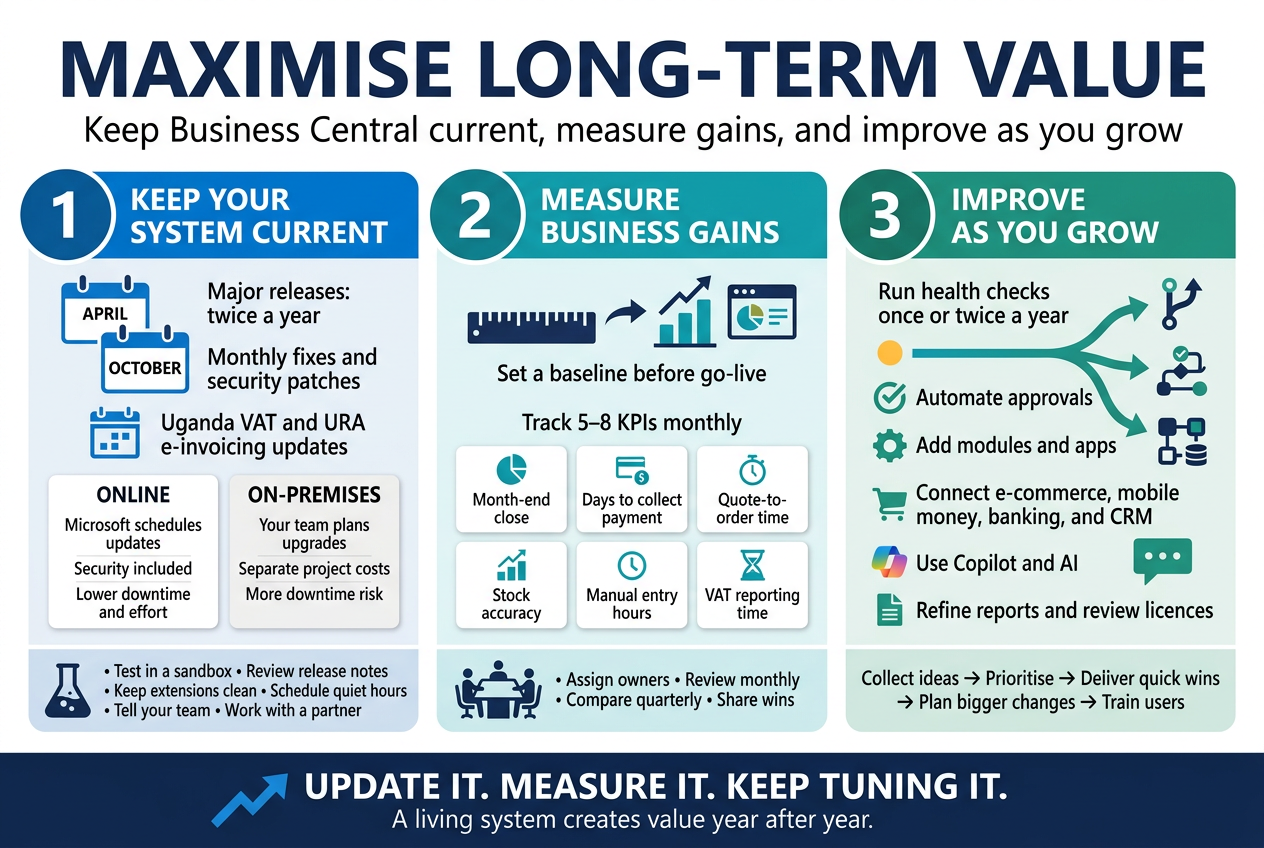
Keep Your System Current with Updates and Upgrades
Go-live is the starting line. Microsoft ships Business Central updates twice a year, in April (release wave 1) and October (release wave 2), plus monthly cumulative updates for fixes and security patches. Skip them for a couple of years and you end up with a slow, exposed system that costs a lot to catch up.
What Microsoft rolls out
- Major releases (twice a year): New features, better reporting, improved Copilot and AI tools, and tweaks to the user interface.
- Minor updates (monthly): Bug fixes, security patches and performance improvements.
- Regulatory and localisation changes: Tax and compliance updates that matter for Ugandan businesses, such as VAT and URA e-invoicing requirements.
Cloud or on-premises: who handles what
| Factor | Business Central Online (SaaS) | On-premises |
|---|---|---|
| Update schedule | Microsoft pushes updates automatically | You plan and run each upgrade |
| Your effort | Test extensions, schedule update windows | Full upgrade project, infrastructure checks |
| Security patches | Applied by Microsoft | Applied by your IT team or partner |
| Downtime risk | Low, mostly planned | Higher, depends on your setup |
| Cost of staying current | Included in the subscription | Separate project costs |
For most small and medium businesses in Uganda, the online version takes a big load off. You don’t need a server room, and you don’t need to worry about a power cut ruining an upgrade weekend.
Make updates painless
- Use a sandbox. Test every major update in a copy of your live environment before it reaches your real data.
- Review release notes early. Microsoft publishes them months ahead. Spot the changes that affect your workflows.
- Keep customisations clean. Extensions built the modern way (AppSource-style extensions, not code changes to the base app) survive updates much better.
- Pick your update window. In the online version, you can schedule updates for quiet hours, such as a Sunday night, so nobody is mid-invoice when it happens.
- Tell your team. A short note about what’s changing and when saves a flood of “where did that button go?” calls.
- Lean on your partner. A Dynamics 365 Business Central partner in Uganda like Othware can check your extensions against upcoming releases and fix compatibility issues before they cause trouble.
Measure Performance and Track Business Gains
You put money and effort into your ERP. A year in, you should be able to say what you got back. Without numbers, it’s just a feeling.
Set your baseline first
Pull figures from before go-live, or from the first month, so you have something to compare against. Typical examples:
- How many days it takes to close the month
- How long it takes to produce an invoice or quote
- Stock count accuracy
- Average days to collect payment
- Hours spent on manual data entry and reconciliations
KPIs worth tracking
| Area | KPI | What good looks like |
|---|---|---|
| Finance | Month-end close time | Down from weeks to a few days |
| Finance | Days sales outstanding (DSO) | Falling steadily as invoicing and reminders improve |
| Sales | Quote-to-order time | Shorter turnaround, fewer lost deals |
| Inventory | Stock accuracy and stock-outs | Fewer surprises, less dead stock |
| Purchasing | Supplier lead time and order accuracy | Fewer late or incorrect deliveries |
| Operations | Manual entry hours per week | Clear reduction as processes are automated |
| Compliance | Time to prepare VAT and tax reports | Faster, with fewer errors |
| People | User adoption rate | Most staff using the system daily |
Where to find the data
Business Central has the tools built in, so you don’t need extra software to start:
- Role Centers give each person a dashboard with the numbers they care about.
- Power BI integration turns your data into live reports and trends you can share with directors or lenders.
- Analysis views and financial reports let you slice results by branch, department, product or project.
- Excel integration is handy for finance teams who like to build their own views.
Make it a habit
- Choose five to eight KPIs, not thirty.
- Assign an owner to each one.
- Review them monthly in a short management meeting.
- Do a deeper review every quarter, comparing against your baseline.
- Share wins with the team. Staff who see the system saving time are more likely to keep using it properly.
The gains often show up in quiet ways: the accountant who leaves on time at month-end, the sales manager who can answer a customer’s stock question on the spot, the owner who finally trusts the numbers. Tracking helps you spot these and prove them.
Continuously Improve Processes as Your Business Evolves
Your business won’t look the same in three years. You may add a branch in Mbarara, start exporting, launch a new product line or take on a big contract that needs project tracking. Business Central should grow with you, but it needs regular attention.
Hold regular system health checks
Once or twice a year, sit down with your team and your implementation partner and ask:
- Which tasks are still done outside the system, in spreadsheets or on paper?
- Where do people complain about delays or double entry?
- Are there features we paid for but never switched on?
- Have user roles and permissions kept up with staff changes?
- Is our data clean, or are there duplicate customers, old items and unused accounts?
Common improvements as you grow
- Automate approvals: Purchase orders, expense claims and payment approvals can follow workflows instead of email chains.
- Add modules and apps: Manufacturing, service management, project management or warehouse management can be added when the need arrives.
- Connect other systems: Link your e-commerce site, mobile money payments, banking feeds or CRM.
- Use Copilot and AI features: Let built-in tools help with things like drafting product descriptions, suggesting bank reconciliations and summarising data.
- Refine reports: Replace the reports you built in year one with sharper ones that match how you manage now.
- Review your licences: Add or remove users, or move between Essentials and Premium, so you only pay for what people actually use.
Build a feedback loop
Your users know where the friction is. Make it easy for them to say so:
- Keep a simple improvement log where staff can submit ideas.
- Review it monthly and rank items by impact and effort.
- Tackle quick wins first, such as a new field, a shortcut or a simple report.
- Plan bigger changes as small projects with a clear owner and date.
- Run refresher training whenever you roll out something new, and for new hires.
Don’t go it alone
Ongoing support from a Microsoft Dynamics 365 Business Central partner in Uganda keeps small problems from turning into big ones. A good partner sends you updates on new features, reviews your setup, and helps you decide what’s worth doing next. Othware Uganda, an official Microsoft Dynamics 365 partner for Uganda, offers training and support after go-live so your system keeps pace with the business instead of falling behind it.
The companies that get the most from their ERP treat it as a living tool. They update it, measure it and keep tuning it, and the payoff builds year after year.
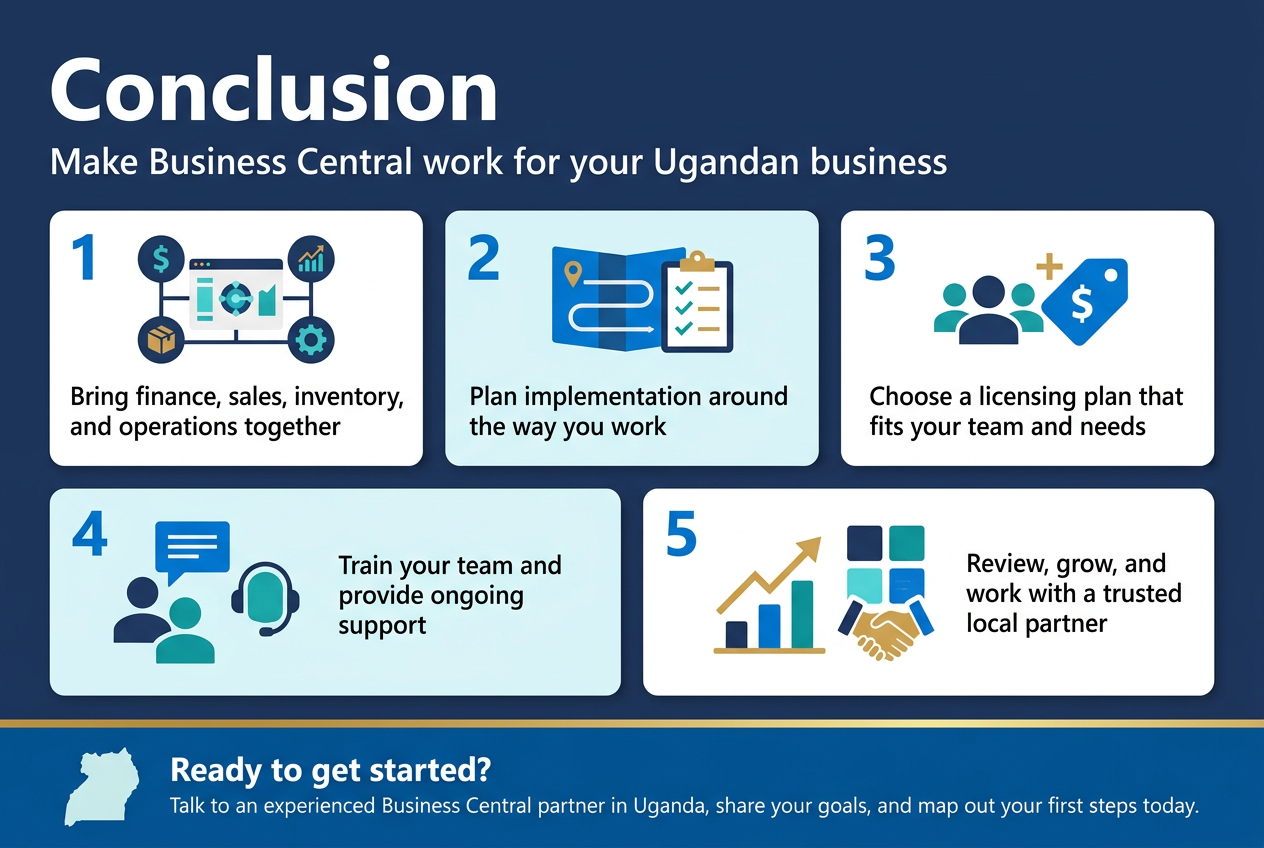
Business Central works well for Ugandan businesses because it brings finance, sales, inventory, and operations into one place. But the software is only part of the story. A good result comes from planning your implementation, following a clear process, and shaping the system around the way you actually work. Pick the licensing plan that matches your team size and needs, so you only pay for what you’ll use.
Don’t overlook your people, either. Solid training and ongoing support help your team feel confident and keep the system useful long after go-live. Keep reviewing how you use it, add new features as you grow, and lean on a trusted local partner when you need help.
Ready to get started? Talk to an experienced Business Central partner in Uganda, share your goals, and map out your first steps today.

Tech Evangelist and Business Developer.
I love connecting with nature