The Cost of Implementing Microsoft Dynamics 365 Business Central in Uganda
Wondering what Business Central cost Uganda really looks like? You’re not alone. Most business owners we talk to want a straight number before they commit, and the honest answer is that it depends on a few key things.
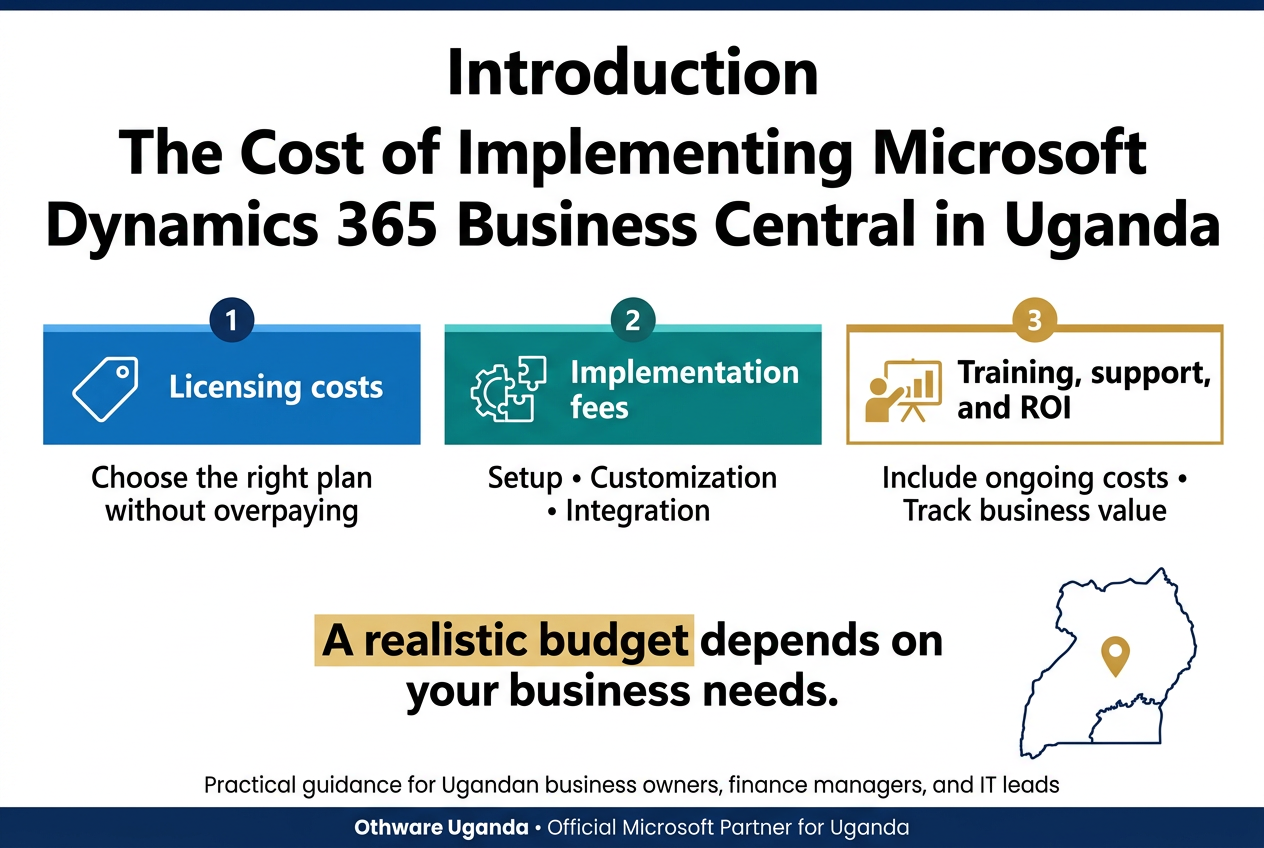
This guide is for Ugandan business owners, finance managers, and IT leads who are weighing up Dynamics 365 Business Central Uganda and need a realistic budget before they talk to a vendor.
Here’s what we’ll cover:
- Licensing costs: how Microsoft Dynamics 365 Business Central pricing works, and how to pick the right plan without overpaying.
- Implementation fees: what your Dynamics 365 partner Uganda will charge for setup, customization, and integration, and why ERP implementation cost Uganda varies so much.
- Training, support, and ROI: the costs people forget, and how to tell if your Business Central ROI is paying off.
We’ll keep it simple and skip the jargon. As an Official Microsoft Partner for Uganda, Othware Uganda has seen what works and what drains budgets, so you’ll get practical advice, not a sales pitch.
Understand What Drives Your Business Central Investment
Choose the Right Deployment: Cloud vs. On-Premises
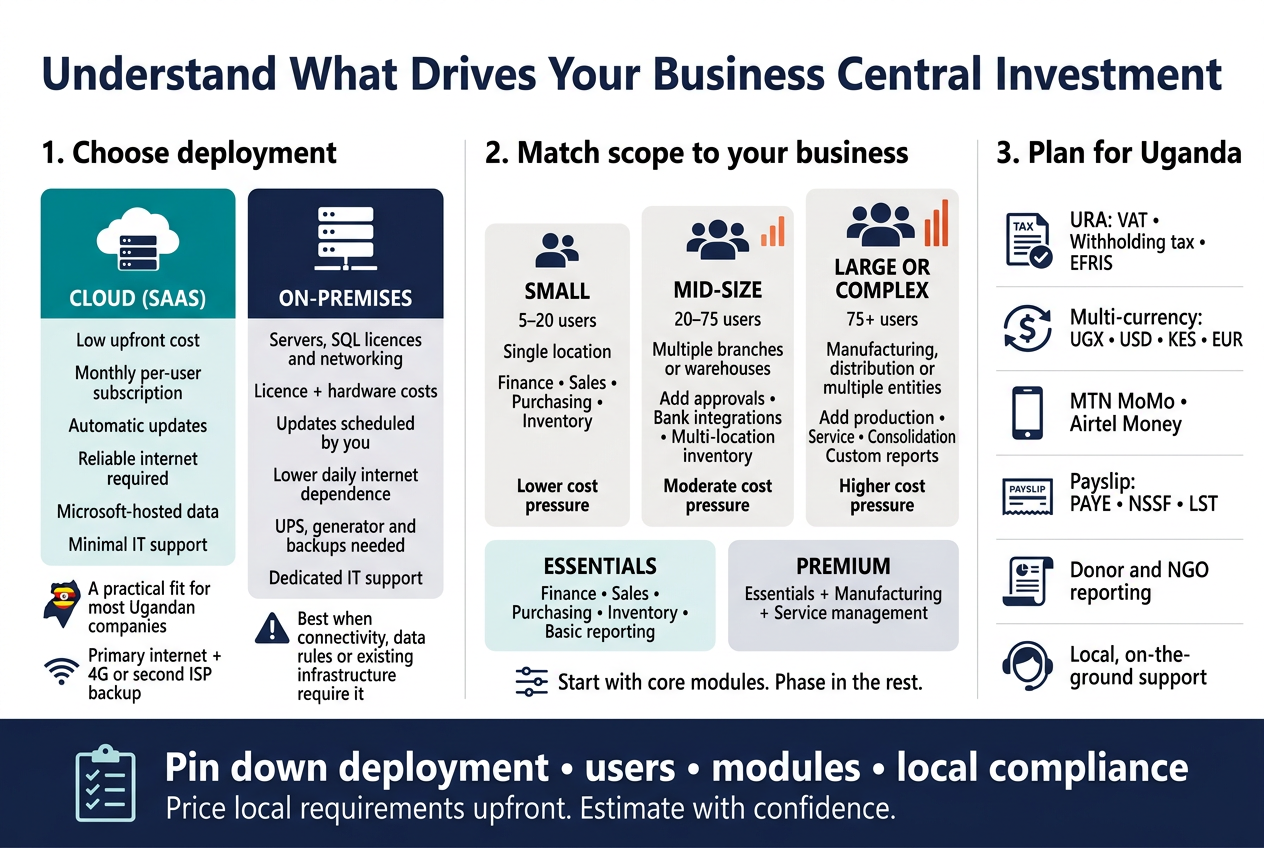
Your deployment choice shapes almost every cost that follows, so settle it first. Business Central runs in the cloud (Microsoft-hosted SaaS) or on-premises (your own servers or a private host).
| Factor | Cloud (SaaS) | On-Premises |
|---|---|---|
| Upfront cost | Low. No server purchase | High. Servers, SQL licences, networking |
| Payment model | Monthly per-user subscription | Perpetual or subscription licence plus hardware |
| Updates | Automatic, twice a year | You schedule and pay for them |
| Internet dependence | High | Lower for daily use |
| Power-cut resilience | Data is safe offsite | Needs UPS, generator, backups |
| IT staff needed | Minimal | Dedicated admin or support contract |
For most Ugandan companies, cloud is the easier path. You skip the server room, the cooling, the backup tapes, and the worry about what happens when UMEME drops the power. Your data sits in a Microsoft datacenter, and your team can log in from Kampala, Gulu, or a site visit in Mbarara.
On-premises still makes sense in a few cases:
- Your internet connection is unreliable and you can’t fix it.
- You have strict internal rules about where data lives.
- You already own solid server infrastructure and a capable IT team.
Be honest about connectivity before you decide. If you go cloud, a reliable primary line plus a backup (a second ISP or 4G failover) costs far less than a day of stopped invoicing.
Match Your Business Size and Complexity to the Right Scope
A 15-person trading company and a 200-person manufacturer with multiple branches don’t need the same system. Scope is the biggest lever on your implementation bill, so decide what you actually need before you ask for quotes.
Business Central has two licence tiers, Essentials and Premium. Essentials covers finance, sales, purchasing, inventory, and basic reporting. Premium adds manufacturing and service management. Pick the tier that fits your operations, not the one that sounds more impressive.
Here’s a rough way to size your project:
| Business profile | Typical scope | Cost pressure |
|---|---|---|
| Small (5-20 users), single location, simple trading or services | Finance, sales, purchasing, inventory | Lower. Mostly standard setup |
| Mid-size (20-75 users), multiple branches or warehouses | Above plus multi-location inventory, approvals, bank integrations | Moderate. More configuration and data migration |
| Large or complex (75+ users), manufacturing, distribution, or multi-entity | Above plus production, service, consolidation, custom reports | Higher. Customization, integrations, longer timeline |
A few questions help you pin down scope fast:
- How many people need full access, and how many only need to view reports or approve requests? Limited users cost less than full users.
- How many entities, branches, or currencies do you manage?
- Which processes are painful today: stock tracking, month-end close, payroll handoffs, project costing?
- How much clean historical data do you want to bring over?
Start with the core modules and phase in the rest. Many businesses go live with finance, sales, and inventory first, then add manufacturing or advanced reporting once the team is comfortable. That spreads the spend and lowers the risk of a messy launch.
Plan Around Uganda’s Local Business Needs
A good ERP has to fit how business actually works here. Generic setups miss local details, and fixing them later costs more than planning for them now. Raise these points with your Dynamics 365 partner during scoping:
- Tax compliance: URA requirements around VAT, withholding tax, and EFRIS e-invoicing. Ask how your partner will connect Business Central to EFRIS and whether that’s a standard feature or a custom job.
- Multi-currency: Many Ugandan firms deal in UGX and USD, sometimes KES or EUR too. Make sure exchange rate handling and revaluation are set up properly.
- Mobile money and banking: MTN MoMo and Airtel Money are part of daily cash flow. Reconciling these with your books may need an integration or a clear manual process.
- Payroll: PAYE, NSSF, and LST calculations. Check whether payroll sits inside Business Central or connects to a separate tool.
- Donor and NGO reporting: If you run grant-funded programs, you may need fund tracking, dimension-based reporting, and donor-specific formats.
- Local support: Time zone, language, and on-the-ground help matter when something breaks at month-end. Working with an official Microsoft partner in Uganda, such as Othware Uganda, means support is a short call away instead of a ticket sent overseas.
Raise these early. Each one can add configuration hours or a small integration, and it’s much cheaper to price them upfront than to discover them after go-live.
A solid scoping conversation covers deployment, user count, modules, and local compliance together. Once you have those four pinned down, the rest of your Business Central cost in Uganda becomes far easier to estimate.
Budget Smartly for Licensing Costs
Compare Essentials and Premium Plans
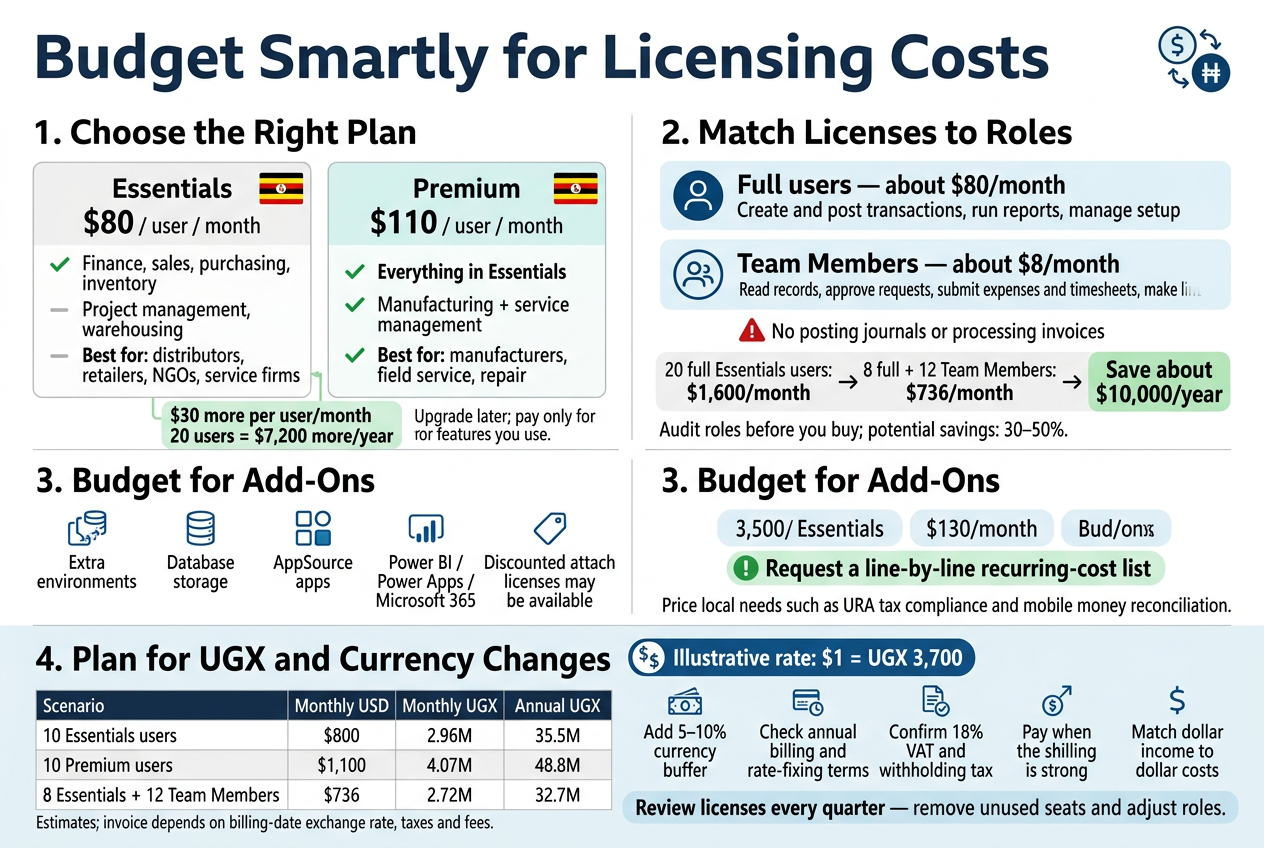
Business Central licensing is priced per user, per month, in US dollars. Microsoft adjusts list prices from time to time, so confirm current numbers with your partner before you lock in a budget. At the time of writing, the rough figures are:
| Feature | Essentials | Premium |
|---|---|---|
| Approx. price per user/month | $80 | $110 |
| Finance, sales, purchasing, inventory | Yes | Yes |
| Project management and warehousing | Yes | Yes |
| Manufacturing (production orders, BOMs, capacity planning) | No | Yes |
| Service management | No | Yes |
| Best for | Distributors, retailers, NGOs, service firms | Manufacturers, businesses with field service or repair work |
The $30 gap looks small, but across 20 users it adds up to $7,200 a year. Most Ugandan businesses start with Essentials. Choose Premium only if you actually run production or manage service contracts and repair jobs. If you’re unsure, ask your Dynamics 365 partner to map your daily processes to each plan before you decide.
You can also upgrade later, so don’t pay for features you won’t use in year one.
Decide Between Full Users and Team Members
This is where many companies save real money. Not everyone who touches the system needs a full license.
Full users
Full users create and post transactions, run reports, and manage setup. Think accountants, procurement officers, sales administrators, warehouse controllers, and finance managers.
Team Members
Team Member licenses cost about $8 per user/month. They suit people who mostly look at data or do light tasks, such as:
- Viewing and reading reports and records
- Approving requests, such as purchase orders or leave
- Submitting expense reports and timesheets
- Making limited edits to existing records
Team Members can’t do heavy transactional work, like posting journals or processing invoices.
A quick cost example
Say you have 20 people who need access. Licensing all of them as full Essentials users costs about $1,600 a month. If 8 are full users and 12 are Team Members, the cost drops to roughly $736 a month. That saves around $10,000 a year.
Before you sign anything, list every user, what they do in the system, and which license fits. Partners like Othware Uganda, an official Microsoft partner for Uganda, usually run this exercise during scoping. An honest user audit often cuts the license bill by 30–50%.
Account for Add-Ons and Extra Modules
The per-user price is not the whole licensing bill. Watch for these extras:
- Additional environments: Your license includes a production and a sandbox environment. Extra test or training environments cost more each month.
- Extra database capacity: Storage beyond the included allowance is billed per GB. Companies with heavy transaction volumes, such as distributors and retailers, hit this limit sooner than expected.
- Third-party apps (AppSource): Local tax tools, payroll, advanced reporting, or industry-specific add-ons usually have their own subscription fees, often per user or per company.
- Other Dynamics 365 or Microsoft products: Power BI Pro, Power Apps, Power Automate, or Microsoft 365 licenses may be priced separately depending on how you use them.
- Attach licenses: If you already own another Dynamics 365 product, discounted Business Central “attach” licenses may be available.
Ask your partner for a line-by-line list of every recurring license, not just the headline user cost. If an add-on is needed for URA tax compliance, mobile money reconciliation, or similar local needs, price it in from the start.
Convert Pricing to Ugandan Shillings and Plan for Currency Shifts
Microsoft bills in dollars, so your real cost depends on the UGX/USD exchange rate. Using an illustrative rate of UGX 3,700 to $1:
| Scenario | Monthly (USD) | Monthly (UGX, approx.) | Annual (UGX, approx.) |
|---|---|---|---|
| 10 Essentials users | $800 | 2.96M | 35.5M |
| 10 Premium users | $1,100 | 4.07M | 48.8M |
| 8 Essentials + 12 Team Members | $736 | 2.72M | 32.7M |
Treat these as estimates. Your final invoice depends on the exchange rate on the billing date, and on any taxes or fees your reseller adds.
Ways to protect your budget
- Add a buffer. Build in 5–10% for exchange rate swings when you set your annual IT budget.
- Ask about billing terms. Annual commitments are usually cheaper than month-to-month. Find out whether your partner bills in USD or UGX, and when the rate is fixed.
- Check the tax. Ask whether quotes include 18% VAT. Your finance team should also confirm whether withholding tax applies to your payments.
- Pay when the shilling is strong. If you’re paying annually and have flexibility, time larger payments when the rate works in your favor.
- Match income to costs. If you earn in dollars (exporters, NGOs, donor-funded projects), the currency risk is much smaller.
Review your licensing spend every quarter. Users leave, roles change, and the exchange rate moves. Adjusting licenses as you go keeps you from paying for seats nobody uses.
Plan for Implementation Service Fees
Choose a Local or International Microsoft Partner
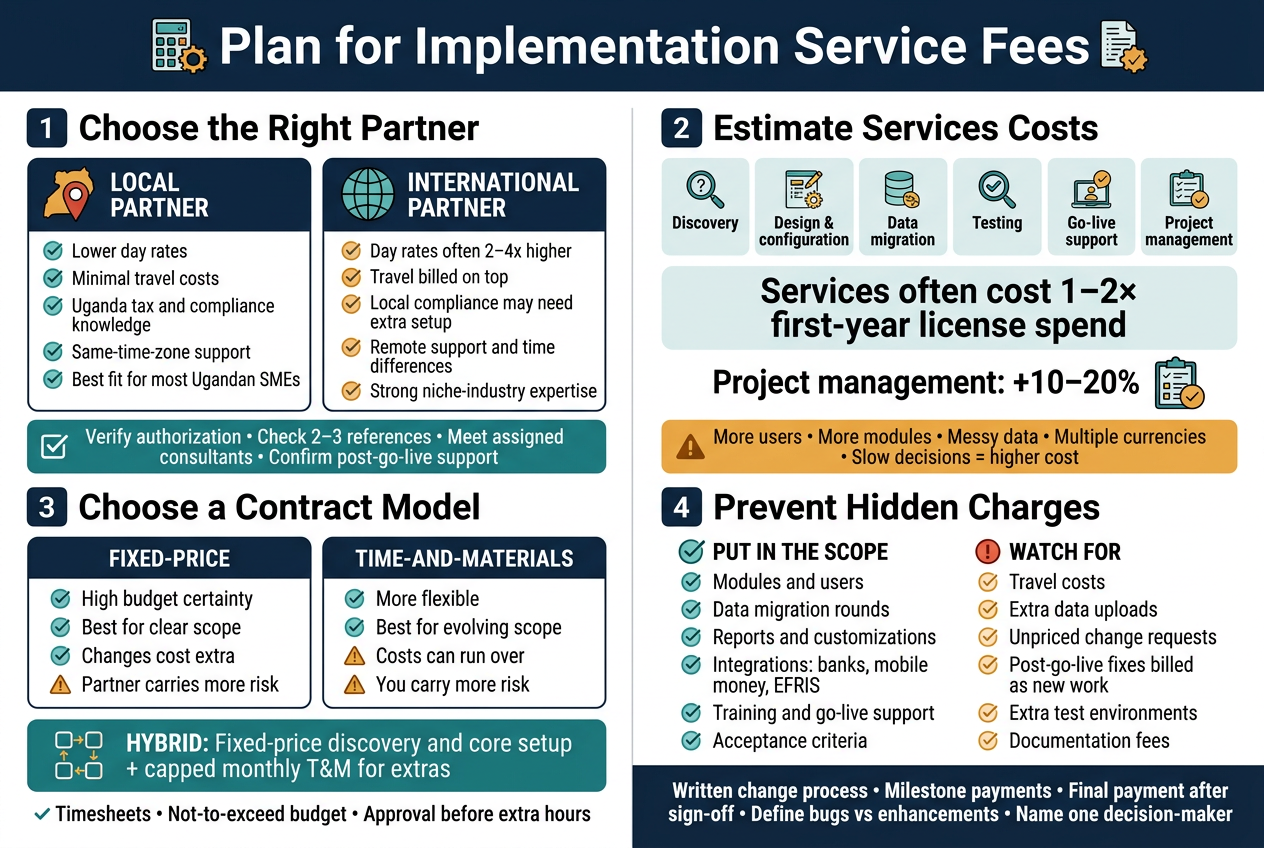
Your partner shapes the final bill more than almost anything else. In Uganda, you have two broad options.
| Factor | Local Partner | International Partner |
|---|---|---|
| Day rates | Generally lower | Often 2–4x higher |
| Travel and accommodation | Minimal | Billed on top |
| Local compliance (URA, EFRIS, VAT, PAYE, NSSF) | Built in or well understood | Often needs extra setup |
| Support hours | Same time zone, quick site visits | Remote, time differences |
| Depth on complex projects | Varies by partner | Often strong in niche industries |
For most Ugandan SMEs and mid-sized firms, a local partner makes more financial sense. They know the tax rules, the banking setup, and mobile money realities. They can also be at your office the same day something breaks.
When you shortlist, ask for:
- Proof they’re an authorized Dynamics 365 partner in Uganda
- Two or three references from similar-sized businesses in your industry
- Names and experience of the consultants who’ll actually work on your project
- A clear support plan after go-live
An official Microsoft partner for Uganda, such as Othware Uganda, can give you licensing, implementation, and support from one team. That setup usually cuts down on finger-pointing and duplicate fees.
Estimate Consultation and Project Management Costs
Implementation fees are mostly people’s time. Typically, you pay for:
- Discovery and requirements workshops: mapping your processes, reports, and approvals
- Solution design and configuration: chart of accounts, inventory setup, user roles, workflows
- Data migration support: cleaning and loading customers, vendors, items, and opening balances
- Testing and user acceptance: checking everything works before you go live
- Go-live support: extra hands during the first weeks
- Project management: coordinating tasks, timelines, and communication
A good rule of thumb is that implementation services often cost one to two times your first-year license spend. Simple projects with a few users and standard finance and sales setups sit near the lower end. Multi-branch operations with manufacturing, projects, or heavy reporting needs push toward the top, sometimes beyond.
Project management typically adds around 10–20% to the services total. Don’t try to skip it. Projects without proper management tend to drift, and drifting means more billable hours.
What pushes your estimate up:
- More users and more companies or branches
- Several modules (finance, supply chain, manufacturing, service)
- Messy legacy data
- Multiple currencies (UGX, USD, KES)
- Slow decisions on your side
That last one catches people out. If your team takes two weeks to approve a design document, the consultants’ schedule slips and the cost creeps up.
Control Costs with Fixed-Price vs. Time-and-Materials Contracts
How you pay matters as much as how much you pay. Here’s how the two main models compare.
| Fixed-Price | Time-and-Materials (T&M) | |
|---|---|---|
| Budget certainty | High | Lower |
| Flexibility if needs change | Low (change requests cost extra) | High |
| Best for | Clear, well-defined scope | Complex or evolving projects |
| Main risk | Scope disputes | Costs running over |
| Who carries the risk | Mostly the partner | Mostly you |
Go fixed-price when your needs are standard: core finance, basic sales and purchasing, and inventory. If you can write down what “done” looks like, a fixed price protects your budget.
Go T&M when your processes are still unclear, you’re integrating with other systems, or you expect to change course midway.
A hybrid often works best. Fix the price for discovery and core setup, then run T&M with a monthly cap for extras. You get predictability where it counts and room to adapt elsewhere.
If you choose T&M, ask for:
- Weekly or monthly timesheet reports
- A not-to-exceed budget
- Approval required before extra hours are worked
Avoid Hidden Charges Through Clear Scope Agreements
Most cost surprises don’t come from bad intent. They come from vague documents. Before signing, make sure the statement of work spells out the details.
Check that it covers:
- Which modules and features are included
- Number of users, companies, and locations
- Number of data migration rounds and what data gets moved
- Reports, forms, and dashboards included (and how many custom ones)
- Integrations in scope, such as mobile money, banks, or EFRIS
- Training sessions: how many, how long, and who attends
- Go-live support period
- Acceptance criteria for each phase
Watch for common hidden charges:
- Travel and transport for consultants
- Extra fees for additional data uploads
- Charges for change requests with no agreed rate
- Post-go-live fixes labeled as “new work”
- Extra environments for testing or training
- Separate fees for documentation
Protect yourself with a few simple steps:
- Get a written change-request process with agreed hourly rates.
- Tie payments to milestones, not just dates.
- Hold back a small final payment until sign-off.
- Define what counts as a bug versus an enhancement.
- Name one person on your side who has authority to approve decisions.
Clear paperwork keeps the relationship healthy. When both sides know exactly what’s included, you spend the budget on building your system rather than arguing about invoices.
Cover Customization and Integration Expenses
Adapt Business Central to Your Unique Workflows
Business Central works well out of the box for finance, sales, purchasing, inventory, and basic manufacturing. Many Ugandan businesses still have processes that don’t fit the standard setup. Think of a distributor with route-based van sales, a school billing by term, or a agribusiness buying produce from hundreds of smallholder farmers.
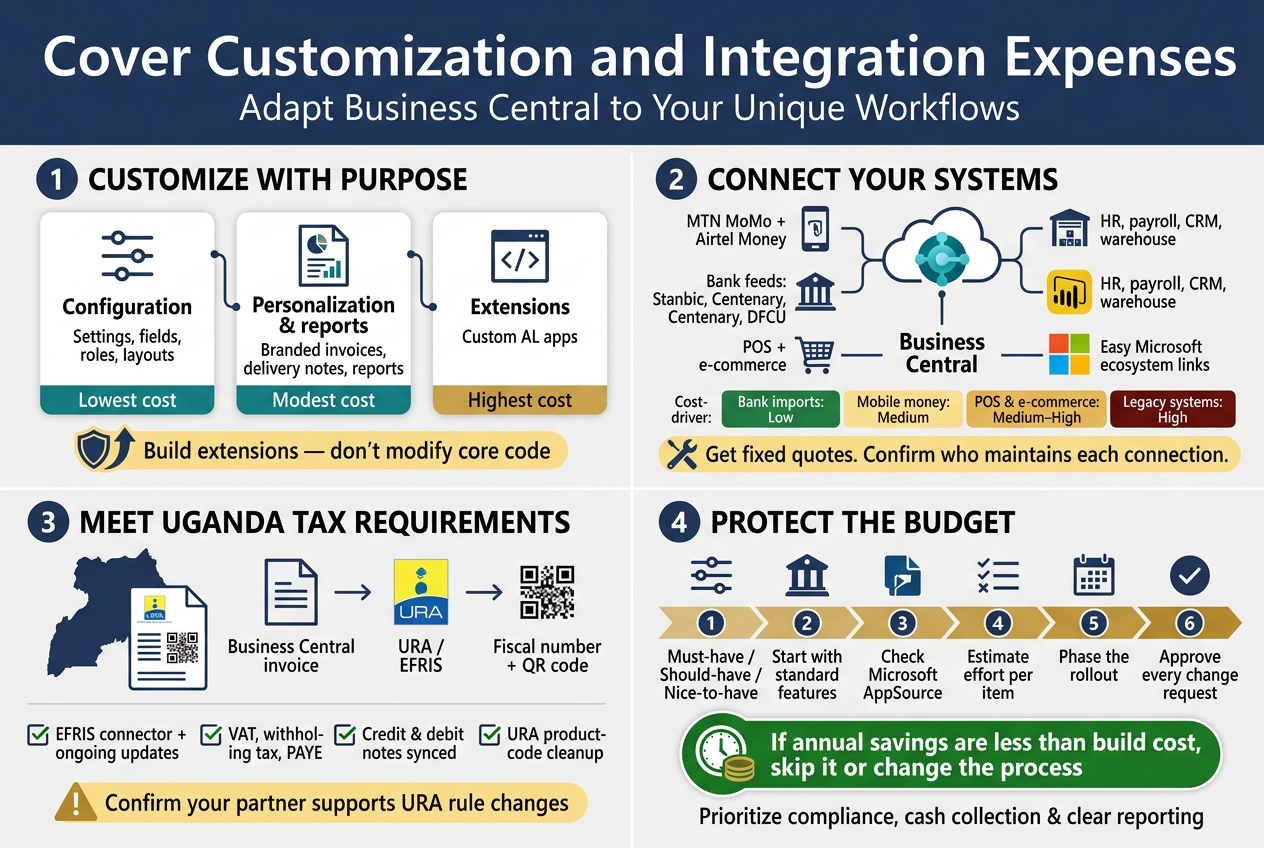
Customization usually comes in three forms:
- Configuration: Changing settings, fields, roles, and page layouts. It costs little or nothing beyond consulting time.
- Personalization and reports: Custom invoices, delivery notes, and management reports in your branding and format. Costs are modest.
- Extensions: Custom code built as apps using AL. This is where costs climb, since developers bill by the day.
Microsoft’s approach favors extensions over changing core code. That keeps upgrades smooth and saves you money later. Ask your Dynamics 365 partner in Uganda to build any custom work as an extension, never as a modification to the base application.
Connect with Mobile Money, Banks, and Existing Systems
Cash in Uganda moves through MTN MoMo, Airtel Money, and bank transfers. Business Central doesn’t talk to these natively, so integration is a real line item in your budget.
Common integration needs include:
- Mobile money: Matching MoMo and Airtel Money collections to customer invoices automatically.
- Bank feeds and reconciliation: Importing statements from banks like Stanbic, Centenary, or DFCU to speed up reconciliation.
- Payment gateways: Linking online stores or customer portals to card and mobile payments.
- Existing systems: Connecting your POS, HR and payroll tools, CRM, or warehouse scanners.
- Power BI and Microsoft 365: Usually easy to set up, since they’re part of the Microsoft ecosystem.
Here’s a rough guide to what drives the price:
| Integration type | Typical complexity | Cost driver |
|---|---|---|
| Bank statement import | Low | File format and number of banks |
| Mobile money reconciliation | Medium | Provider APIs, transaction volumes |
| POS or e-commerce link | Medium to high | Real-time sync, number of outlets |
| Legacy system link | High | Poor documentation, data quality |
Ask for fixed quotes per integration. Also ask who maintains each connection when a bank or mobile money provider changes its API. That ongoing support cost often gets missed.
Meet URA and EFRIS Tax Compliance Requirements
Compliance isn’t optional here. The Uganda Revenue Authority requires many VAT-registered businesses to issue e-invoices through EFRIS (Electronic Fiscal Receipting and Invoicing Solution). Your ERP has to send invoice data to URA and receive a fiscal document number and QR code back.
What to budget for:
- EFRIS integration: Either a connector built by a local partner or an add-on extension. Expect a one-time setup fee and sometimes an annual subscription.
- Tax setup: VAT, withholding tax, and PAYE configured correctly, with Ugandan chart of accounts and reporting.
- Credit notes and debit notes: These need to sync with EFRIS too, and they’re where many setups break.
- Product codes: Your item master must match URA commodity codes, which takes data-cleanup time.
- Updates: URA rules change. Confirm your partner commits to updating the integration when they do.
A partner with real Ugandan experience, such as Othware Uganda, an official Microsoft Partner for Uganda, will have handled EFRIS before. That saves you weeks of trial and error, and it lowers the risk of penalties from failed submissions.
Prioritize Must-Have Features to Protect Your Budget
Scope creep is the quickest way to blow up a Business Central implementation cost. Every “wouldn’t it be nice if” adds developer days. A few habits keep spending under control:
- Sort requirements into three buckets. Must-have (legal, financial, or operational survival), should-have (clear efficiency gain), and nice-to-have (can wait).
- Launch with standard features first. Run on the base system for three to six months, then see what gaps are real. Many “must-have” customizations vanish once teams learn the standard tools.
- Check for existing apps. Microsoft AppSource has hundreds of ready-made extensions. A monthly app fee is often cheaper than custom development.
- Ask for effort estimates per item. When you see “12 days for a custom approval screen,” priorities get clearer fast.
- Phase the work. Go live with finance, sales, and inventory. Add integrations and advanced reports in phase two.
- Control change requests. Agree on a written process so every addition gets a price tag and sign-off before work starts.
A useful test: if a customization saves less money or time in a year than it costs to build, skip it or change the process instead. Sometimes it’s cheaper to adjust how your team works than to bend the software around an old habit.
Get this part right and you’ll keep your Business Central customization and integration budget focused on what moves the needle: compliance, cash collection, and clear reporting.
Prepare Your Infrastructure and Data
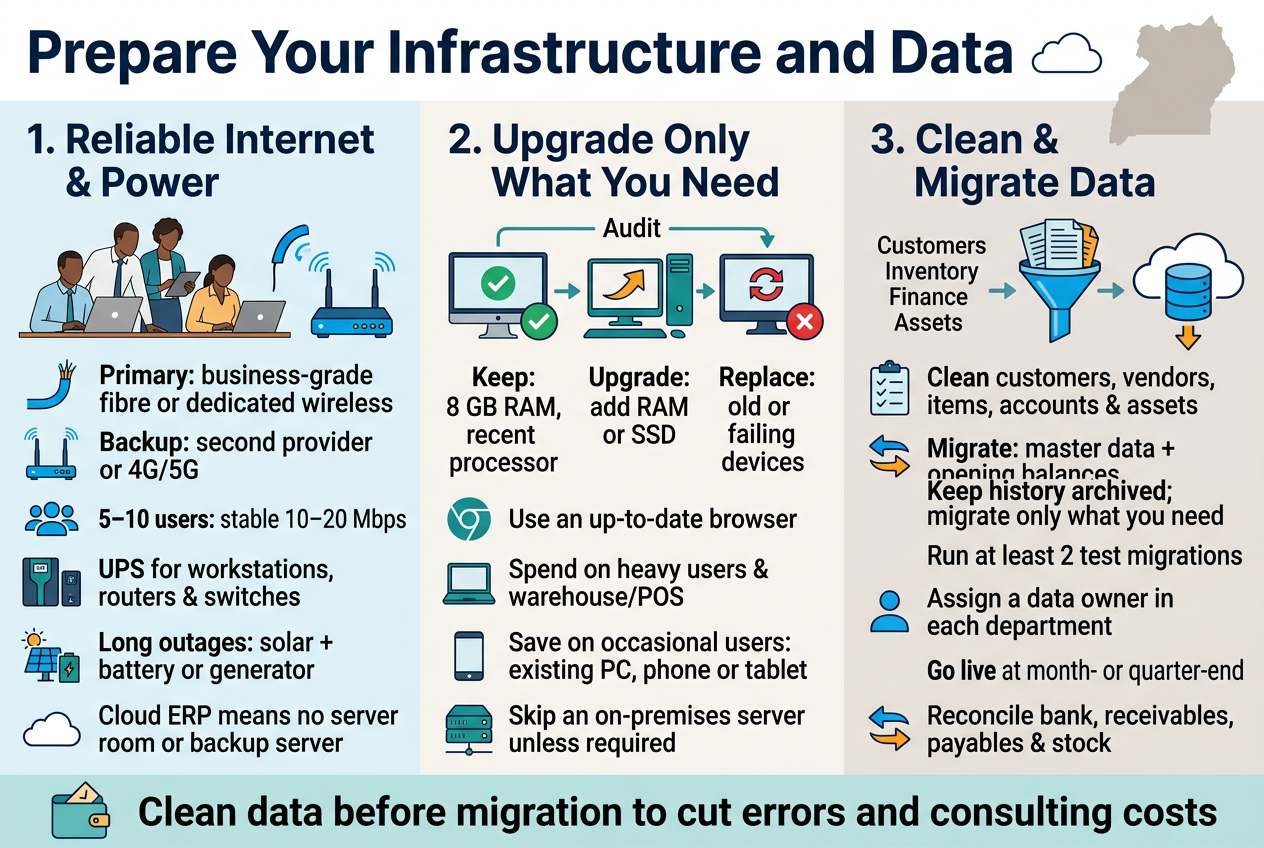
Secure Reliable Internet and Power Solutions
Business Central is a cloud ERP. If your internet drops, your team stops posting invoices, and if the power goes out, nobody can log in. In Uganda, both problems are common, so budget for them early.
Internet
- Primary line: A business-grade fibre or dedicated wireless link from a provider like Airtel, MTN Business, or Liquid costs more than a basic package, but it comes with service guarantees and faster fault response.
- Backup line: Add a second connection from a different provider. A 4G/5G router with a business data plan is often enough.
- Bandwidth: Business Central is fairly light. A small team of 5–10 users usually runs well on 10–20 Mbps with stable latency. Stability matters more than raw speed.
- Branch offices: Upcountry sites may need a mobile data plan. Business Central works in a browser and on phones, so a modest connection is often enough.
Power
- UPS units: Give each workstation, router, and switch a UPS. It buys you time to save work and shut down properly.
- Generator or solar backup: If outages last hours, a small solar-and-battery setup or a generator keeps the office running. Solar costs more upfront but cuts fuel bills.
- Surge protection: Voltage spikes kill equipment. Good surge protectors are cheap compared to replacing a server or laptop.
Tip: Because Business Central runs in Microsoft’s cloud, you skip the cost of a server room, cooling, and a backup server. That money can go into better connectivity.
Upgrade Hardware Only Where Necessary
Many Ugandan businesses overspend here. Business Central runs in a modern browser, so you probably don’t need to replace everything.
What you actually need
- A computer with at least 8 GB RAM and a recent processor
- An up-to-date browser (Edge, Chrome, or Firefox)
- A reliable router and network switches
- Barcode scanners, receipt printers, or label printers if you run warehouse or retail operations
Check before you buy
Do a quick audit of your current machines. Sort them into three groups:
| Category | What to do |
|---|---|
| Meets the specs above | Keep it |
| Slightly under (e.g., 4 GB RAM) | Upgrade RAM or add an SSD |
| Old or failing | Replace it |
A RAM or SSD upgrade often costs a fraction of a new laptop and gives a noticeable speed boost.
Where to spend and where to save
- Spend on: Machines for heavy users, such as finance staff running large reports, and devices for warehouse or point-of-sale use.
- Save on: Occasional users who only approve requests or view dashboards. Their existing computers, or even a phone or tablet, will do.
- Skip: An on-premises server, unless you have a specific compliance reason. Your Dynamics 365 partner in Uganda can tell you whether cloud or on-premises fits your case.
Clean and Migrate Data Without Costly Errors
Data migration is where budgets quietly blow up. Bad data moved into a new system gives you a faster way to get wrong answers, and fixing it afterwards costs more than fixing it before.
Start with a data cleanup
Before you move anything, go through your records:
- Customers and vendors: Remove duplicates, close dormant accounts, and fix missing details like TIN numbers, phone numbers, and addresses.
- Items and inventory: Standardise names, units of measure, and codes. Count your stock so opening balances are real.
- Chart of accounts: Simplify it. Merge accounts nobody uses and make sure it matches your reporting needs and URA requirements.
- Fixed assets: Confirm that each asset exists, its cost, and its depreciation to date.
Decide what to migrate
You don’t need ten years of history. A common approach:
- Master data: Customers, vendors, items, chart of accounts. Migrate all of it (after cleaning).
- Opening balances: Bring in trial balance, open invoices, open purchase orders, and stock quantities as of the go-live date.
- Historical transactions: Keep these in the old system or an archive, or migrate only the last one or two years if you really need them in reports.
Migrating less history lowers consulting hours and reduces the risk of errors.
Avoid common mistakes
- Skipping test migrations: Run at least two trial loads in a test environment. Fix errors there, not in your live books.
- No data owner: Assign one person in each department to sign off on their data. Your implementation partner can load it, but only your team knows if it’s right.
- Cutting over mid-month: Go live at a month-end or quarter-end so reconciliation is simpler.
- Skipping reconciliation: After loading, compare totals against your old system: bank balances, receivables, payables, and stock value should match.
Budget tip
Cleanup done by your own staff costs time, not consulting fees. Spend a few weeks on it before the project starts and you can cut migration costs noticeably. When you talk to a partner such as Othware Uganda, ask for a clear data migration scope and a fixed price so you aren’t surprised by extra hours later.
Invest in Training and Change Management
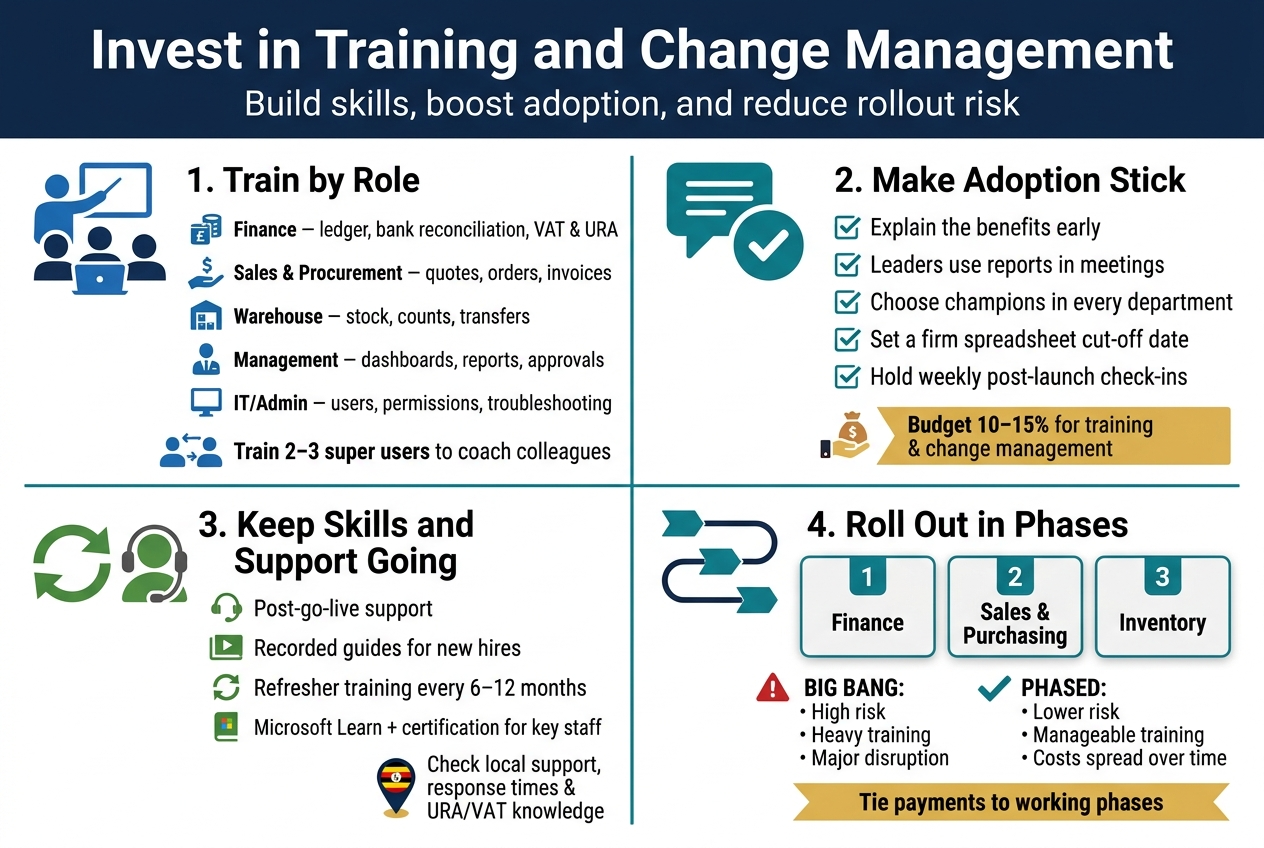
Equip Your Team with Role-Based Training
Generic, one-size-fits-all training wastes money. Your finance officer doesn’t need to know how warehouse transfers work, and your storekeeper doesn’t need to understand bank reconciliation. Split training by role and you pay for only what each person needs.
A typical role-based plan for a Ugandan SME looks like this:
| Role | Focus areas | Typical format |
|---|---|---|
| Finance team | General ledger, bank reconciliation, VAT and URA reporting, budgets | Hands-on workshops |
| Sales and procurement | Quotes, orders, purchase invoices, vendor records | Short practical sessions |
| Warehouse and inventory | Item tracking, stock counts, transfers | On-site, on-the-job |
| Management | Dashboards, Power BI reports, approvals | Brief executive briefings |
| IT/Admin | User setup, permissions, basic troubleshooting | Technical sessions |
Ask your Dynamics 365 partner whether training is included in the implementation quote or billed separately. Many partners price it per day, so a clear headcount and schedule keeps the bill predictable.
Another way to keep costs down is the train-the-trainer approach. Choose two or three “super users” who get deeper training and then coach everyone else. It’s cheaper than putting every employee through a full external course, and staff often learn faster from a colleague who sits next to them.
Boost Adoption to Maximize Your Return
You can buy the best licenses and pay for a flawless setup, but if people keep running things on Excel and paper, your Business Central ROI shrinks fast. Software doesn’t deliver value by being installed. It delivers value by being used.
Change management is what closes that gap. Budget time and a little money for:
- Early communication: Tell staff why you’re moving to Business Central and what’s in it for them, like fewer manual entries and faster month-end closing.
- Leadership buy-in: When the MD and department heads use the system’s reports in meetings, everyone else follows.
- Champions in every department: Pick respected team members who can answer questions and report problems early.
- Clear cut-off dates: Set a firm date to stop using old spreadsheets. Running both systems in parallel for too long doubles the workload and breeds distrust.
- Feedback loops: Hold short weekly check-ins after go-live to catch frustrations before they turn into workarounds.
Resistance is normal. Staff often worry the system will expose mistakes or replace their jobs. Addressing those worries openly costs almost nothing compared with a failed rollout.
A rough rule many ERP consultants use is to set aside about 10–15% of your total implementation budget for training and change management. Businesses that skip it usually pay more later in rework, fixes, and lost productivity.
Budget for Ongoing Support and Skills Development
Training doesn’t end at go-live. Staff leave, new hires join, and Microsoft releases major updates twice a year, adding features your team may not know about.
Plan for these recurring items:
- Post-go-live support: Most partners offer a hypercare period of a few weeks. After that, expect a support plan, either monthly retainers or pay-as-you-go hours.
- New-hire onboarding: Keep recorded sessions and simple user guides in-house so you don’t pay for the same training twice.
- Refresher sessions: A half-day workshop every six to twelve months helps teams use features like approvals workflows, reporting, and automation.
- Free learning resources: Microsoft Learn offers free Business Central learning paths, which are a good supplement to paid sessions.
- Certification for key staff: Your admin or super users can pursue Microsoft certification to reduce dependency on outside consultants over time.
When comparing quotes for Business Central training and support, check response times, whether support is local, and whether the partner understands Ugandan requirements like URA compliance and local VAT. A local partner such as Othware Uganda, an official Microsoft partner for Uganda, can often provide on-site help faster than an offshore provider, which saves downtime costs.
Reduce Disruption with a Phased Rollout
Switching everything on at once, often called a “big bang” go-live, is risky and expensive if something goes wrong. A phased rollout spreads out both the cost and the pain.
Common phasing options include:
- By module: Start with finance, then add sales, purchasing, and inventory once the team is comfortable.
- By location: Launch at head office first, then roll out to branches in Kampala, Mbarara, Gulu, or elsewhere.
- By business unit: Pilot with one department or subsidiary, learn from it, then replicate.
Here’s how the two approaches compare:
| Factor | Big bang | Phased rollout |
|---|---|---|
| Upfront cost | Concentrated | Spread over months |
| Risk | High | Lower |
| Training load | Heavy, all at once | Manageable, in stages |
| Disruption to daily work | Significant | Limited |
| Time to full benefit | Faster if it works | Gradual |
For most Ugandan SMEs with limited staff and tight cash flow, phasing is the safer bet. Each stage gives your team a chance to train, practice, and fix issues before moving on. It also lets you tie payments to milestones, so you’re not paying for the next phase until the current one is working.
Whatever you choose, ask your implementation partner to show a clear timeline with training sessions mapped to each phase. That makes your Business Central implementation cost easier to forecast and keeps surprises off your budget sheet.
Anticipate Ongoing and Long-Term Costs
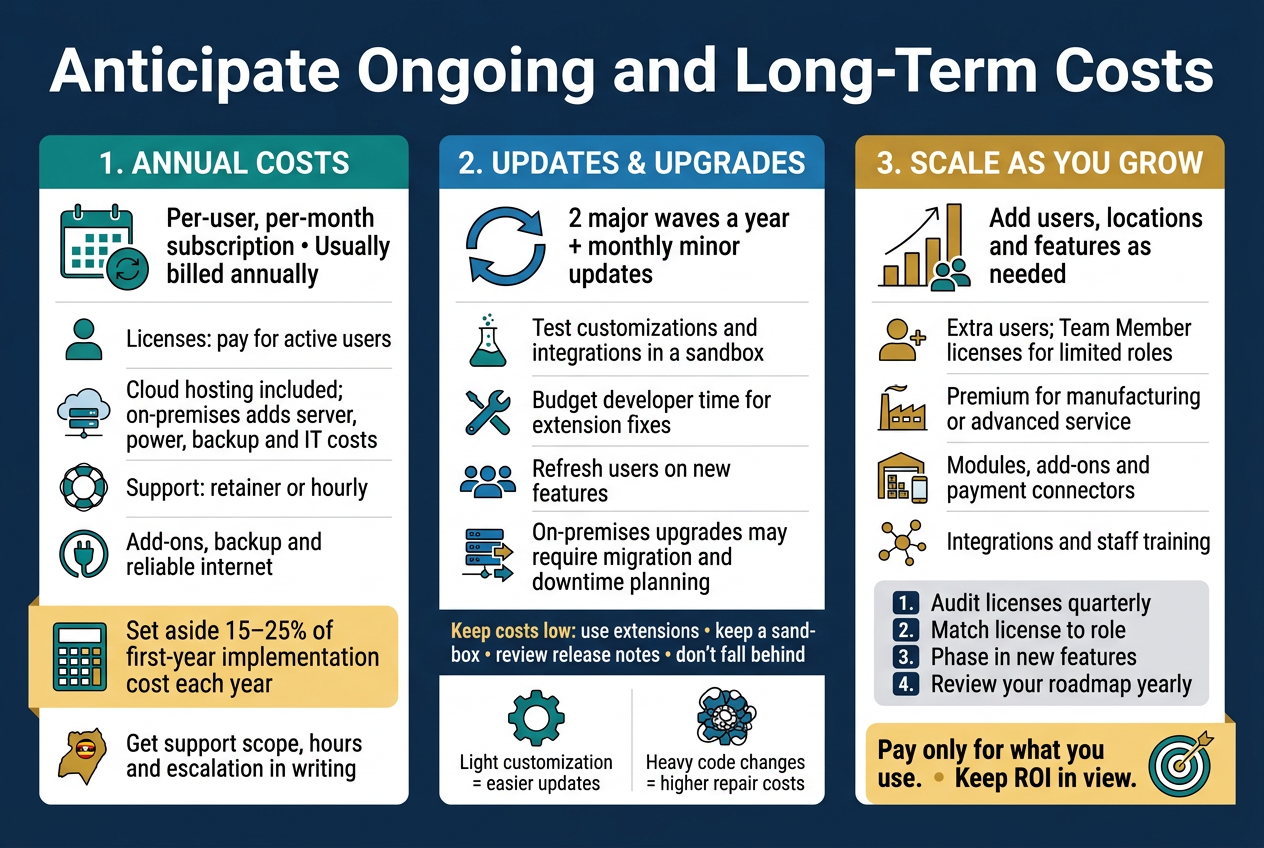
Plan for Annual Subscriptions and Maintenance
Business Central runs on a per-user, per-month subscription, and most partners bill it annually. That makes it a recurring line item, not a one-off purchase. Your yearly bill usually covers:
- User licenses: Essentials or Premium, billed per named user. Microsoft prices in US dollars, so the shilling exchange rate can move your bill from one renewal to the next.
- Cloud hosting: Included in the subscription for the SaaS version. If you pick on-premises, you carry server, power, backup, and IT staff costs yourself.
- Support and maintenance: Most Dynamics 365 partners in Uganda sell a support plan, either a monthly retainer or a block of hours.
Here’s a simple way to budget:
| Cost item | How it’s billed | What to watch |
|---|---|---|
| Licenses | Per user, per month | Pay only for users who actually log in |
| Support plan | Retainer or hourly | Check response times in writing |
| Add-on apps | Per user or flat monthly | Renewals often rise yearly |
| Backup/connectivity | Monthly | Reliable internet matters more than most people expect |
A good rule of thumb is to set aside 15–25% of your first-year implementation cost every year for support and small improvements. If your setup is heavily customized, lean toward the higher end.
Ask your partner what’s actually covered. “Support” can mean anything from answering a quick question to fixing a broken report. Get the scope, hours, and escalation process on paper. Working with an Official Microsoft Partner for Uganda, such as Othware Uganda, means you get local support in your time zone and someone who understands URA requirements, VAT, and withholding tax setups.
Budget for Upgrades and Microsoft Updates
Microsoft releases two major Business Central updates a year (wave releases), plus monthly minor updates. On the cloud version, they land automatically. That’s good news for security and new features, but it’s not entirely free of effort.
Here’s where the money goes:
- Testing: Before each wave, someone needs to check that your customizations, extensions, and integrations still work. Your partner can run this in a sandbox environment.
- Extension fixes: Custom code or third-party apps sometimes need a tweak after an update. Budget a few hours of developer time per wave.
- User refreshers: New menus, Copilot features, and report changes mean your team may need a quick walkthrough.
- Version upgrades (on-premises): If you self-host, upgrading between major versions is a mini-project. It can mean data migration, code upgrades, and downtime planning.
Customization is the biggest factor. A lightly configured system upgrades with almost no fuss. A system loaded with heavy code changes can turn every wave into a repair job. That’s why the Business Central customization and integration choices you made earlier come back to affect your long-term costs.
A few ways to keep upgrade costs low:
- Use extensions, not code changes to the base app. Extensions are built to survive updates.
- Keep a sandbox. Test every wave there first, so Monday morning isn’t a surprise.
- Review release notes twice a year. Your partner can flag the changes that matter to you.
- Don’t fall behind. Skipping versions makes the next jump bigger and pricier.
Scale Users and Features as You Grow
Your first go-live probably won’t be your final setup. A new branch in Mbarara, a warehouse in Jinja, or a sales team in Gulu means more users, more entities, or new modules. The good part is that you can add and remove licenses monthly, so you’re not locked into a big upfront bill.
Common growth costs:
- Extra users: Each new named user adds a monthly fee. Team Member licenses are cheaper for people who only view data, approve requests, or enter timesheets.
- Moving from Essentials to Premium: You’d do this if you need manufacturing or advanced service management.
- New modules or add-ons: Think warehouse management, project tracking, or mobile payment connectors such as MTN MoMo or Airtel Money.
- More integrations: E-commerce, banking, or URA EFRIS links add development and maintenance charges.
- Extra training: Every new hire or department needs onboarding.
To stay in control as you scale:
- Audit licenses quarterly. Remove accounts for people who left or never log in. It’s the easiest money you’ll save.
- Match license type to role. Not everyone needs a full user license.
- Phase new features. Roll out one module at a time so costs, training, and bugs stay manageable.
- Revisit your roadmap yearly with your Dynamics 365 partner. Ask what’s worth switching on now and what can wait.
Keep your ROI in view while you grow. If a new module doesn’t save time, cut errors, or bring in revenue, it can wait. Business Central pricing is flexible, and that works in your favor when you only pay for what you use.
Measure Return on Investment and Cut Costs
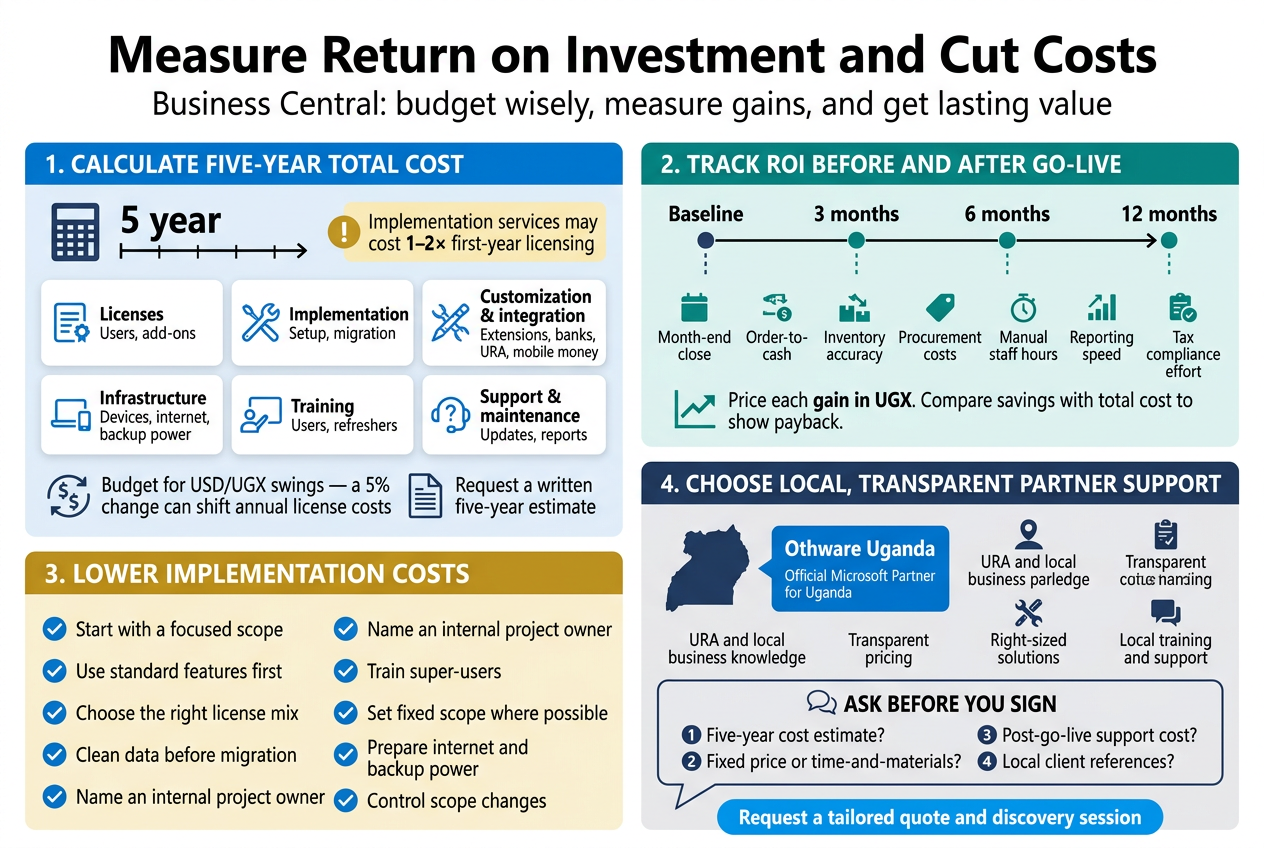
Calculate Total Cost of Ownership
The license price is only one line on the bill. To see what Business Central really costs your company, add up everything you’ll pay over five years, not just year one.
Here’s a simple way to break it down:
| Cost Category | One-Time or Recurring | What to Include |
|---|---|---|
| Licenses | Recurring (monthly or annual) | Essentials or Premium users, Team Members, add-ons |
| Implementation services | One-time | Setup, configuration, project management, data migration |
| Customization and integration | One-time, plus upkeep | Custom extensions, links to mobile money, URA tax tools, banks, e-commerce |
| Infrastructure | Mixed | Laptops, reliable internet, backup power, security |
| Training and change management | One-time, plus refreshers | End-user and admin training, new-hire onboarding |
| Support and maintenance | Recurring | Support plan, updates, extra reports |
Since Business Central pricing is usually quoted in US dollars, factor in shilling exchange rate swings. A 5% move in the dollar can shift your yearly license bill noticeably, so build a buffer into your budget.
A good rule of thumb: for many mid-sized projects, implementation and related services can cost as much as one to two times the first-year licensing. Ask your partner to spell this out in a written five-year estimate.
Track Efficiency Gains and Financial Savings
You can’t prove Business Central ROI if you don’t know where you started. Before go-live, capture a baseline for the numbers below. Then check them again at 3, 6, and 12 months.
Metrics worth tracking:
- Month-end close time: Days taken to finalize books
- Order-to-cash cycle: How fast invoices go out and payments come in
- Inventory accuracy: Stock count variances, stockouts, and overstock value
- Procurement costs: Supplier price comparisons and fewer emergency purchases
- Staff hours on manual work: Re-keying data, chasing spreadsheets, reconciling
- Reporting speed: Time to produce management reports or donor reports
- Compliance effort: Time spent preparing VAT and other tax returns
Where the money usually shows up:
- Fewer errors and less rework
- Lower inventory carrying costs
- Faster collections, which improves cash flow
- Finance staff freed up for analysis instead of data entry
- Retiring older software and its separate support fees
Put a shilling value on each gain. For example, if three accountants each save 10 hours a week, that’s 120+ hours a month you can redirect or avoid paying overtime for. Add it up, compare it with your total cost of ownership, and you’ll have a payback period you can show to your board.
Apply Practical Tips to Lower Your Implementation Cost
You don’t have to cut corners to spend less. You just have to be deliberate.
- Start with a focused scope. Launch with finance, sales, purchasing, and inventory. Add manufacturing, projects, or advanced warehousing in phase two.
- Use standard features first. Business Central does a lot out of the box. Every custom change adds build, testing, and upgrade costs.
- Pick the right license mix. Don’t buy Premium or Essentials seats for people who only need Team Member access, such as those approving requests or viewing data.
- Clean your data before migration. Delete duplicate customers, dead items, and old balances. Less messy data means fewer billable hours.
- Name an internal project owner. Delays in decisions and feedback quietly burn budget.
- Train a few super-users. They can handle day-to-day questions and train new hires, which cuts long-term support costs.
- Choose fixed-scope pricing where possible. A clear statement of work with defined deliverables reduces surprise charges.
- Prepare your infrastructure early. Sort out internet stability and backup power before go-live so you don’t pay for rushed fixes.
- Say no to scope creep. Keep a change-request list and decide what’s worth paying for.
Deal with Othware Uganda to Get the Best Value – Official Microsoft Partner for Uganda
A cheap quote that leads to a failed rollout is the most expensive option. Working with a certified Dynamics 365 partner in Uganda helps you avoid that trap, and Othware Uganda, an Official Microsoft Partner for Uganda, is built for exactly this.
What you get:
- Local knowledge: Familiarity with Ugandan business realities, from URA compliance to mobile money payments and multi-currency needs.
- Transparent Business Central pricing: Clear breakdowns of licensing, implementation, customization, training, and support so there are no hidden surprises.
- Right-sized solutions: Recommendations built around your actual needs, not the biggest package.
- Local support: Help is nearby, in your time zone, when something goes wrong at month-end.
- Business Central training and support: Hands-on training and ongoing assistance that keep your team confident and your system healthy.
Questions to ask any partner before you sign:
- Can you give me a five-year cost estimate?
- Which items are fixed-price and which are time-and-materials?
- What does post-go-live support cost?
- Can I speak to local clients you’ve worked with?
Ask Othware Uganda for a tailored quote and a short discovery session. You’ll leave with a realistic budget, a phased plan, and a clear picture of the return you can expect from your Business Central investment.
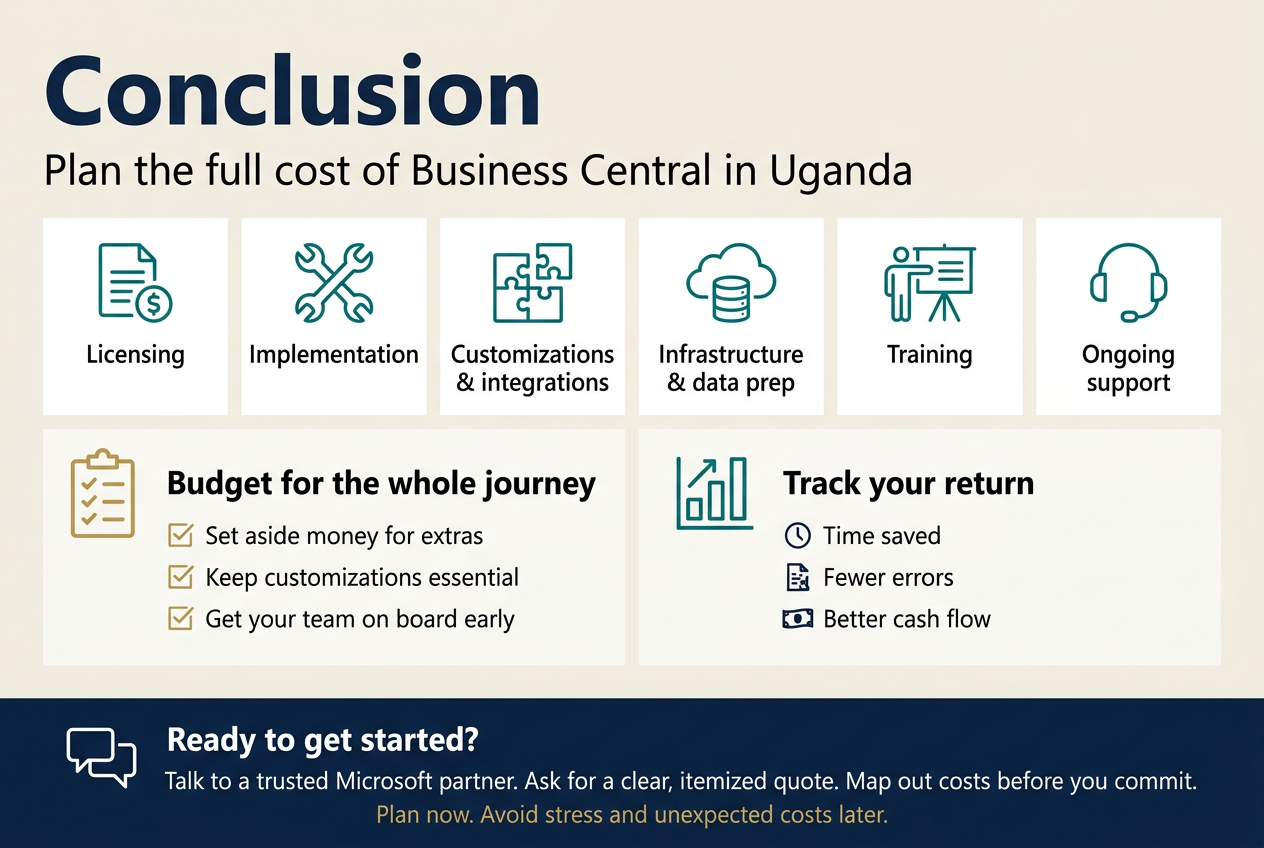
Getting Business Central up and running in Uganda isn’t just about the price tag on the licenses. The real cost is a mix of things: licensing, implementation fees, customization and integrations, infrastructure and data prep, training, and the ongoing support you’ll need long after go-live. Once you see how each piece adds up, the final number stops being a surprise and starts being something you can plan for.
The smartest move is to budget for the whole journey, not just the first invoice. Set aside money for the little extras, keep your customizations to what you actually need, and get your team on board early so they use the system properly. Then track your return, whether that’s time saved, fewer errors, or better cash flow, so you know the investment is paying off.
Ready to get started? Talk to a trusted Microsoft partner, ask for a clear, itemized quote, and map out your costs before you commit. A little planning now will save you a lot of stress and money later.

Tech Evangelist and Business Developer.
I love connecting with nature