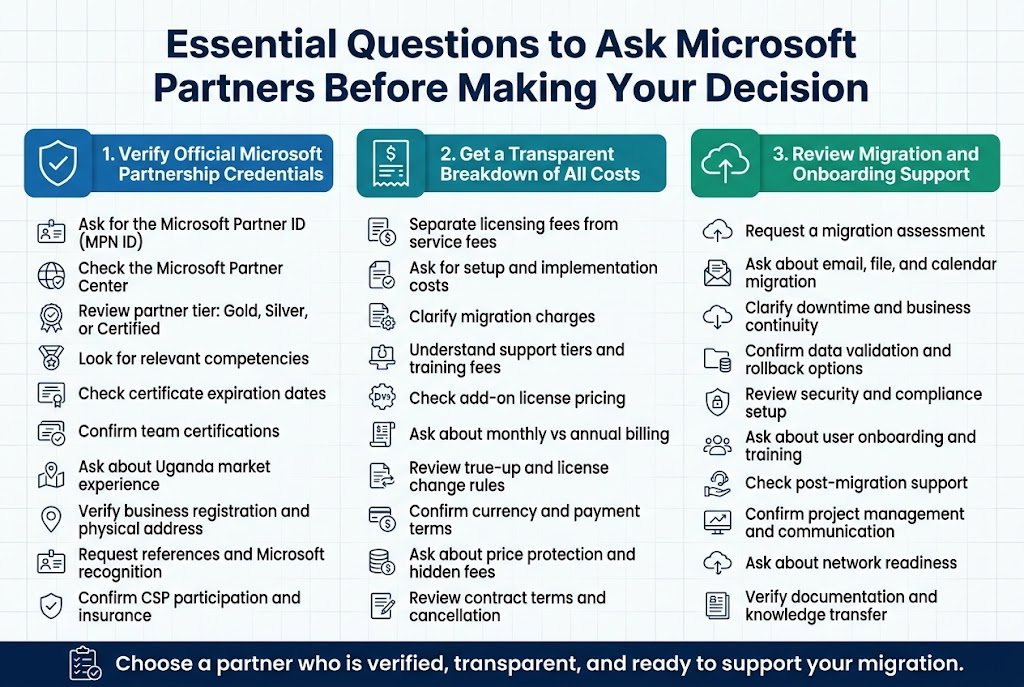
Verification of Official Microsoft Partnership Credentials
When searching for the right Microsoft 365 partner in Uganda, your first priority should be confirming their official Microsoft partnership status. This verification process can save you from potential headaches, financial losses, and security risks down the road. Too many businesses have fallen victim to unauthorized resellers who promise incredible deals but deliver subpar service or, worse, invalid licenses.
Start by asking your potential partner to provide their Microsoft Partner ID (MPN ID). Every legitimate Microsoft partner has this unique identifier that you can verify directly through Microsoft’s partner directory. Don’t just take their word for it – visit the official Microsoft Partner Center and search for their company using the MPN ID they provide. This simple step immediately separates legitimate partners from imposters trying to cash in on Microsoft’s reputation.
The Microsoft Partner Network has different tiers, and understanding these levels helps you gauge what kind of support and expertise you can expect. Gold partners have achieved the highest level of competency and typically offer more comprehensive services and better pricing options. Silver partners have demonstrated solid capabilities but may have limitations in certain areas. Certified partners represent the entry level, which doesn’t necessarily mean poor service, but you might want to ask more detailed questions about their experience and capabilities.
Look for partners who hold specific competencies relevant to your needs. Microsoft awards competencies in areas like Cloud Platform, Cloud Productivity, Collaboration and Content, Data Analytics, and Enterprise Mobility Management. If your business needs strong email security and compliance features, a partner with Cloud Productivity competency will likely serve you better than one focused primarily on data analytics.
Ask to see their Microsoft partner certificate and note the expiration date. These certifications require annual renewal, and partners must meet specific requirements to maintain their status. An expired certificate is a red flag that suggests the partner may not be keeping up with Microsoft’s latest technologies and best practices. This could impact the quality of support you receive and their ability to help you leverage new features as Microsoft rolls them out.
Request information about their technical certifications as well. Individual team members should hold relevant Microsoft certifications like Microsoft 365 Certified: Enterprise Administrator Expert, Microsoft 365 Certified: Security Administrator Associate, or Microsoft 365 Certified: Teams Administrator Associate. These certifications demonstrate that the people actually working on your account have proven expertise in Microsoft 365 technologies.
Don’t forget to ask about their experience specifically with businesses in Uganda. Microsoft 365 implementation can vary significantly based on local infrastructure, internet connectivity patterns, and regulatory requirements. A partner who understands the unique challenges of operating in the Ugandan market will be better positioned to design a solution that works reliably for your organization.
Verify their physical presence and legal status in Uganda. While some international partners can provide excellent service remotely, having a local presence often means better support response times and easier communication. Ask for their business registration documents and physical address. If they’re reluctant to provide this information, consider it a warning sign.
Check if they have any Microsoft awards or recognition. Microsoft regularly recognizes outstanding partners through programs like Partner of the Year awards. While not having awards doesn’t disqualify a partner, recognition from Microsoft can indicate a higher level of service and expertise.
Ask about their relationship with Microsoft distributors in the region. In many African markets, Microsoft works through authorized distributors who sell to partners. Understanding this supply chain helps you verify that your partner is obtaining licenses through legitimate channels and can provide proper support for licensing compliance.
Request references from other businesses they’ve served in Uganda, particularly companies similar in size and industry to yours. A good partner should be proud to share success stories and provide contact information for satisfied customers. When speaking with references, ask specifically about the partner’s responsiveness, technical expertise, and ability to resolve issues quickly.
Inquire about their participation in Microsoft programs like the Cloud Solution Provider (CSP) program. CSP partners can provide more flexible licensing options and often have better access to Microsoft support resources. They can also offer more granular billing options and easier license management tools.
Don’t overlook the importance of asking about their insurance coverage and professional liability protection. Implementing Microsoft 365 involves handling sensitive business data and critical communications systems. Your partner should carry appropriate insurance to protect both their business and yours in case something goes wrong during implementation or ongoing management.
Transparent Breakdown of All Costs and Ongoing Fees
Getting a clear, detailed breakdown of all costs associated with your Microsoft 365 implementation is absolutely critical, yet many businesses in Uganda skip this crucial step and end up with unpleasant surprises in their monthly bills. As the most reputable Microsoft partner in Uganda, Othware Uganda provides complete transparency about pricing. You need need to know the right questions to ask your Microsoft partner to get the full picture.
Start by requesting a detailed quote that separates Microsoft licensing costs from partner services fees. This breakdown helps you understand exactly what you’re paying for and makes it easier to compare offers from different partners. The quote should clearly show the monthly or annual cost for each type of license you need, whether that’s Microsoft 365 Business Basic, Business Standard, Business Premium, or any add-on services.
Ask about volume discounts and how they apply to your organization size. Microsoft offers various discount tiers based on the number of licenses purchased, and these discounts can significantly impact your total cost. Your partner should explain exactly which discount tier you qualify for and whether growing your user count would move you to a better pricing tier. Some partners may also offer their own volume discounts on top of Microsoft’s pricing, so don’t assume the first quote you receive is the final price.
Demand clarity on setup and implementation fees. These one-time costs can vary dramatically between partners, ranging from a few hundred to several thousand dollars depending on the complexity of your environment and the level of service included. Make sure the quote specifies exactly what’s included in these setup fees. Does it cover user account creation, email migration, security configuration, training sessions, or just basic license provisioning?
Migration costs deserve special attention, especially if you’re moving from another email system or collaboration platform. Ask for a detailed breakdown of migration services, including how much data can be migrated, what types of content are supported, and what happens if you exceed the included migration scope. Some partners include basic email migration in their setup fees, while others charge separately for each mailbox migrated.
Understand the ongoing support costs and what different support tiers include. Many partners offer multiple support levels, from basic email support during business hours to 24/7 phone support with guaranteed response times. Make sure you understand what’s included in each tier and whether you can upgrade or downgrade your support level later without penalty.
Ask about training costs upfront. Microsoft 365 includes many features that your team probably hasn’t used before, and proper training can dramatically improve adoption and productivity. Some partners include basic training sessions in their setup fees, while others charge separately for each training session or user. Get specifics about what training methods they offer – live sessions, recorded videos, documentation, or hands-on workshops.
Don’t forget to ask about add-on licenses and how they’re priced. Many organizations discover they need additional services like Microsoft 365 E5 security features, Power BI Pro licenses, or Project Online after their initial implementation. Understanding how these add-ons are priced and whether your partner offers any discounts on them can help you budget for future needs.
Inquire about billing frequency options and whether annual payments offer any discounts compared to monthly billing. Microsoft typically offers better pricing for annual commitments, and some partners may provide additional discounts for customers who pay annually in advance. However, make sure you understand the cancellation policies before committing to annual billing.
Get clarity on license true-up processes and costs. If your user count fluctuates throughout the year, you need to understand how billing adjustments work. Some licensing models allow you to add users immediately and pay for them at the end of the month, while others require advance payment. Ask about the process for removing licenses when employees leave and whether you can get credit for unused licenses.
Ask about currency and payment terms, especially if you’re working with an international partner. Exchange rate fluctuations can significantly impact your costs over time, and some partners may offer pricing in local currency to provide more predictability. Understand what payment methods they accept and whether there are any fees for different payment options.
Request information about price protection policies. Microsoft occasionally adjusts its pricing, and you want to know how these changes will affect your costs. Some partners offer price protection for a certain period, guaranteeing that your costs won’t increase even if Microsoft raises prices. Others pass through price changes immediately, which could impact your budget planning.
Don’t overlook potential hidden fees that might not appear in the initial quote. Ask specifically about fees for license changes, account modifications, emergency support outside business hours, or additional security configurations. Some partners charge for services that others include as part of their standard offering, so detailed comparison is essential.
Understand the contract terms and what happens if you want to switch partners later. While you own your Microsoft 365 licenses directly, your partner relationship involves service agreements that may have minimum terms or cancellation fees. Make sure you can move to another partner if needed without losing your investment in setup and configuration work.
Ask about backup and disaster recovery costs if these services are important to your organization. While Microsoft 365 includes some data protection features, many businesses need additional backup services or more comprehensive disaster recovery planning. These services can add significant cost to your monthly bills, so understand the options and pricing upfront.
Inquire about compliance and security add-ons, especially if your business operates in a regulated industry. Services like Microsoft 365 E5 Compliance, Advanced Threat Protection, or Data Loss Prevention can be essential for some organizations but add substantial cost to your monthly subscription. Your partner should help you understand which compliance features you actually need versus nice-to-have options.
Get details about licensing optimization services. Some partners offer ongoing license management to help ensure you’re not paying for unused licenses or missing opportunities to optimize your licensing mix. While these services cost extra, they can save money in the long run for larger organizations with complex licensing needs.
Available Migration and Onboarding Support Services
The quality of migration and onboarding support can make or break your Microsoft 365 implementation experience. Many businesses underestimate the complexity involved in moving their email, files, and collaboration workflows to Microsoft 365, and poor migration planning can lead to data loss, extended downtime, and frustrated users. Understanding exactly what migration and onboarding support your potential partner provides is essential for a smooth transition.
Start by asking for a detailed migration assessment process. A professional partner should offer to evaluate your current environment before providing any migration timeline or pricing. This assessment should cover your existing email system, file storage locations, current user count, data volumes, network connectivity, and any custom applications that integrate with your current systems. Partners who provide quotes without understanding your specific environment are likely to encounter problems during the actual migration.
Request specifics about their email migration capabilities and experience. Email migration is often the most complex part of moving to Microsoft 365, especially if you’re coming from older systems like Exchange 2010 or non-Microsoft platforms like Gmail or IBM Notes. Ask what migration tools they use, whether they perform migrations during business hours or after hours, and what their typical migration success rate looks like. A good partner should be able to migrate not just emails but also calendars, contacts, and folder structures while maintaining user permissions and distribution lists.
Understand their approach to file migration and collaboration setup. Moving from traditional file servers or other cloud storage solutions requires careful planning to maintain folder structures, file permissions, and sharing relationships. Ask whether they can migrate files to SharePoint Online, OneDrive for Business, or Microsoft Teams, and how they handle version history and metadata during the transition. Some partners use automated migration tools, while others prefer manual approaches for better control over the process.
Ask about their user onboarding methodology and timeline. Simply creating user accounts and migrating data isn’t enough – your team needs to understand how to use their new tools effectively. A comprehensive onboarding program should include account setup, initial training sessions, documentation or quick reference guides, and ongoing support during the first few weeks after migration. Ask how they handle different user types, from executives who need basic functionality to power users who want to leverage advanced features.
Inquire about their approach to maintaining business continuity during migration. The best migration strategies minimize disruption to daily operations, often using phased approaches or hybrid configurations that allow users to continue working normally while data moves in the background. Ask about their typical downtime requirements and whether they can perform migrations outside normal business hours to reduce impact on productivity.
Get details about their data validation and verification processes. After migration, you need confidence that all your important data made the journey successfully and that everything works as expected. Ask what verification steps they perform, how they handle missing or corrupted data, and what guarantees they provide about data integrity. Professional partners should provide detailed migration reports showing what was migrated, what encountered issues, and how those issues were resolved.
Understand their rollback capabilities in case something goes wrong. While modern migration tools are quite reliable, problems can occur, and you need to know your options if the migration doesn’t go as planned. Ask whether they can reverse migrations if needed, how long that process would take, and what data might be lost in a rollback scenario. This information helps you assess the risk level of your migration project.
Ask about their experience with security and compliance configuration during onboarding. Microsoft 365 includes extensive security and compliance features, but they need proper configuration to protect your business effectively. Your partner should help you set up appropriate security policies, multi-factor authentication, data loss prevention rules, and compliance features relevant to your industry. Ask for examples of security configurations they’ve implemented for similar businesses.
Inquire about their training programs and user adoption support. Even the best technical migration won’t deliver value if your team doesn’t embrace the new tools. Ask what training options they provide – live sessions, recorded videos, written documentation, or hands-on workshops. Find out whether they offer role-based training that focuses on how different job functions can best use Microsoft 365 features. Some partners also provide ongoing user adoption support to help maximize the value of your investment.
Get specifics about their approach to custom integrations and third-party applications. If your business relies on applications that integrate with your current email or collaboration systems, you need to understand how these integrations will work with Microsoft 365. Ask whether they can help configure these integrations, what additional costs might be involved, and whether they have experience with your specific applications.
Ask about their post-migration support policies and timeline. The period immediately after migration is critical, as users discover new issues and need quick resolution to maintain productivity. Find out what level of support they provide during the first days and weeks after migration, how quickly they respond to issues, and whether this support is included in their migration fees or costs extra.
Understand their approach to handling different types of data and special requirements. Some organizations have unique migration challenges, such as large mailboxes, extensive archive data, complex calendar sharing, or specialized file types. Ask whether they have experience with your specific data types and what additional steps might be required. For example, migrating from Lotus Notes requires different expertise than moving from Google Workspace.
Inquire about their project management approach and communication methods. Migration projects involve multiple phases and can take several weeks or months to complete. Ask how they manage project timelines, who your primary point of contact will be, how often they provide progress updates, and what happens if the project encounters delays. Good project management can significantly reduce stress and ensure smooth communication throughout the migration process.
Ask about their experience with network and infrastructure considerations. Microsoft 365 performance depends heavily on internet connectivity and network configuration. Your partner should assess your current network capacity, recommend any necessary upgrades, and help optimize your network for cloud services. This might include configuring Quality of Service (QoS) settings, adjusting firewall rules, or recommending internet bandwidth upgrades.
Get details about their user communication and change management support. Successful migrations require good communication with end users about what’s changing, when it’s happening, and what they need to do differently. Ask whether they help create user communication materials, participate in announcement meetings, or provide templates for communicating with your team about the upcoming changes.
Understand their approach to testing and pilot programs. Rather than migrating everyone at once, many organizations benefit from pilot programs that migrate a small group of users first to identify and resolve issues before the full rollout. Ask whether they recommend pilot programs for your situation, how they select pilot users, and what they learn from pilot programs that improves the full migration process.
Ask about their documentation and knowledge transfer practices. After migration, your internal team needs to understand how your Microsoft 365 environment is configured and how to handle routine administrative tasks. A good partner should provide documentation about your specific configuration, train your internal administrators, and ensure you’re not completely dependent on them for ongoing management.
Inquire about their experience with regulatory and compliance requirements specific to Ugandan businesses. Different industries have varying requirements for data handling, retention, and privacy, and these requirements can affect migration planning and configuration choices. Ask whether they understand the compliance requirements relevant to your business and how they ensure your Microsoft 365 setup meets these requirements from day one.

Tech Evangelist and Business Developer.
I love connecting with nature