Microsoft 365 Business Pricing in Uganda: How to Get the Best Partner Deal in 2026
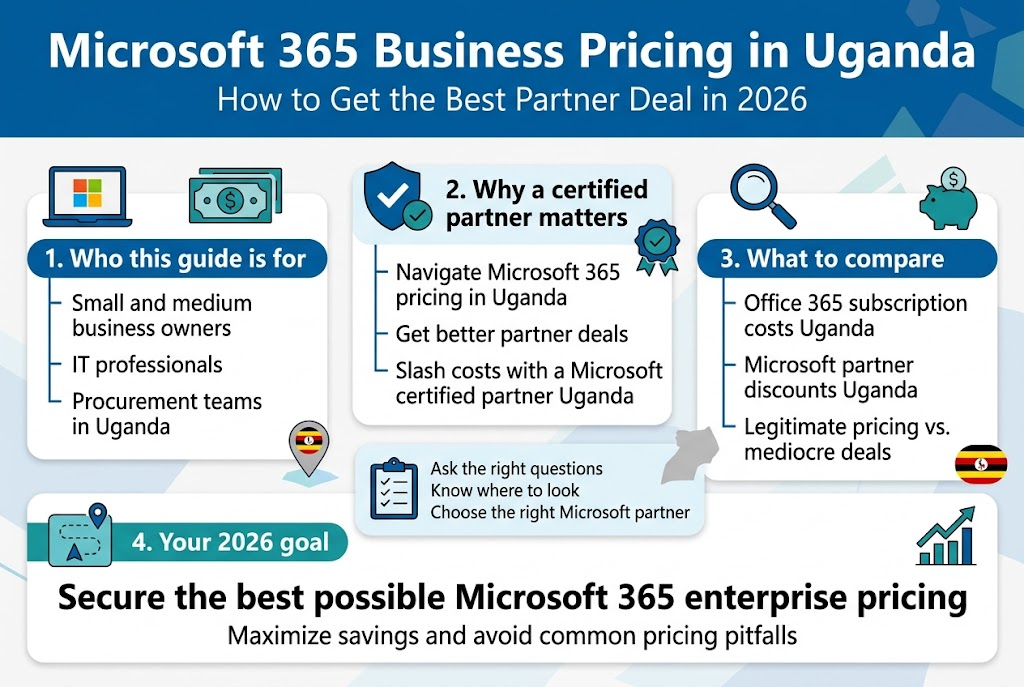
Ugandan businesses are finding Microsoft 365 essential for growth, but navigating Microsoft 365 Business pricing Uganda can be tricky without the right guidance. If you’re a business owner, IT manager, or decision-maker looking to implement or upgrade your Microsoft 365 setup, getting the best Microsoft partner deals Uganda requires knowing exactly where to look and what questions to ask.
This guide is for: Small to medium business owners, IT professionals, and procurement teams in Uganda who want to maximize their software investment while avoiding common pricing pitfalls.
We’ll walk you through the current Microsoft 365 pricing structure in the Ugandan market and show you exactly how working with a Microsoft certified partner Uganda can slash your costs significantly. You’ll also discover the key strategies that savvy businesses use to secure maximum savings on their Office 365 subscription costs Uganda, plus the essential questions that separate legitimate Microsoft partner discounts Uganda from mediocre deals.
By the end, you’ll have a clear roadmap to secure the best possible Microsoft 365 enterprise pricing for your organization in 2026.
Understanding Microsoft 365 Business Plans Available in Uganda
Essential features of Microsoft 365 Business Basic
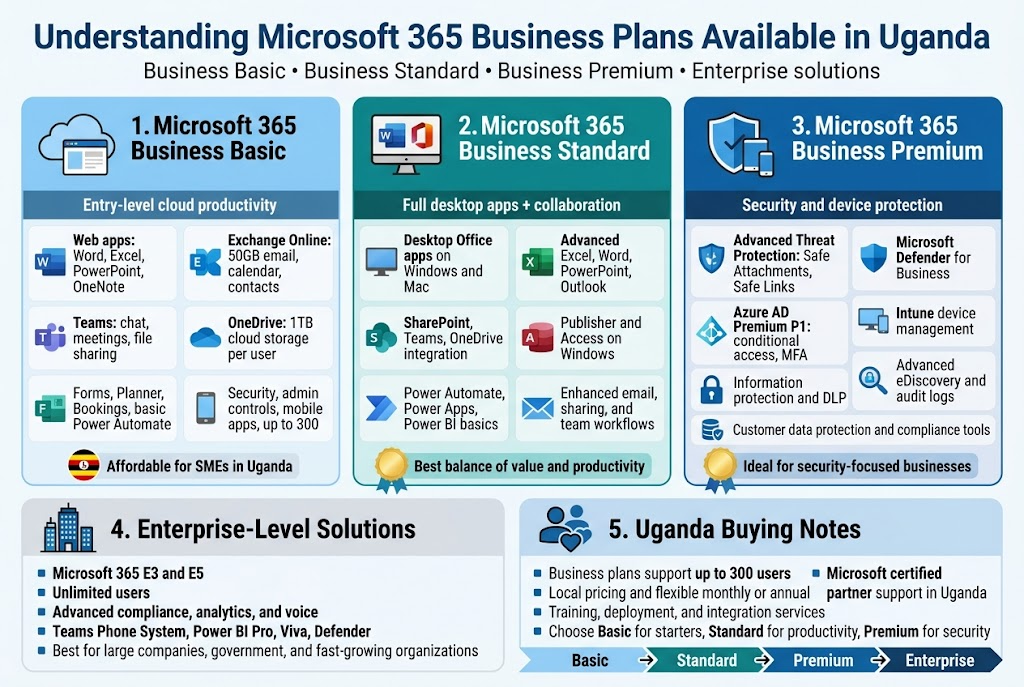
Microsoft 365 Business Basic serves as the entry point for organizations looking to modernize their digital workplace without overwhelming complexity. This plan delivers core productivity tools that help businesses transition from traditional desktop applications to cloud-based collaboration platforms. The Microsoft 365 Business pricing Uganda market has seen significant adoption of this plan among small to medium enterprises seeking cost-effective solutions.
The cornerstone of Business Basic is its web-based Office applications. Users access Word, Excel, PowerPoint, and OneNote through web browsers, eliminating the need for desktop installations. This approach reduces IT overhead while providing familiar interfaces that require minimal training for existing staff. The web applications offer robust functionality for document creation, editing, and formatting, though they lack some advanced features found in desktop versions.
Exchange Online provides enterprise-grade email hosting with 50GB mailbox storage per user. The email system includes anti-malware and anti-spam protection, shared calendars, and contacts management. Business owners appreciate the professional appearance of custom domain email addresses while benefiting from Microsoft’s infrastructure reliability. The system supports mobile device synchronization, allowing team members to access email, calendar, and contacts across smartphones and tablets.
SharePoint Online transforms how teams collaborate on documents and projects. The platform offers team sites for organizing files, sharing information, and managing workflows. Version control prevents document conflicts when multiple users edit files simultaneously. Integration with other Microsoft 365 services creates seamless experiences where users can start documents in SharePoint and continue editing in web applications without switching contexts.
Microsoft Teams fundamentals are included, providing chat, online meetings, and file sharing capabilities. Teams supports up to 300 participants in meetings, making it suitable for company-wide communications and client presentations. Screen sharing, recording capabilities, and integration with calendar systems streamline meeting management. The chat function reduces email volume while maintaining searchable conversation histories.
OneDrive for Business offers 1TB of personal cloud storage per user. This storage integrates with Office applications, automatically saving documents to the cloud and enabling access from any device. File sharing controls allow users to collaborate with internal team members or external partners while maintaining security through permission settings. Offline synchronization ensures productivity continues even without internet connectivity.
Microsoft Forms enables creation of surveys, polls, and feedback forms without technical expertise. Results automatically compile into Excel spreadsheets for analysis. This tool proves valuable for customer feedback collection, employee surveys, and market research activities. The drag-and-drop interface makes form creation accessible to users without web design experience.
The plan includes Microsoft Planner for project management and task assignment. Teams can create visual project boards, assign tasks to specific members, and track progress through completion. Integration with Teams and Outlook creates unified task management across the productivity suite. This feature particularly benefits organizations transitioning from paper-based or spreadsheet project tracking methods.
Web-based Outlook provides email management beyond basic sending and receiving. Features include focused inbox for prioritizing important messages, clutter reduction through intelligent filtering, and scheduling assistant for finding optimal meeting times. The interface remains consistent across devices, reducing learning curves for users switching between desktop and mobile access.
Microsoft Bookings allows service-based businesses to manage appointments and scheduling. Customers can book appointments through web interfaces while staff receive automatic notifications and calendar updates. This feature particularly benefits healthcare providers, consultants, and professional services firms serving the Ugandan market. Integration with Teams enables virtual appointments alongside in-person scheduling.
Power Platform foundations include basic Power Automate capabilities for workflow automation. Users can create simple automated processes like email notifications when files are uploaded or approval workflows for expense reports. While limited compared to premium plans, these features introduce businesses to process automation benefits without requiring technical expertise.
Security features in Business Basic include multi-factor authentication options, helping protect accounts from unauthorized access. Data encryption protects information during transmission and storage. Compliance tools assist with basic regulatory requirements, though advanced compliance features require higher-tier plans. Regular security updates and monitoring help maintain protection against evolving threats.
Administrative controls allow IT administrators to manage user accounts, assign licenses, and configure security policies from centralized dashboards. User provisioning and deprovisioning processes help maintain security when staff changes occur. Basic reporting provides insights into service usage and potential security concerns.
Mobile applications extend functionality to iOS and Android devices. Users can access email, calendars, files, and collaboration tools from smartphones and tablets with full functionality. Offline capabilities ensure productivity continues during connectivity disruptions, with synchronization occurring automatically when connections resume.
The Business Basic plan supports up to 300 users, making it suitable for small to medium-sized enterprises. Pricing structures in the Microsoft 365 Business pricing Uganda market make this plan accessible for organizations with limited IT budgets. Monthly or annual billing options provide flexibility for businesses with varying cash flow patterns.
Integration capabilities extend beyond Microsoft services to include popular third-party applications used in Ugandan businesses. API access enables custom integrations for specialized business processes. This extensibility ensures that Microsoft 365 Business Basic can grow with expanding business requirements.
Training resources and support documentation help organizations maximize their investment. Microsoft provides extensive online training materials, video tutorials, and community forums. Local Microsoft certified partner Uganda organizations offer additional support and training services tailored to regional business needs.
Advanced capabilities of Microsoft 365 Business Standard
Microsoft 365 Business Standard builds upon the Business Basic foundation with desktop applications, advanced collaboration tools, and enhanced productivity features. Organizations choosing this tier gain access to full-featured Office applications while maintaining cloud-based collaboration benefits. The Office 365 business plans Uganda market has embraced this tier for its balance of functionality and value.
Desktop Office applications represent the primary upgrade from Business Basic. Users receive full versions of Word, Excel, PowerPoint, Outlook, OneNote, Publisher, and Access on Windows devices, plus Word, Excel, PowerPoint, and Outlook on Mac systems. These applications offer complete feature sets including advanced formatting, complex formulas, sophisticated presentation capabilities, and robust email management tools that web versions cannot match.
Excel gains particular importance with advanced data analysis capabilities. Power Query enables data connections to external sources including databases, web services, and other spreadsheet files. PivotTables and PivotCharts provide sophisticated data visualization and analysis tools. Advanced formulas and functions support complex financial modeling, statistical analysis, and business intelligence tasks common in growing enterprises.
Word processing advances include advanced document formatting, mail merge capabilities, and collaboration features like tracked changes and comments. Professional document templates accelerate creation of proposals, reports, and marketing materials. Integration with SharePoint and Teams enables real-time co-authoring where multiple users can edit documents simultaneously while seeing each other’s changes instantly.
PowerPoint gains advanced animation capabilities, slide master functionality, and design tools that create professional presentations. Integration with Excel enables dynamic chart updates when underlying data changes. Presenter tools include speaker notes, rehearsal timers, and live captions for accessibility. Recording capabilities transform presentations into training materials or client communication tools.
Outlook desktop application provides advanced email management including rules, categories, and search capabilities that surpass web-based alternatives. Calendar features support complex scheduling scenarios, meeting room booking, and resource management. Contact management integrates with customer relationship management workflows. Task management coordinates with project planning systems across the productivity suite.
Access database capabilities enable organizations to create custom applications without extensive programming knowledge. Template databases accelerate development of inventory management, customer tracking, and project management systems. Integration with other Office applications allows data import/export and report generation. While not suitable for enterprise-scale databases, Access handles small to medium business data management requirements effectively.
Publisher desktop application supports creation of marketing materials, newsletters, and professional publications. Templates provide starting points for brochures, flyers, and business cards. Professional printing output ensures materials maintain quality when produced locally or through commercial printing services. Integration with other Office applications enables dynamic content updates from data sources.
Enhanced SharePoint capabilities support more sophisticated document management and collaboration scenarios. Advanced permission settings enable granular access control for sensitive documents. Workflow automation helps manage document approval processes, version control, and notification systems. Integration with Power Platform enables custom business process automation tailored to specific organizational needs.
Microsoft Teams receives significant enhancements including meeting recording, live captions, and breakout rooms for large meetings. Advanced meeting features support webinar scenarios with up to 1,000 attendees. Phone system integration enables Teams to replace traditional phone systems for organizations ready to modernize communications infrastructure. Background blur and custom backgrounds improve professionalism during video calls.
Power Platform access expands beyond basic automation to include more sophisticated Power Automate workflows. Users can create multi-step processes that connect Microsoft 365 services with external applications. Power Apps enables creation of custom mobile and web applications without traditional programming. Power BI basic features support data visualization and reporting from various data sources.
Advanced OneDrive capabilities include Personal Vault for protecting sensitive files with additional security layers. Version history extends to 500 versions of each file, enabling recovery from accidental changes or corruption. Advanced sharing controls include password protection, expiration dates, and download restrictions for external sharing scenarios.
Email capabilities expand with advanced threat protection including safe attachments and safe links scanning. These features protect against malware and phishing attempts that bypass traditional security measures. Advanced anti-phishing policies help protect organizations from business email compromise attacks common in emerging markets.
Compliance tools include basic eDiscovery capabilities for legal and regulatory requirements. Data loss prevention policies help prevent accidental sharing of sensitive information. Audit logs provide visibility into user activities for security monitoring and compliance reporting. While not comprehensive enterprise compliance tools, these features address common regulatory needs.
Administrative features include advanced user management, group policies, and security configuration options. Mobile device management basics help control access to corporate data on personal devices. Windows Autopilot integration streamlines device deployment and management for organizations standardizing on Windows devices.
Development and customization options expand with access to Graph APIs for integrating Microsoft 365 data with custom applications. SharePoint Framework enables custom web parts and applications. These capabilities support organizations with specific business processes that require custom development beyond standard functionality.
Training and adoption tools include MyAnalytics for individual productivity insights and basic usage analytics for administrators. These tools help organizations measure adoption rates and identify training needs. Microsoft Viva basics provide employee engagement and productivity insights that support change management during digital transformation initiatives.
Integration capabilities support advanced scenarios including line-of-business application connections. Power Platform connectors enable data synchronization with accounting systems, customer relationship management platforms, and industry-specific applications common in Uganda business environments. These integrations eliminate duplicate data entry while maintaining data consistency across systems.
The Microsoft 365 Business Standard plan supports the same 300-user limit as Business Basic while providing significantly enhanced capabilities. The business software licensing Uganda market recognizes this tier as optimal for organizations ready to fully embrace cloud productivity while maintaining desktop application familiarity. Pricing reflects the additional value while remaining accessible for growing enterprises.
Premium security options in Microsoft 365 Business Premium
Microsoft 365 Business Premium represents the most comprehensive business plan, adding advanced security, device management, and compliance capabilities to the Business Standard foundation. Organizations prioritizing security and regulatory compliance find this tier essential for protecting business operations and customer data. The Microsoft 365 enterprise pricing considerations begin at this level due to enhanced security infrastructure.
Advanced Threat Protection forms the security cornerstone of Business Premium. Safe Attachments scanning uses virtual environments to detect malicious content before files reach user inboxes or SharePoint libraries. This protection extends beyond email to include OneDrive and Teams file shares. Safe Links provides real-time URL scanning, rewriting suspicious links to protect users from phishing and malware distribution sites. These protections adapt to emerging threats through machine learning algorithms that analyze attack patterns globally.
Microsoft Defender for Business provides endpoint protection that surpasses traditional antivirus solutions. The system monitors device behavior, network traffic, and user activities to detect advanced persistent threats that evade signature-based detection. Automated investigation and response capabilities contain threats before they spread across networks. Integration with Microsoft 365 services provides unified security management across cloud applications and endpoint devices.
Azure Active Directory Premium Plan 1 enhances identity and access management beyond basic authentication. Conditional access policies enable organizations to control application access based on user location, device compliance, and risk assessment. Multi-factor authentication becomes more sophisticated with options including Microsoft Authenticator app, hardware tokens, and biometric verification. Self-service password reset reduces help desk burden while maintaining security standards.
Identity protection leverages machine learning to detect unusual sign-in patterns and potential account compromises. Risk-based policies can require additional authentication or block access when suspicious activities are detected. Integration with global threat intelligence provides insights into attack patterns targeting similar organizations. These capabilities prove particularly valuable for organizations with remote workers accessing systems from various locations.
Privileged Identity Management helps protect administrative accounts that represent the highest security risks. Just-in-time access provides administrative privileges only when needed for specific tasks. Approval workflows ensure multiple people review requests for sensitive access. Time-limited access automatically revokes privileges after specified periods. These controls help prevent both malicious and accidental misuse of administrative capabilities.
Device management through Microsoft Intune enables comprehensive mobile device and application management. Organizations can enforce security policies, configure applications, and protect corporate data on both company-owned and personal devices. Remote wipe capabilities protect data if devices are lost or stolen. Application protection policies prevent corporate data from being copied to personal applications or cloud services.
Conditional access integrates device compliance with application access controls. Devices must meet security requirements including encryption, screen locks, and current security updates before accessing corporate resources. Non-compliant devices receive limited access or complete blocking depending on policy configuration. These controls prove essential for organizations supporting bring-your-own-device policies while maintaining security standards.
Information protection capabilities include sensitivity labels that automatically protect documents based on content classification. Data loss prevention policies prevent accidental sharing of sensitive information through email, SharePoint, or OneDrive. Rights management enables persistent document protection that travels with files regardless of where they are stored or shared. These features prove critical for organizations handling customer data or confidential business information.
Advanced eDiscovery capabilities support legal and regulatory compliance requirements. Content search across all Microsoft 365 services enables rapid response to legal discovery requests. Hold policies preserve data during litigation or investigation periods. Export capabilities provide data in formats required by legal processes. While not as comprehensive as enterprise eDiscovery solutions, these features meet most small to medium business compliance needs.
Customer Lockbox provides transparency and control when Microsoft engineers require access to customer data for support purposes. Organizations receive notifications and must approve access requests before engineers can view data. This capability proves important for organizations in regulated industries or those handling sensitive customer information. The approval process includes detailed justifications and time limitations for access.
Cloud App Security integration extends protection beyond Microsoft 365 to monitor and control access to other cloud applications used within the organization. Shadow IT discovery identifies unauthorized cloud services that may pose security risks. Policy enforcement can block access to inappropriate applications or require additional authentication for high-risk services. These capabilities prove valuable as organizations adopt multiple cloud services.
Security analytics and reporting provide comprehensive visibility into security posture and threat activities. Microsoft 365 Defender provides unified security management across endpoints, email, and cloud applications. Threat intelligence feeds provide insights into attack patterns targeting similar organizations. Automated investigation capabilities reduce the security expertise required to respond effectively to threats.
Compliance Manager helps organizations assess and improve compliance with various regulatory frameworks. Built-in assessments cover common standards including ISO 27001, NIST, and GDPR. Improvement actions provide step-by-step guidance for implementing security controls and policies. Progress tracking helps demonstrate compliance efforts to auditors and regulatory bodies. These features prove particularly valuable for organizations expanding into regulated markets.
Advanced audit logging provides detailed visibility into user activities across Microsoft 365 services. Logs include file access, sharing activities, administrative actions, and sign-in events. Long-term retention ensures historical data availability for investigation purposes. Integration with external security information and event management systems enables centralized security monitoring across hybrid environments.
Application governance extends beyond basic application management to include risk assessment and policy enforcement for third-party applications connecting to Microsoft 365. Organizations can review application permissions, usage patterns, and risk assessments before allowing access to corporate data. Ongoing monitoring identifies applications that may pose security risks as their capabilities or ownership change.
Security baselines provide pre-configured security policies based on Microsoft recommendations and industry best practices. Organizations can implement comprehensive security configurations without extensive security expertise. Regular updates ensure policies evolve with emerging threats and new platform capabilities. Customization options enable organizations to adjust policies for specific business requirements while maintaining security standards.
The premium security capabilities address the increasing cyber security threats facing Uganda businesses as digital transformation accelerates. Organizations handling customer data, financial information, or intellectual property find these protections essential for maintaining business continuity and customer trust. Integration across the Microsoft 365 platform ensures security measures enhance rather than impede productivity.
Training and awareness tools include attack simulation campaigns that test employee responses to phishing and social engineering attempts. Results identify individuals requiring additional security training while measuring overall organizational security awareness. These capabilities prove crucial for organizations recognizing that human factors represent significant security risks regardless of technical controls implemented.
Enterprise-level solutions for growing companies
As organizations in Uganda scale beyond 300 users or develop complex operational requirements, Microsoft 365 enterprise plans provide the advanced capabilities necessary for supporting large-scale operations. These solutions address the sophisticated needs of multinational corporations, government agencies, and rapidly growing enterprises that require enhanced compliance, security, and administrative capabilities beyond business plans.
Microsoft 365 E3 represents the foundational enterprise plan, removing user limits while adding enterprise-grade security and compliance capabilities. The plan supports unlimited users, making it suitable for organizations experiencing rapid growth or large enterprises standardizing on Microsoft 365 across multiple departments and locations. Enhanced administrative controls provide the granular management capabilities required for complex organizational structures.
Advanced Analytics and Business Intelligence capabilities distinguish enterprise plans from business offerings. Power BI Pro provides comprehensive data visualization and business intelligence tools that connect to multiple data sources including on-premises databases, cloud services, and external data feeds. Organizations can create interactive dashboards, automated reports, and self-service analytics that support data-driven decision making across all organizational levels.
Microsoft Viva suite integration provides employee experience capabilities that support large-scale digital workplace initiatives. Viva Insights offers organizational analytics that help leaders understand productivity patterns, collaboration effectiveness, and employee wellbeing across the enterprise. Viva Learning provides centralized access to training content from Microsoft and third-party providers. Viva Topics uses artificial intelligence to automatically organize and surface organizational knowledge.
Exchange Online Plan 2 increases mailbox storage to 100GB while adding advanced features like in-place archiving, litigation hold, and data loss prevention for email. These capabilities prove essential for organizations with regulatory compliance requirements or large volumes of business-critical email communications. Advanced message encryption enables secure communication with external parties including customers and partners.
SharePoint Online enterprise capabilities include advanced site collections, enterprise search, and business connectivity services. Organizations can create sophisticated intranet portals, knowledge management systems, and collaboration platforms that scale across thousands of users. Advanced workflow capabilities support complex business processes including multi-stage approvals, automated routing, and integration with external systems.
Advanced security features include Microsoft 365 Defender for comprehensive threat protection across endpoints, email, and cloud applications. Extended detection and response capabilities provide sophisticated threat hunting and investigation tools. Security orchestration enables automated response to security incidents, reducing response times and limiting potential damage from cyber attacks.
Azure Active Directory Premium Plan 2 adds advanced identity governance capabilities including access reviews, privileged identity management, and identity protection. Organizations can implement sophisticated access control policies that adapt to risk levels, user behavior patterns, and business requirements. Integration with on-premises Active Directory enables hybrid identity management for organizations maintaining legacy systems.
Information Governance capabilities provide comprehensive data lifecycle management including retention policies, disposition reviews, and records management. Organizations can automatically classify content based on sensitivity levels, apply appropriate protection measures, and manage data throughout its lifecycle. These capabilities prove essential for organizations operating in regulated industries or handling sensitive customer data.
Advanced Compliance features include insider risk management, communication compliance, and advanced eDiscovery. These tools help organizations detect and prevent data breaches, monitor communications for regulatory violations, and respond effectively to legal discovery requests. Machine learning algorithms analyze patterns to identify potential compliance risks before they result in violations.
Microsoft Defender for Cloud Apps provides comprehensive cloud application security posture management. The service monitors all cloud applications used within the organization, identifies security risks, and enforces policies to protect sensitive data. Shadow IT discovery identifies unauthorized cloud services that may pose security risks. Integration with other Microsoft security services provides unified threat protection across hybrid environments.
Advanced networking capabilities include dedicated bandwidth, priority routing, and enhanced service level agreements for Microsoft 365 services. ExpressRoute connectivity provides private network connections to Microsoft data centers, reducing latency and improving performance for bandwidth-intensive applications. These capabilities prove valuable for organizations with high-performance requirements or strict data residency requirements.
Windows Enterprise licenses included with E3 provide advanced device management, security, and deployment capabilities. Organizations can implement sophisticated device policies, application deployment systems, and security configurations that scale across thousands of devices. Integration with Microsoft Endpoint Manager provides unified management of Windows devices, mobile devices, and applications.
Microsoft 365 E5 represents the premium enterprise offering, adding advanced voice capabilities, advanced security analytics, and sophisticated compliance tools. Phone System integration enables Teams to replace traditional phone systems with enterprise-grade voice capabilities including call routing, auto attendants, and call queues. Audio Conferencing provides toll-free meeting dial-in capabilities for participants without internet access.
Advanced Security features in E5 include Microsoft Defender for Identity, which monitors on-premises Active Directory for security threats. Cloud App Security provides comprehensive monitoring and control of cloud application usage. Advanced Threat Analytics uses machine learning to detect sophisticated attacks that evade traditional security measures. Security score provides comprehensive assessment of organizational security posture with recommendations for improvement.
Customer Key enables organizations to control encryption keys used to protect data in Microsoft 365 services. This capability addresses data sovereignty requirements for organizations in regulated industries or those with strict data protection requirements. Integration with Azure Key Vault provides enterprise-grade key management capabilities.
Advanced analytics capabilities include MyAnalytics for all users, providing personal productivity insights and recommendations. Workplace Analytics offers organizational insights that help leaders understand collaboration patterns, meeting effectiveness, and productivity trends across the enterprise. These insights support data-driven decisions about workplace policies, training programs, and technology investments.
Power Platform integration reaches premium levels with expanded Power Automate, Power Apps, and Power BI capabilities. Organizations can create sophisticated business applications, automated workflows, and comprehensive analytics solutions without traditional development resources. Integration with Microsoft 365 data and external systems enables powerful business process automation.
Advanced Voice capabilities transform Teams into a complete phone system replacement. Direct Routing enables integration with existing phone systems and carriers. Calling Plans provide managed voice services in supported markets. Call analytics provide insights into call quality, usage patterns, and cost optimization opportunities. These capabilities prove valuable for organizations seeking to modernize communication infrastructure while reducing costs.
Microsoft 365 F3 addresses the specific needs of frontline workers including retail employees, manufacturing workers, and field service teams. The plan provides essential productivity tools while focusing on mobile-first experiences and shift management capabilities. Specialized applications support task management, communication, and access to organizational resources for workers who do not spend significant time at desks.
Enterprise Mobility + Security integration provides comprehensive identity, device, and information protection across hybrid environments. Advanced threat protection extends beyond Microsoft 365 to provide unified security management across all enterprise applications and systems. These capabilities prove essential for organizations with complex IT environments including on-premises systems, multiple cloud services, and diverse device types.
The Microsoft certified partner Uganda ecosystem provides specialized expertise for implementing enterprise solutions. Partners offer strategic planning, deployment services, change management, and ongoing support for complex enterprise implementations. Local expertise proves valuable for addressing regional compliance requirements, integration with local systems, and cultural considerations for user adoption.
Enterprise agreements provide volume licensing discounts and simplified procurement processes for large organizations. Flexible payment terms and licensing models accommodate budget cycles and growth patterns common in enterprise environments. These agreements often include additional services like training, support, and strategic consulting that support successful enterprise implementations.
Government and education pricing provides specialized offerings for public sector organizations and educational institutions. These plans include additional compliance capabilities, enhanced security features, and specialized support services tailored to unique requirements in these sectors. Student and faculty licensing enables affordable access to enterprise-grade productivity tools for educational purposes.
The best Microsoft partner Uganda organizations provide comprehensive services for enterprise implementations including assessment, planning, deployment, training, and ongoing support. Partner expertise proves particularly valuable for organizations implementing enterprise solutions for the first time or those migrating from competing productivity platforms. Local partners understand regional business practices, compliance requirements, and integration challenges common in Uganda enterprises.
Conclusion
Getting Microsoft 365 for your business in Uganda doesn’t have to break the bank. The key is understanding what plans actually fit your needs, finding certified partners who know the local market, and asking the right questions upfront. Smart businesses are already saving significant money by working with the right partners instead of going it alone.
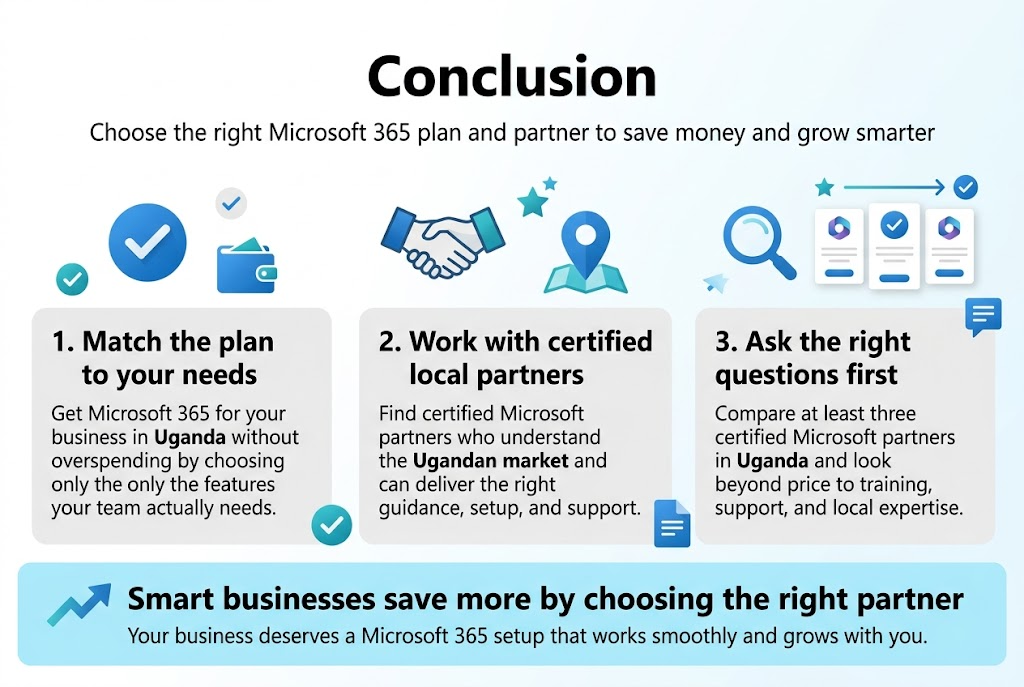
Ready to make the move? Start by reaching out to at least three certified Microsoft partners in Uganda and compare their offers. Don’t just look at the price – consider the support, training, and local expertise they bring to the table. Your business deserves a Microsoft 365 setup that works smoothly and grows with you, so take the time to find the partner who can deliver exactly that.

Tech Evangelist and Business Developer.
I love connecting with nature