Microsoft 365 Copilot vs. Gemini for Google Workspace: Cost, Features & Local Support Compared
If your team is trying to decide between Microsoft 365 Copilot vs Gemini for Google Workspace, you’re not alone. Right now, businesses across East Africa — and Uganda especially — are asking the same question: which AI assistant for business actually delivers value, and which one just looks good on a product page?
This comparison is for IT managers, business owners, and operations leads who are ready to move beyond the hype and make a real decision. You’ve probably already heard the big promises. What you need now is a straight answer on Microsoft Copilot pricing vs Gemini for Google Workspace cost, how the features stack up where your team actually works, and what local support looks like on the ground.
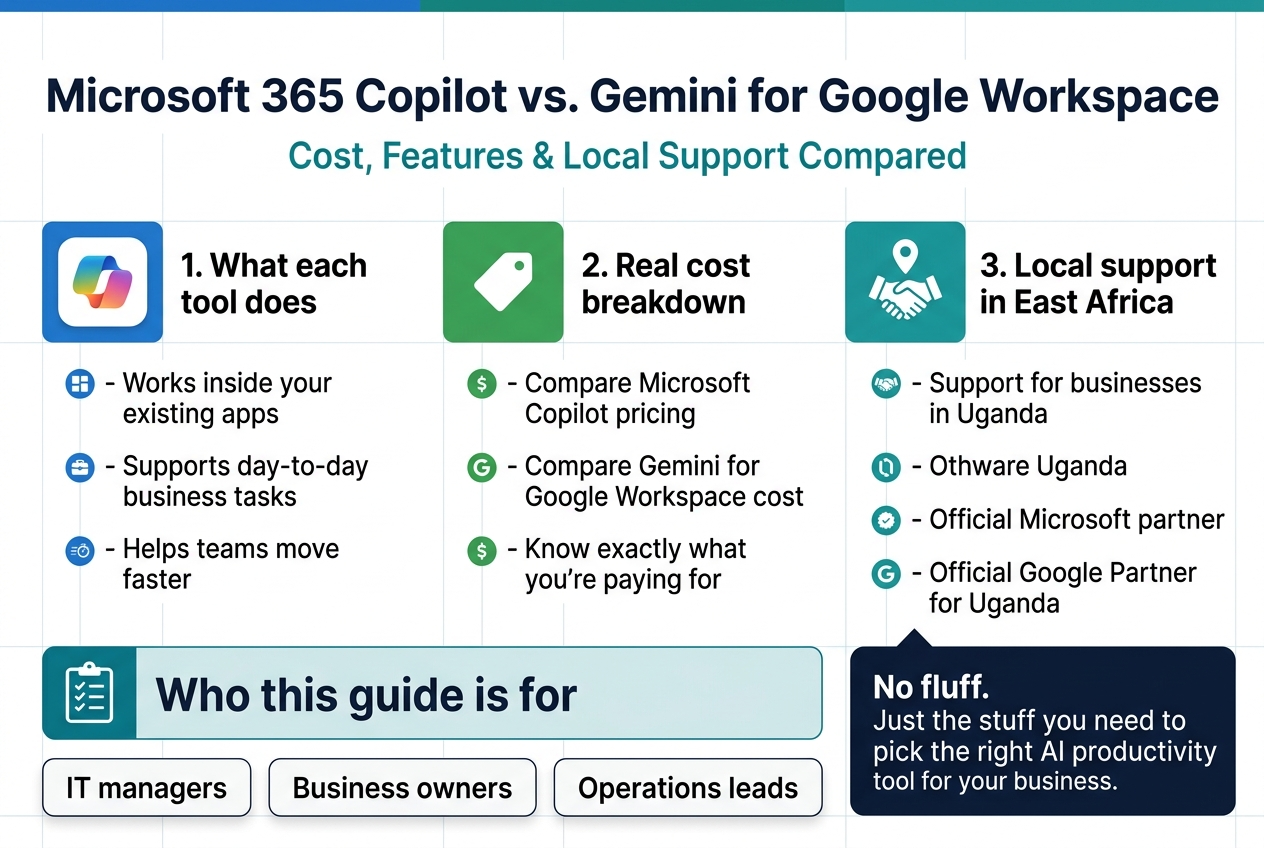
Here’s what we’ll walk through:
- What each tool actually does day-to-day inside your existing apps
- A real cost breakdown so you know exactly what you’re paying for
- Local support and availability — including how Othware Uganda, the official Microsoft partner and official Google Partner for Uganda, can help you get set up and keep things running
No fluff. Just the stuff you need to pick the right AI productivity tool for your business.
What Each AI Assistant Actually Does for Your Team
Core Capabilities of Microsoft 365 Copilot Across Office Apps
Microsoft 365 Copilot is woven directly into the apps your team likely already spends most of their day in. Here’s what it actually does across the suite:
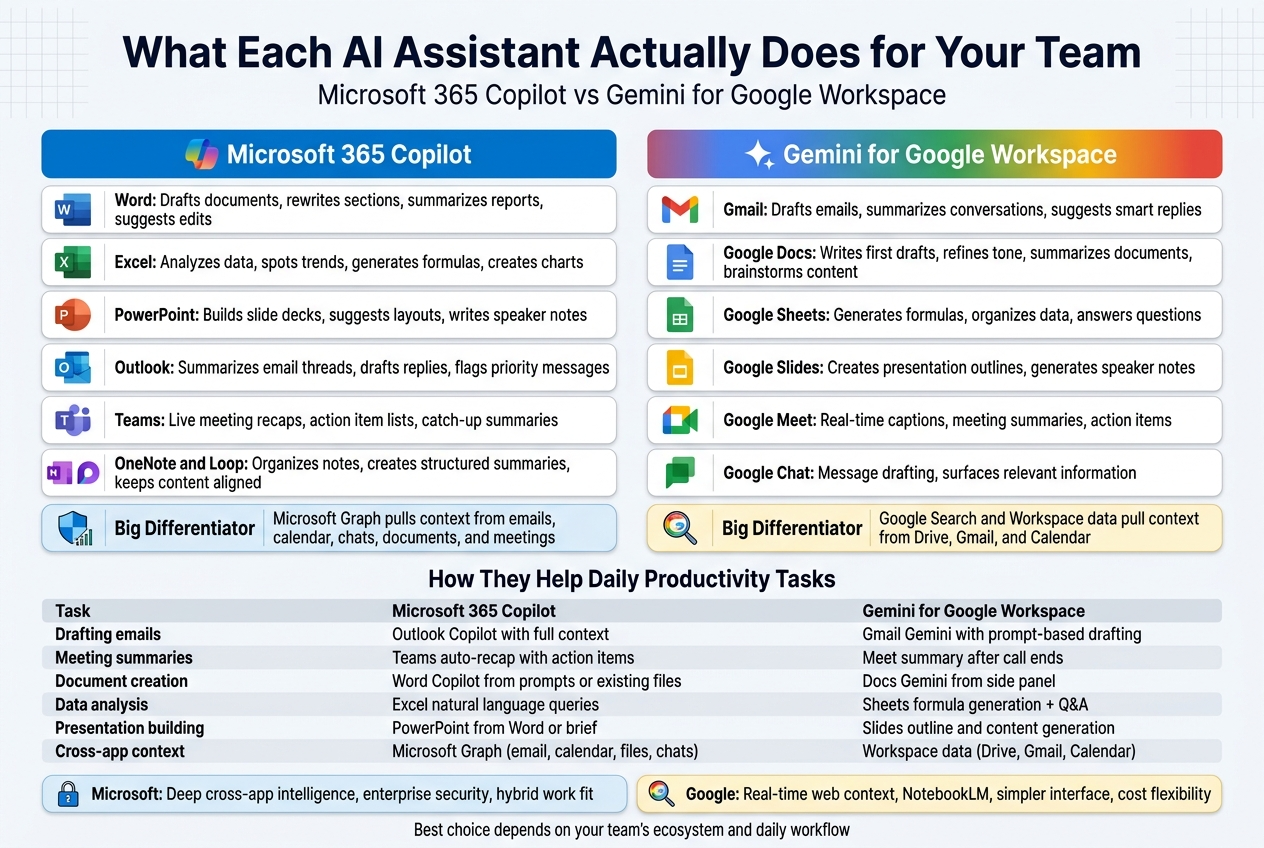
- Word: Drafts documents from a simple prompt, rewrites sections in a different tone, summarizes long reports, and suggests edits without you having to dig through every paragraph yourself.
- Excel: Analyses data, spots trends, generates formulas, and creates charts — all from plain-language questions like “What were our top-performing products last quarter?”
- PowerPoint: Builds full slide decks from a Word document or a short brief, suggests design layouts, and writes speaker notes.
- Outlook: Summarizes long email threads, drafts replies, flags priority messages, and helps you clear your inbox faster.
- Teams: Provides live meeting recaps, action item lists, and catches you up if you joined late — without anyone having to take notes manually.
- OneNote and Loop: Organizes notes, creates structured summaries, and keeps collaborative content aligned across your team.
The big differentiator here is Microsoft Graph. Copilot pulls context from your emails, calendar, chats, documents, and meetings to give you responses that are relevant to your actual work — not just generic AI output.
Core Capabilities of Gemini Across Google Workspace Apps
Gemini for Google Workspace is Google’s answer to AI-powered productivity, and it fits naturally into the tools millions of teams already rely on:
- Gmail: Drafts emails from bullet points, summarizes conversations, suggests smart replies, and helps you respond to messages faster without staring at a blank screen.
- Google Docs: Writes first drafts, refines tone, summarizes long documents, and helps brainstorm content — all from a side panel inside the doc itself.
- Google Sheets: Generates formulas, organizes data, and answers questions about your spreadsheet in plain English.
- Google Slides: Creates presentation outlines, generates speaker notes, and pulls in content based on your prompts.
- Google Meet: Provides real-time captions, meeting summaries, and action items after calls end.
- Google Chat: Assists with message drafting and surfaces relevant information without breaking your flow.
Gemini also benefits from Google’s deep integration with Search and Workspace data, meaning it can pull relevant context from Drive, Gmail, and Calendar when crafting responses.
How Each Tool Enhances Daily Productivity Tasks
Both platforms target the same core problem: too much time spent on repetitive tasks that drain focus from actual work. But they approach it slightly differently.
| Task | Microsoft 365 Copilot | Gemini for Google Workspace |
|---|---|---|
| Drafting emails | Outlook Copilot with full context | Gmail Gemini with prompt-based drafting |
| Meeting summaries | Teams auto-recap with action items | Meet summary after call ends |
| Document creation | Word Copilot from prompts or existing files | Docs Gemini from side panel |
| Data analysis | Excel natural language queries | Sheets formula generation + Q&A |
| Presentation building | PowerPoint from Word or brief | Slides outline and content generation |
| Cross-app context | Microsoft Graph (email, calendar, files, chats) | Workspace data (Drive, Gmail, Calendar) |
For teams that run on Microsoft 365, Copilot feels native — it understands what’s in your inbox, what’s on your calendar, and what files you’ve been working on, and connects the dots across all of it. For teams already in Google Workspace, Gemini delivers that same sense of context without forcing anyone to change tools.
Unique Strengths That Set Each Platform Apart
What Microsoft 365 Copilot Does Best
- Deep cross-app intelligence: The Microsoft Graph connection means Copilot can reference a Teams conversation, pull data from a SharePoint file, and draft an Outlook email — all informed by the same context.
- Enterprise-grade security integration: Copilot respects your existing Microsoft 365 permissions. It won’t surface content a user doesn’t already have access to.
- Business Chat (BizChat): This feature lets you ask Copilot questions that span your entire Microsoft 365 environment — files, emails, meetings — in a single conversational interface.
- Strong fit for hybrid work: Teams + Copilot together is a genuinely powerful combination for companies managing complex meeting-heavy workflows.
What Gemini for Google Workspace Does Best
- Google Search integration: Gemini can bring in real-time web context alongside your Workspace data, which is a meaningful edge for research-heavy roles.
- NotebookLM integration: Google’s NotebookLM (available separately but connected to the ecosystem) lets teams create AI-powered research hubs from their own documents.
- Imagen and Duet AI creative tools: Higher-tier Workspace plans include image generation and more advanced creative capabilities.
- Simplicity and accessibility: For smaller teams or businesses newer to AI tools, Gemini’s interface tends to feel less complex, with a shorter learning curve.
- Cost flexibility: Google’s tiered pricing gives businesses room to start smaller and scale — which is worth considering when evaluating Gemini for Google Workspace cost against your budget.
Both tools represent serious investments in AI workplace productivity, and neither is a clear universal winner. The right choice depends heavily on which ecosystem your team already lives in and what kinds of tasks eat up the most time each week. For businesses in Uganda evaluating these platforms, both Othware Uganda — the Official Microsoft Partner and Official Google Partner for Uganda — can help match the right solution to your team’s specific needs.
Breaking Down the Real Cost of Each Solution
Microsoft 365 Copilot Pricing Plans and Licensing Requirements
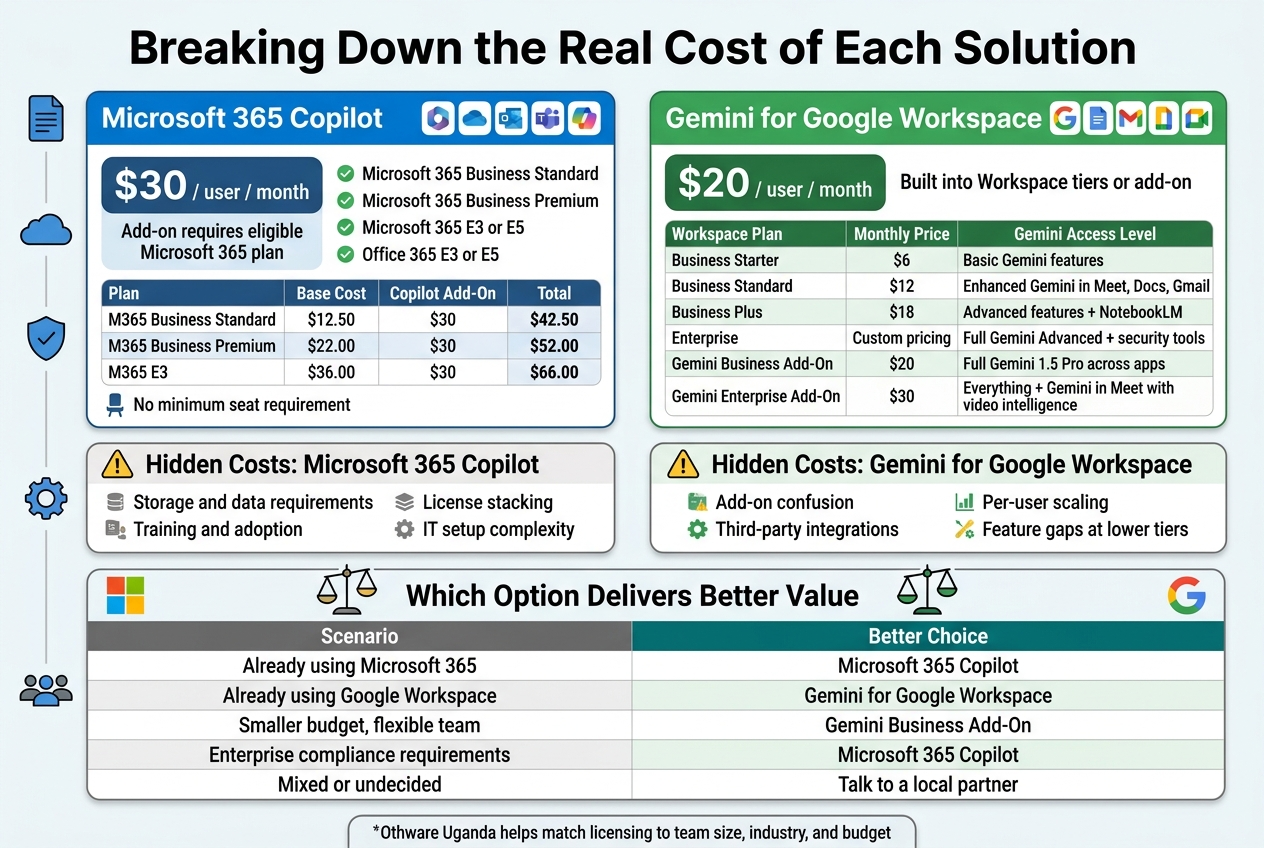
Microsoft 365 Copilot sits at $30 per user per month, billed on top of your existing Microsoft 365 subscription. That’s not a standalone product — you need a qualifying base plan first.
Eligible base plans include:
- Microsoft 365 Business Standard
- Microsoft 365 Business Premium
- Microsoft 365 E3 or E5
- Office 365 E3 or E5
So the real entry price for a small business looks more like this:
| Plan | Base Cost (per user/month) | Copilot Add-On | Total |
|---|---|---|---|
| M365 Business Standard | $12.50 | $30 | $42.50 |
| M365 Business Premium | $22.00 | $30 | $52.00 |
| M365 E3 | $36.00 | $30 | $66.00 |
Microsoft dropped its previous minimum seat requirement (it used to be 300 users), which is great news for smaller teams. You can now get Copilot for as few users as you need.
One thing worth knowing: Copilot is available as an annual commitment. Monthly billing flexibility is limited depending on your region and how you purchase — whether directly from Microsoft or through a local partner like Othware Uganda, the official Microsoft partner for Uganda.
Gemini for Google Workspace Pricing Tiers and Eligibility
Google takes a slightly different approach. Gemini features are woven into existing Google Workspace plans at different depths depending on which tier you’re on.
Here’s how the pricing breaks down:
| Workspace Plan | Monthly Price (per user) | Gemini Access Level |
|---|---|---|
| Business Starter | $6 | Basic Gemini features |
| Business Standard | $12 | Enhanced Gemini in Meet, Docs, Gmail |
| Business Plus | $18 | Advanced features + NotebookLM |
| Enterprise | Custom pricing | Full Gemini Advanced + security tools |
| Gemini Business Add-On | $20 | Full Gemini 1.5 Pro across apps |
| Gemini Enterprise Add-On | $30 | Everything + Gemini in Meet with video intelligence |
The Gemini Business add-on at $20/user/month is Google’s direct answer to Copilot’s $30 price point — and for many teams, the gap matters. If your team is already on Google Workspace, adding Gemini Business keeps your total cost lower than switching to or adding Microsoft Copilot.
Othware Uganda, as the official Google Partner for Uganda, can help you identify which Gemini tier fits your team’s actual workflow — rather than defaulting to the most expensive option.
Hidden Costs to Watch Out for With Each Platform
Headline pricing rarely tells the whole story. Here’s what tends to sneak up on businesses with each platform.
Hidden Costs with Microsoft 365 Copilot
- Storage and data requirements: Copilot works best when your Microsoft 365 data is well-organised. If your SharePoint is a mess, you’ll likely need to invest time (and possibly consultant fees) cleaning it up before Copilot delivers real value.
- Training and adoption: Microsoft has great resources, but internal training time is real. Teams unfamiliar with Copilot’s capabilities often underuse it, making the $30/seat feel wasted.
- License stacking: If you need advanced security, compliance tools, or voice features, those often require upgrading your base plan — which pushes the total cost higher.
- IT setup complexity: Enabling Copilot across your tenant requires proper admin configuration, especially around data permissions and sensitivity labels.
Hidden Costs with Gemini for Google Workspace
- Add-on confusion: The tiered structure means some teams pay for Gemini features they already partially have in their base plan, without realising it.
- Third-party integrations: Google Workspace connects well within its own ecosystem, but if your business uses a lot of non-Google tools, you may need additional connectors or middleware.
- Per-user scaling: At $20/user for the Business add-on, costs scale quickly as your team grows. A 50-person team adds $1,000/month just for Gemini access.
- Feature gaps at lower tiers: Teams on Business Starter expecting full Gemini functionality will be disappointed — the best features are locked behind higher tiers or the add-on.
Which Option Delivers Better Value for Your Budget
Value depends almost entirely on where your team already lives.
If your team runs on Microsoft 365, Copilot is a natural extension. The $30/user/month is a premium, but the integration is seamless — Copilot works inside Teams, Word, Excel, Outlook, and PowerPoint without switching contexts. For knowledge workers who live in these apps all day, the productivity gains can justify the cost quickly.
If your team runs on Google Workspace, the Gemini Business add-on at $20/user/month is genuinely compelling. You’re getting deep AI integration across Gmail, Docs, Sheets, Slides, and Meet at a lower price point, with no platform migration required.
For budget-conscious businesses, Google’s tiered approach gives more flexibility. You don’t have to commit everyone to the full add-on — you can enable it for power users first and expand from there.
For enterprise teams with compliance needs, Microsoft’s ecosystem tends to be stronger for industries like finance, healthcare, and government — where data governance tools and Microsoft’s security stack are already deeply embedded.
A straightforward way to think about it:
| Scenario | Better Choice |
|---|---|
| Already using Microsoft 365 | Microsoft 365 Copilot |
| Already using Google Workspace | Gemini for Google Workspace |
| Smaller budget, flexible team | Gemini Business Add-On |
| Enterprise compliance requirements | Microsoft 365 Copilot |
| Mixed or undecided | Talk to a local partner |
For businesses in Uganda, both Othware Uganda (official Microsoft partner) and Othware Uganda (official Google partner) can structure the right licensing for your team size, industry, and budget — without overpaying for features you won’t use.
Head-to-Head Feature Comparison Where It Matters Most
AI Writing and Content Generation Capabilities
Both tools can draft emails, summarize documents, and generate content from prompts — but they handle it differently depending on your ecosystem.
Microsoft 365 Copilot sits inside Word, Outlook, PowerPoint, and Teams. It pulls context directly from your existing files, emails, and calendar to generate content that actually sounds like your organization. Ask it to write a proposal in Word and it will reference related documents in your OneDrive without you hunting them down.
Gemini for Google Workspace works the same way inside Docs, Gmail, Slides, and Meet. Its writing suggestions feel slightly more conversational, and its integration with Google Search gives it a real edge when you need content grounded in current information rather than just internal documents.
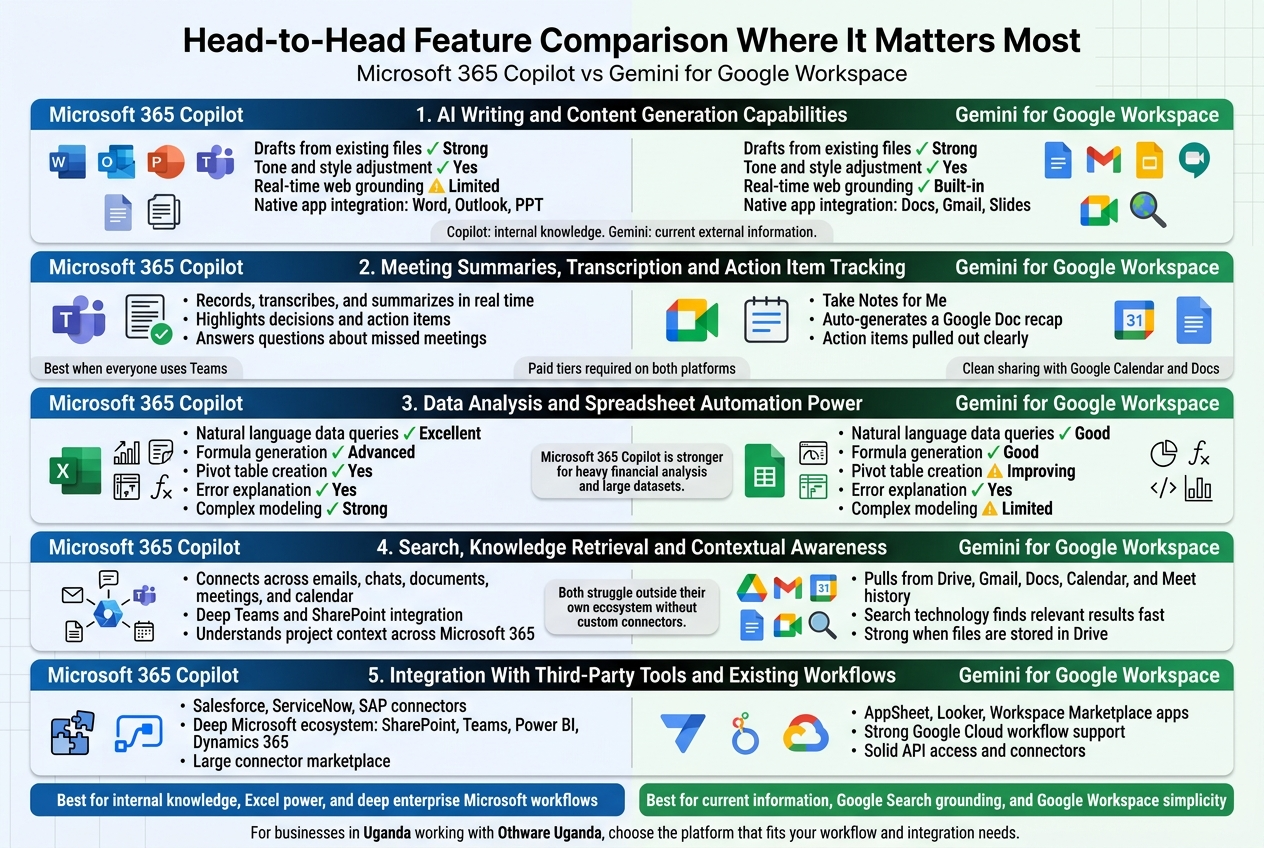
| Capability | Microsoft 365 Copilot | Gemini for Google Workspace |
|---|---|---|
| Drafts from existing files | ✅ Strong | ✅ Strong |
| Tone and style adjustment | ✅ Yes | ✅ Yes |
| Real-time web grounding | ⚠️ Limited | ✅ Built-in |
| Native app integration | Word, Outlook, PPT | Docs, Gmail, Slides |
If your team lives in Microsoft Office and relies heavily on internal knowledge bases, Copilot edges ahead. If staying current with external information matters, Gemini has the advantage.
Meeting Summaries, Transcription and Action Item Tracking
This is where both tools genuinely save hours every week — when they work well.
Microsoft Copilot in Teams records, transcribes, and summarizes meetings in real time. After a call, it generates a summary, highlights decisions made, and lists action items with the names of people responsible. You can even ask it questions about a meeting you missed — like “What did the team decide about the Q4 budget?” — and get a direct answer.
Gemini in Google Meet does something similar with its “Take Notes for Me” feature. It auto-generates a Google Doc with the meeting recap attached to your Calendar event. Action items get pulled out clearly, and the summary lands where your team already works.
Key differences worth knowing:
- Copilot’s meeting intelligence works best when everyone is on Microsoft Teams
- Gemini’s summaries integrate neatly with Google Calendar and Docs, making them easier to share without extra steps
- Both require users to be on paid tiers — this feature is not available on free or entry-level plans
For teams running hybrid or cross-platform meetings, Copilot can feel slightly clunky if some participants are not on Teams. Gemini keeps things cleaner inside the Google ecosystem.
Data Analysis and Spreadsheet Automation Power
This category matters most for finance teams, operations managers, and anyone who spends real time inside spreadsheets.
Copilot in Excel is genuinely impressive. You can ask it in plain English to analyze trends, create pivot tables, highlight anomalies, or build charts — and it does it without you writing a single formula. It also explains what it did, so your team learns along the way rather than just getting an output.
Gemini in Google Sheets has improved significantly. It can generate formulas, suggest analysis approaches, and help build dashboards. However, for complex multi-step data modeling, Copilot in Excel currently handles it with more precision and fewer errors.
| Feature | Copilot in Excel | Gemini in Sheets |
|---|---|---|
| Natural language data queries | ✅ Excellent | ✅ Good |
| Formula generation | ✅ Advanced | ✅ Good |
| Pivot table creation | ✅ Yes | ⚠️ Improving |
| Error explanation | ✅ Yes | ✅ Yes |
| Complex modeling | ✅ Strong | ⚠️ Limited |
For businesses doing heavy financial analysis or working with large datasets, Microsoft 365 Copilot is the stronger choice right now.
Search, Knowledge Retrieval and Contextual Awareness
Both AI assistants promise to find information fast — but the quality of what they retrieve depends on how your data is organized and where it lives.
Microsoft Copilot uses Microsoft Graph to connect across your emails, chats, documents, meetings, and calendar. This means when you ask a question, it can pull answers from across your entire Microsoft 365 environment. It understands context — who you work with, what projects are active, what was discussed last week.
Gemini does the same across Google Workspace — pulling from Drive, Gmail, Docs, Calendar, and Meet history. Google’s search technology is world-class, and it shows here. Gemini often returns more relevant results faster, especially when content is stored in Drive.
What separates them:
- Copilot has deeper integration with Teams chats and SharePoint, which matters for large organizations with complex internal wikis
- Gemini benefits from Google’s indexing strength — it finds things even when file names are vague or folders are messy
- Neither tool is great at retrieving information from systems outside their own ecosystem without custom connectors
Integration With Third-Party Tools and Existing Workflows
Neither platform is an island — but their openness to outside tools varies.
Microsoft Copilot connects with hundreds of third-party apps through Microsoft’s plugin ecosystem and Power Automate. Salesforce, ServiceNow, SAP, and many others already have Copilot connectors. For enterprises running complex tech stacks, this flexibility is a real advantage.
Gemini for Google Workspace integrates through Google AppSheet, Looker, and Workspace Marketplace apps. Its API access and app connectors are solid, especially for businesses already using Google Cloud products.
Quick comparison:
- Microsoft ecosystem depth: SharePoint, Teams, Power BI, Dynamics 365 — all deeply connected
- Google ecosystem depth: BigQuery, Looker, AppSheet, Google Cloud — strong for data-heavy workflows
- Cross-platform flexibility: Both have APIs, but Microsoft’s connector marketplace is currently larger
For businesses in Uganda working with Othware Uganda — the official partner for both Microsoft and Google in the region — getting the right integration advice before committing to a platform will save significant time and migration costs down the road.
Local Support and Regional Availability You Can Count On
Availability of Local Language Support and Localization
When your team works in multiple languages or operates in a region where English isn’t the primary language, the AI assistant you pick needs to actually keep up.
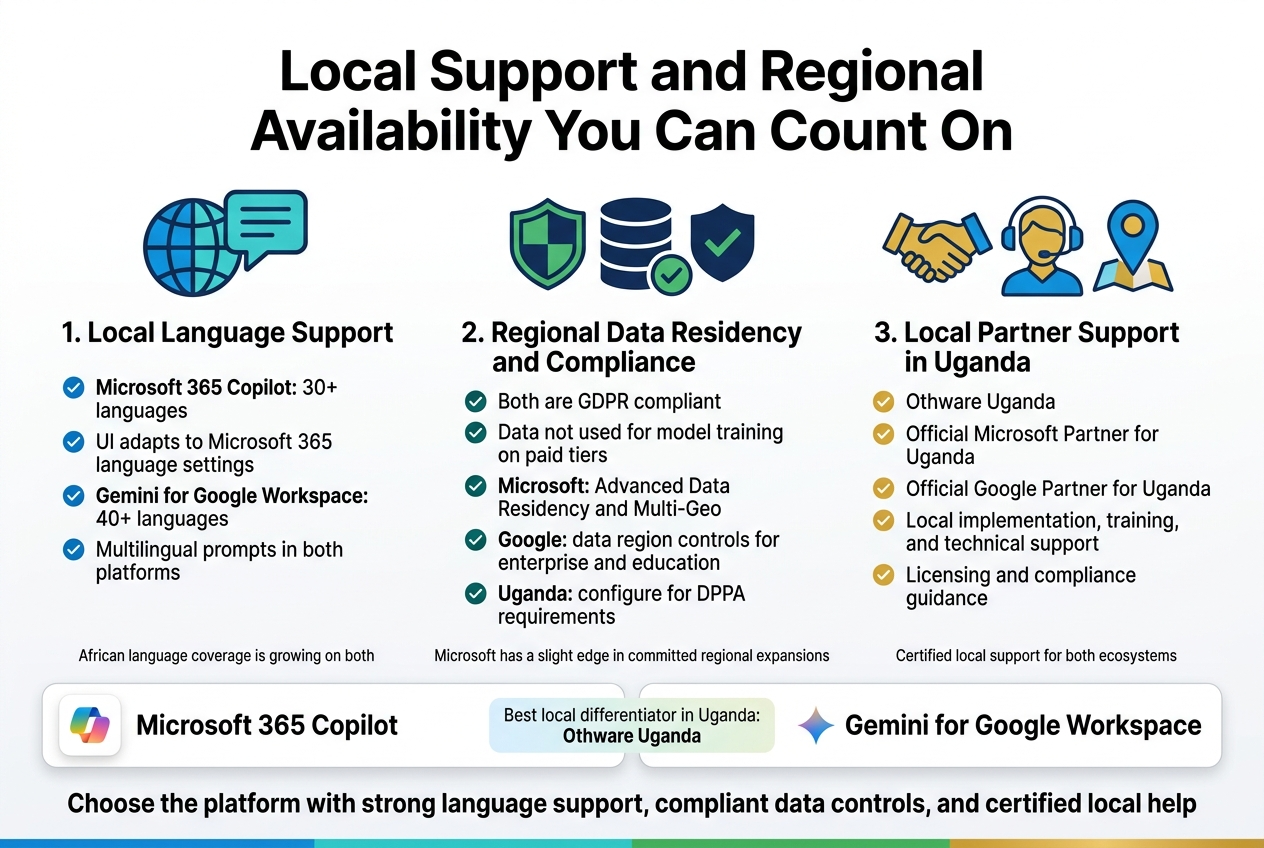
Microsoft 365 Copilot supports over 30 languages, including several African languages and widely spoken regional languages across Asia, Europe, and the Middle East. The interface, prompts, and responses adapt based on your Microsoft 365 language settings. For businesses in Uganda and East Africa, this means teams can work in their preferred language settings without constantly wrestling with the tool.
Gemini for Google Workspace also covers a strong range of languages, largely mirroring Google’s established translation and language capabilities. Given Google’s deep investment in language AI, Gemini handles multilingual prompts well and can switch between languages naturally within a conversation.
Here’s a quick comparison:
| Feature | Microsoft 365 Copilot | Gemini for Google Workspace |
|---|---|---|
| Supported languages | 30+ | 40+ |
| UI localization | Yes, tied to M365 settings | Yes, tied to Google Workspace locale |
| African language support | Growing | Growing |
| Multilingual prompts | Yes | Yes |
Both platforms are still expanding their African language coverage. Neither gives you a decisive edge there yet, but both are improving steadily.
Regional Data Residency and Compliance Considerations
This is where businesses — especially those handling sensitive client data — need to pay close attention.
Microsoft 365 Copilot gives enterprise customers access to Microsoft’s data residency commitments through its Advanced Data Residency (ADR) add-on and the Multi-Geo capabilities. For customers in regions like East Africa, data can be stored within designated geographies. Microsoft has also made strong commitments around GDPR compliance and is progressively expanding its regional data center footprint. Copilot interactions are processed within Microsoft’s compliance boundary, and your data isn’t used to train underlying models.
Gemini for Google Workspace follows Google’s data processing commitments outlined in its Customer Data Processing Addendum. Enterprise and Education tiers include data region controls, and like Microsoft, Google does not use your Workspace data to train its AI models. Google has data centers across multiple continents, though sub-Saharan Africa still largely routes through European or South African infrastructure.
Key compliance factors to weigh:
- GDPR compliance: Both platforms are compliant.
- Data not used for model training: Both confirm this for paid tiers.
- Regional data center presence: Microsoft has a slight edge in committed regional expansions; Google’s African data center presence is also growing (South Africa is currently the closest major node).
- Industry-specific compliance (healthcare, finance, legal): Microsoft’s ecosystem tends to offer more granular compliance tooling through Microsoft Purview.
For Ugandan businesses operating under the Data Protection and Privacy Act (DPPA), both platforms can be configured to meet baseline requirements, but you’ll want your local partner to guide that configuration specifically.
Quality of Local Partner Networks and On-the-Ground Support
Tools are only as good as the support behind them. When something breaks, or when you need hands-on training for your staff, who’s actually going to show up?
This is one area where the local partner network makes a real difference — and for businesses in Uganda, there’s a clear answer on both sides.
Othware Uganda is both the Official Microsoft Partner for Uganda and the Official Google Partner for Uganda. That means whether you’re choosing Microsoft 365 Copilot or Gemini for Google Workspace, you have access to certified, on-the-ground support from the same trusted local team.
Having a single partner certified across both ecosystems is genuinely valuable. You get:
- Local implementation support — setup, migration, and configuration done by people who understand the Ugandan business environment
- Staff training — in-person and remote training sessions tailored to your industry
- Ongoing technical support — response times that work with your timezone, not against it
- Licensing guidance — accurate, up-to-date advice on which plan fits your team size and budget
- Compliance guidance — help configuring data settings to align with Uganda’s DPPA
Beyond Uganda, both Microsoft and Google have established partner networks across East Africa. Microsoft’s partner ecosystem tends to be broader in enterprise segments, while Google’s network has strong coverage in education and SMB markets.
What to look for in a local AI support partner:
- Certified status with the platform vendor (not just a reseller)
- Experience deploying AI tools, not just core productivity suites
- Understanding of local regulatory requirements
- Track record with businesses similar to yours in size and industry
Working directly with a vendor-certified partner like Othware Uganda means you’re not navigating licensing portals, support queues, or timezone gaps on your own. You have someone local who can walk into your office, sit with your team, and make sure the AI tools you’re paying for are actually delivering value.
The bottom line on local support: both platforms have strong global support structures, but in Uganda specifically, the real differentiator is having Othware Uganda in your corner — certified for both Microsoft and Google, and positioned to support whichever direction your business decides to go.
Choosing the Right Fit for Your Business
Best Use Cases for Microsoft 365 Copilot Users
Microsoft 365 Copilot hits differently when your business is already deep in the Microsoft ecosystem. If your team lives inside Word, Excel, Outlook, Teams, and PowerPoint every single day, Copilot feels less like a new tool and more like a supercharge to what you already do.
Here are the scenarios where Copilot genuinely shines:
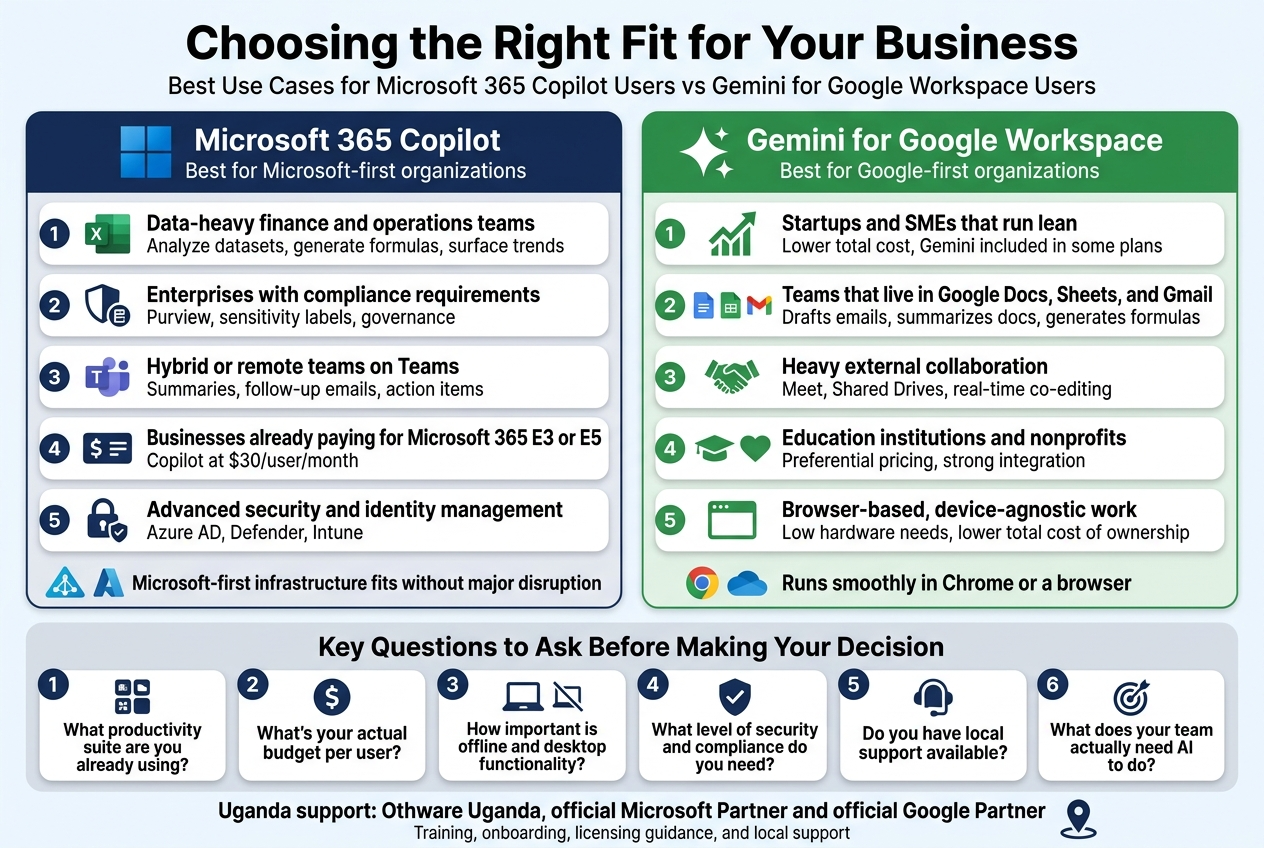
- Data-heavy finance and operations teams – Copilot in Excel can analyze complex datasets, generate formulas, and surface trends without anyone needing to know pivot tables inside out.
- Enterprises with compliance requirements – Businesses in regulated industries (legal, healthcare, finance) benefit from Copilot’s tight integration with Microsoft Purview for data governance and sensitivity labels.
- Organizations running hybrid or remote teams on Teams – Copilot summarizes meetings, drafts follow-up emails, and captures action items automatically — a real time-saver when your team is spread across time zones.
- Businesses already paying for Microsoft 365 E3 or E5 licenses – Adding Copilot at $30/user/month makes financial sense when you’re already invested in the platform.
- Companies needing advanced security and identity management – Microsoft’s enterprise-grade security stack (Azure AD, Defender, Intune) pairs naturally with Copilot’s workflow.
If your IT infrastructure is Microsoft-first — Active Directory, Azure, SharePoint, OneDrive — Copilot slots in without major disruption. Businesses in Uganda working with Othware Uganda, the official Microsoft partner for Uganda, can get localized support and proper licensing guidance to make that transition smooth.
Best Use Cases for Gemini for Google Workspace Users
Gemini for Google Workspace is a strong fit for businesses that already run on Google tools and want AI woven into their daily collaboration without a steep learning curve.
These are the scenarios where Gemini delivers real value:
- Startups and SMEs that run lean – Google Workspace plans start cheaper than Microsoft 365, and Gemini is included in Business Standard and above, making it a cost-effective AI upgrade without a separate per-user fee (depending on your plan tier).
- Teams that live in Google Docs, Sheets, and Gmail – Gemini drafts emails, summarizes documents, generates content in Docs, and builds formulas in Sheets — all natively, without switching apps.
- Businesses with heavy external collaboration – Google Meet, Shared Drives, and real-time co-editing make Gemini a great fit for agencies, consultancies, and client-facing teams that collaborate outside the organization regularly.
- Education institutions and nonprofits – Google Workspace for Education and Nonprofits comes with preferential pricing, and Gemini integrates well into those environments.
- Businesses prioritizing browser-based, device-agnostic work – Since everything runs in Chrome or a browser, hardware requirements are minimal. Chromebooks and low-cost devices keep total cost of ownership down.
For businesses in Uganda already using Google Workspace, Othware Uganda — the official Google Partner for Uganda — can help you configure Gemini correctly, manage user licenses, and provide local support when you need it most.
Key Questions to Ask Before Making Your Decision
Before you sign any contract or roll out an AI assistant to your whole team, slow down and work through these questions honestly. The right answer depends on your actual situation — not the marketing.
1. What productivity suite are you already using?
This is the most practical starting point. Switching platforms to chase an AI feature rarely makes sense. If your team is on Microsoft 365, Copilot is the natural next step. If you’re on Google Workspace, Gemini is the better fit. Migrating everything just for AI capabilities introduces cost, disruption, and a learning curve that often eats the productivity gains.
2. What’s your actual budget per user?
| Factor | Microsoft 365 Copilot | Gemini for Google Workspace |
|---|---|---|
| AI Add-on Cost | ~$30/user/month | Included in some plans |
| Base Plan Needed | Microsoft 365 Business Standard+ | Business Standard+ |
| Total Estimated Cost | $34–$57+/user/month | $12–$22/user/month |
If budget is tight, Google Workspace with Gemini included can deliver solid AI value at a lower total cost.
3. How important is offline and desktop functionality?
Microsoft 365 apps work fully offline with rich desktop clients. Google Workspace is primarily browser-based, though offline modes exist. For teams in areas with unreliable internet (which matters in many parts of East Africa), this could tip the decision.
4. What level of security and compliance do you need?
Both platforms are enterprise-grade, but Microsoft has a longer track record in regulated industries and government environments. If you’re handling highly sensitive data under strict compliance frameworks, Microsoft’s ecosystem may give your legal and compliance teams more comfort.
5. Do you have local support available?
AI tools are only as useful as the implementation behind them. A poorly configured rollout wastes money and frustrates staff. In Uganda, Othware Uganda is both the official Microsoft partner and the official Google Partner — meaning they can advise you objectively, support either platform, and provide training, onboarding, and ongoing account management locally.
6. What does your team actually need AI to do?
Be specific. Do you need AI for writing? Data analysis? Meeting summaries? Customer communication? Map your top three use cases to the features each platform offers before making a call. Generic AI hype doesn’t pay your bills — targeted productivity gains do.
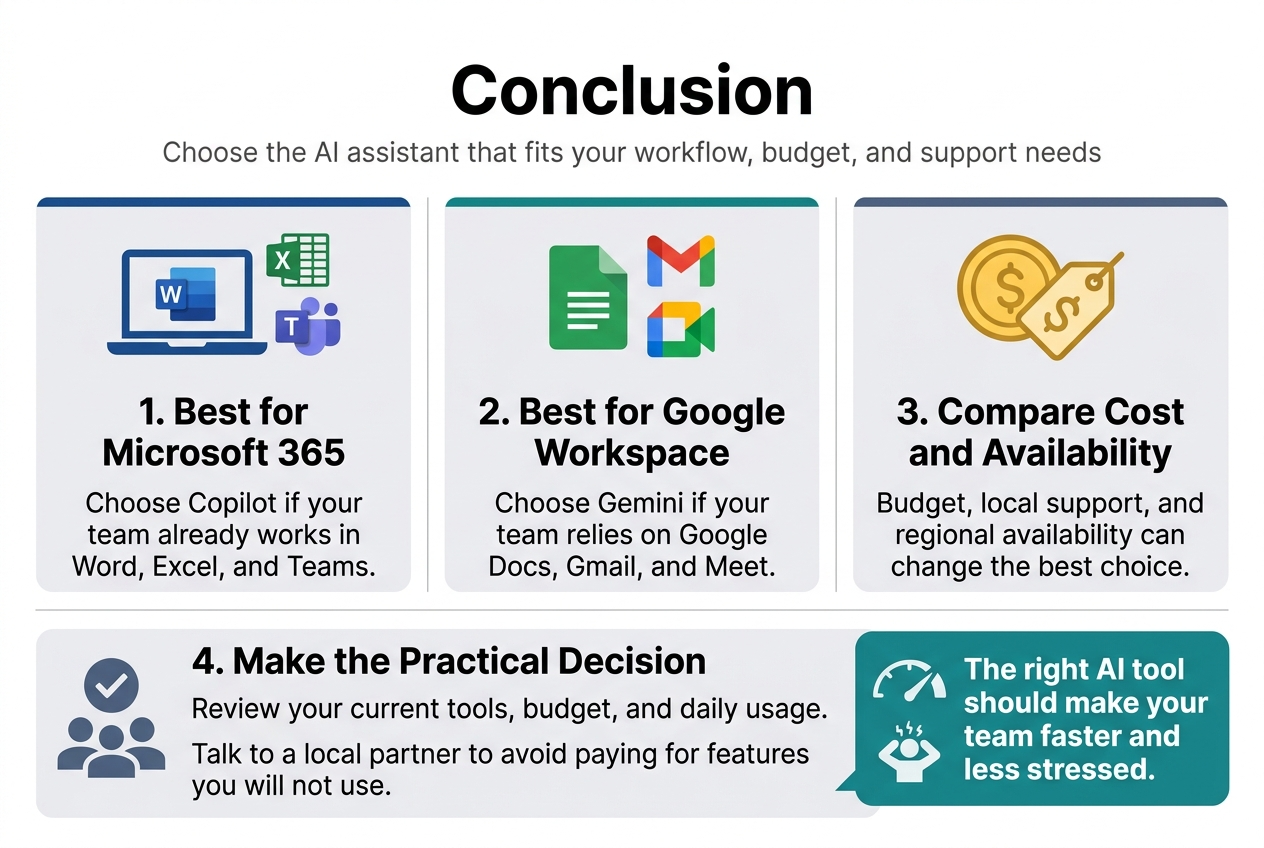
Picking between Microsoft 365 Copilot and Gemini for Google Workspace really comes down to what your team already uses and what you need most from an AI assistant. If your business runs on Word, Excel, and Teams, Copilot slots in naturally and keeps everything connected. If you’re deep in Google Docs, Gmail, and Meet, Gemini makes more sense. Cost plays a big role too, and when you factor in local support and regional availability, the decision gets even more personal to your specific situation.
The best move is to take an honest look at your current setup, your budget, and how much your team will actually use these tools day to day. Talk to a local partner who knows both platforms and can help you avoid paying for features you’ll never touch. The right AI tool should make your team faster and less stressed, not add another layer of complexity to figure out.

Tech Evangelist and Business Developer.
I love connecting with nature