Microsoft 365 Price Increase July 2026: What Ugandan Businesses Must Do Now
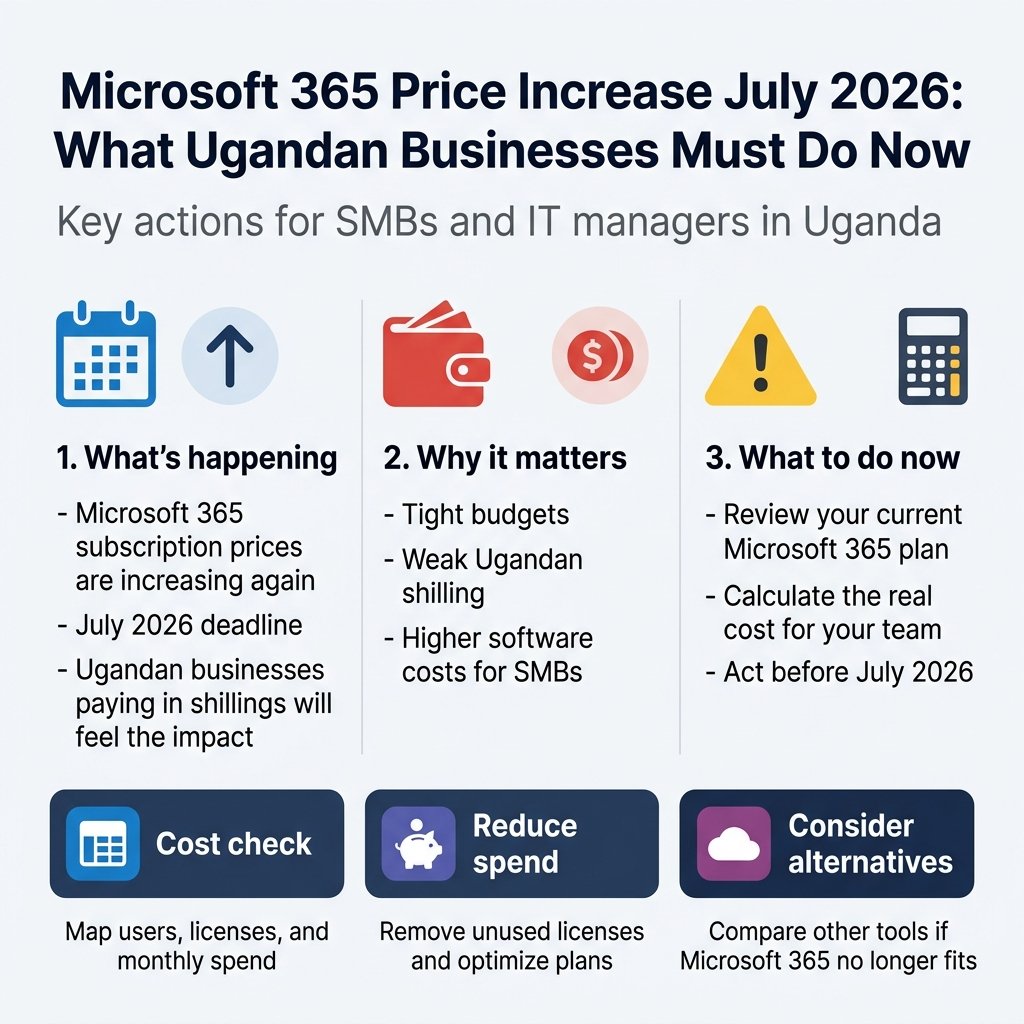
Microsoft just confirmed another price hike on Microsoft 365 subscriptions, and for Ugandan businesses already juggling tight budgets and a weak shilling, this one stings more than most.
If you run a small or medium business in Uganda — or you’re the person in charge of IT costs — this is written for you. You don’t need to panic, but you do need to act before July 2026 arrives and quietly drains more money from your software budget than you planned for.
In this guide, we’ll break down exactly how the Microsoft 365 price increase 2026 affects businesses paying in Uganda shillings, walk you through how to calculate what this actually costs your team, and share practical strategies to reduce Microsoft 365 costs — including some solid alternatives worth considering if the numbers stop making sense.
No fluff. Just what you need to know and what to do next.
Understanding the Microsoft 365 Price Increase
What Is Changing and by How Much
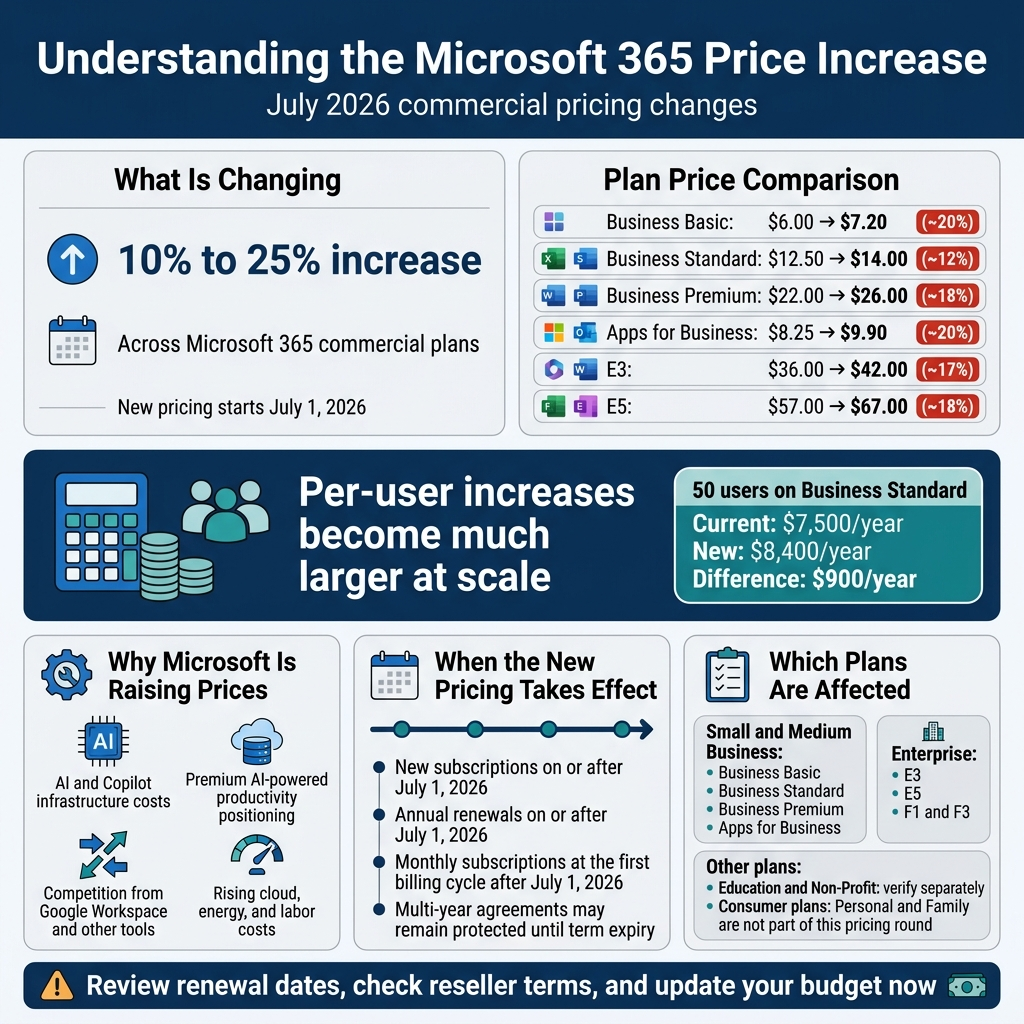
Microsoft has confirmed a across-the-board price increase for its Microsoft 365 commercial subscription plans, set to roll out in July 2026. This is not a minor tweak or a regional adjustment — it is a significant restructuring of how Microsoft prices its productivity suite globally, and businesses that are not paying attention right now will feel the financial shock when renewal season hits.
The price changes vary depending on the plan, but the general pattern shows increases ranging from 10% to as high as 25% on select commercial tiers. Here is a breakdown of what the numbers look like when you compare current pricing to the new post-July 2026 rates for the most widely used commercial plans:
| Microsoft 365 Plan | Current Price (Per User/Month) | New Price (Per User/Month) | % Increase |
|---|---|---|---|
| Microsoft 365 Business Basic | $6.00 | $7.20 | ~20% |
| Microsoft 365 Business Standard | $12.50 | $14.00 | ~12% |
| Microsoft 365 Business Premium | $22.00 | $26.00 | ~18% |
| Microsoft 365 Apps for Business | $8.25 | $9.90 | ~20% |
| Microsoft 365 E3 (Enterprise) | $36.00 | $42.00 | ~17% |
| Microsoft 365 E5 (Enterprise) | $57.00 | $67.00 | ~18% |
Note: Prices are listed in USD as Microsoft’s global baseline. Actual billing in Uganda depends on your licensing agreement, reseller channel, and currency fluctuations at the time of billing.
These numbers might look manageable when you see them on a per-user, per-month basis. The real hit becomes clear when you multiply those figures across your entire organization and project them out over an annual contract. A company with 50 users currently on Microsoft 365 Business Standard is paying roughly $7,500 per year. After July 2026, that same setup could cost closer to $8,400 — a difference of $900 annually. For a small business in Uganda, that is not pocket change. That is money that could have paid for staff training, a new piece of equipment, or two months of an additional employee’s salary.
The price increase also touches add-on services and standalone Microsoft products like Microsoft Copilot integrations, advanced security packages, and compliance toolkits. If your business has been stacking these on top of base subscriptions to extend functionality, your total bill could increase by a proportionally higher amount than the headline percentages suggest.
Why Microsoft Is Raising Prices Globally
To understand why this is happening, you have to look at what Microsoft has been pouring money into over the past three years. The company has made massive, very public investments in artificial intelligence — specifically its deep partnership with OpenAI and the integration of AI capabilities directly into Microsoft 365 through Copilot. Building and running AI infrastructure at scale is extraordinarily expensive. Data centers, specialized chips (Microsoft has been investing in its own custom silicon), and the engineering talent required to maintain these systems all come at a premium.
Microsoft is essentially doing two things at once: covering the operational costs of AI integration and repositioning Microsoft 365 as a premium AI-powered productivity platform, not just a collection of office applications. From a business strategy perspective, this makes sense. The company wants to move the market’s perception of Microsoft 365 from “the thing that runs Word and Excel” to “the intelligent platform that automates your work.” That repositioning comes with a higher price tag.
There is also a competitive dynamic at play. Microsoft is not operating in a vacuum. Google has been investing heavily in its Workspace suite with Gemini AI, and a growing number of smaller players are chipping away at specific segments of the market with specialized tools. By locking in higher prices before competition intensifies further, Microsoft is essentially capturing more value from its existing customer base — particularly in enterprise and SMB segments where switching costs are high.
Inflation across global technology supply chains has also played a role. Cloud infrastructure costs, bandwidth, energy for data centers, and skilled labor have all become more expensive over the past few years. While Microsoft has historically absorbed some of these cost increases rather than passing them to customers, the July 2026 price change signals that the company has reached the point where it needs to reflect rising operational realities in its pricing.
Finally, Microsoft has been fairly transparent in earnings calls and investor communications about targeting higher average revenue per user (ARPU) across its cloud segments. The Microsoft 365 price increase is, in plain terms, a revenue growth strategy — and existing customers are the ones funding it.
When the New Pricing Takes Effect in July 2026
Microsoft has structured the rollout of this price increase to apply based on your subscription renewal date rather than a single hard cutover on a specific day. This matters a great deal for planning purposes.
Here is how the timing works in practice:
- New subscriptions started on or after July 1, 2026 will automatically be billed at the new higher rates from day one.
- Existing annual subscriptions renewing on or after July 1, 2026 will be moved to the new pricing at the point of renewal.
- Monthly subscriptions will see the change reflected in the first billing cycle that falls on or after July 1, 2026.
- Multi-year agreements that were locked in before the announcement may be protected until their current term expires — but you need to verify this directly with your Microsoft licensing partner or Cloud Solution Provider (CSP).
This staggered approach means that some businesses will feel the increase on July 1st, while others might not see it hit until their renewal comes around in August, September, or even later in 2026. Do not mistake a delayed renewal date as a sign that the increase does not apply to you. It absolutely does — it is just a matter of when.
For Ugandan businesses procuring Microsoft 365 through local resellers or CSPs, the effective date may also be influenced by how your reseller structures their own agreements with Microsoft. If your reseller locked in a pricing agreement ahead of the July deadline, there is a possibility of some short-term protection, but this is not guaranteed and should not be assumed without a direct conversation with your provider.
The smart move right now — regardless of your renewal date — is to pull up your current subscription details, identify your exact renewal date, and calculate exactly when the new pricing will first affect your organization.
Which Microsoft 365 Plans Are Affected
The price increase is broad. Microsoft has not limited the changes to its enterprise tiers or its premium plans. The adjustment touches almost every tier of the commercial product line, which means businesses of all sizes — from a five-person startup to a 500-person enterprise — are in scope.
Here is a closer look at how the affected plans break down by category:
Small and Medium Business Plans
These are the plans most commonly used by Ugandan small businesses and organizations that do not have dedicated IT departments managing complex enterprise agreements.
- Microsoft 365 Business Basic — The entry-level plan that covers web and mobile versions of Office apps, Teams, SharePoint, and 1TB of OneDrive storage per user. Despite being the cheapest tier, it is seeing one of the highest percentage increases.
- Microsoft 365 Business Standard — The most popular SMB plan, which adds the full desktop versions of Office apps on top of everything in Business Basic. This is where most small-to-medium Ugandan businesses sit.
- Microsoft 365 Business Premium — The top-tier SMB offering, which adds advanced security features including Microsoft Defender for Business and Intune device management. Organizations that opted into this plan for enhanced security will see a substantial cost jump.
- Microsoft 365 Apps for Business — A plan for organizations that primarily need the desktop Office apps and OneDrive storage without the full collaboration suite. Also affected.
Enterprise Plans
Larger organizations and those with more complex IT environments typically sit on enterprise SKUs, and these are also seeing significant increases:
- Microsoft 365 E3 — Covers all core productivity apps, device management, and a baseline of security and compliance tools.
- Microsoft 365 E5 — The premium enterprise tier, which includes advanced analytics, security, and compliance capabilities. The absolute dollar increase on E5 is one of the highest across the product range.
- Microsoft 365 F1 and F3 (Frontline Worker Plans) — These plans, designed for deskless workers in industries like hospitality, manufacturing, and field services, are also being adjusted upward, though typically at the lower end of the percentage range.
Education and Non-Profit Plans
It is worth flagging that Microsoft 365 for Education and Microsoft 365 Non-Profit plans follow a different pricing structure and the July 2026 changes may not apply in the same way. If your organization qualifies for either of these categories, verify your specific pricing impact directly with Microsoft or a licensed partner rather than assuming you are subject to the commercial rates.
What Is NOT Changing (For Now)
Microsoft has indicated that consumer plans — including Microsoft 365 Personal and Microsoft 365 Family — are not part of this particular pricing round. If your business has been using consumer licenses to save money (a practice that violates Microsoft’s terms of service, by the way), you will not see these specific changes, but that is a conversation about compliance risk that is separate from pricing strategy.
The key takeaway across all these plan categories is that the Microsoft 365 price increase 2026 is not targeting a specific segment or type of organization — it is a systemic reset of the entire commercial pricing structure. For businesses managing Microsoft 365 costs in Uganda, this is a company-wide issue that requires a company-wide response, not a quiet line-item adjustment in the next budget cycle.
How the Price Increase Hits Ugandan Businesses Harder
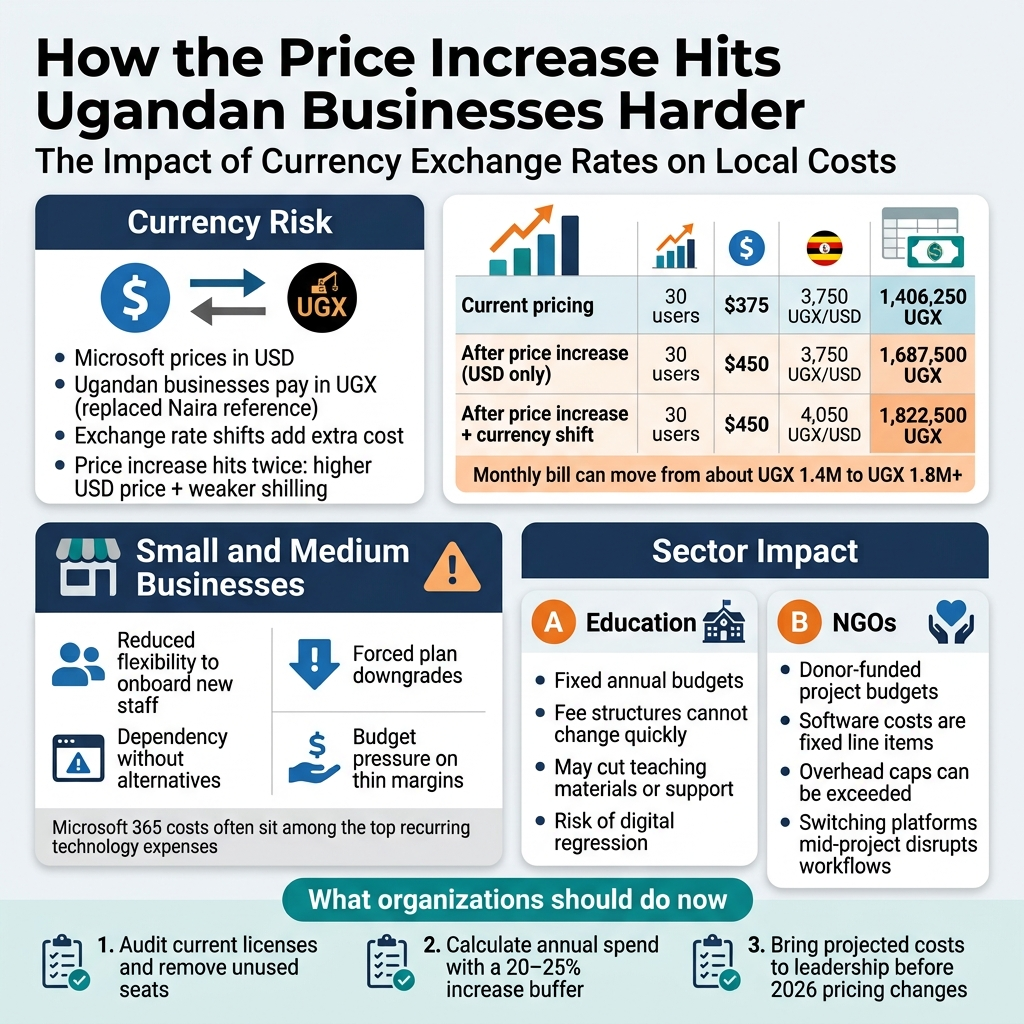
The Impact of Currency Exchange Rates on Local Costs
If you are running a business in Uganda and paying for Microsoft 365, you are already dealing with something that most Western businesses never think about: currency risk. Microsoft prices its subscriptions in US dollars. Uganda pays in Ugandan shillings. That gap is not just an inconvenience — it is a moving target that eats into your budget every single time the exchange rate shifts.
Here is the practical reality. At the time of writing, one US dollar exchanges for roughly 3,700 to 3,800 Ugandan shillings, depending on the day and the bank or mobile money provider you use. When Microsoft announces a price increase in dollar terms, Ugandan businesses absorb that increase twice over — once from the actual dollar price going up, and again from any depreciation in the shilling that happens between now and when the new prices kick in.
To put this in concrete numbers, consider a business running Microsoft 365 Business Standard at the current price of $12.50 per user per month. In shilling terms, that already sits at around UGX 46,250 per user per month. If the 2026 price increase pushes that to even $14 or $15 per user, and if the shilling weakens by another 5 to 10 percent over the next year (which is not an unusual movement for the currency), a company with 30 users could be looking at a monthly bill that has ballooned from roughly UGX 1.4 million to close to UGX 2 million or more.
That is not a small adjustment. That is a budget line that suddenly demands a conversation at the management level.
| Scenario | Users | Monthly Cost (USD) | Exchange Rate (UGX/USD) | Monthly Cost (UGX) |
|---|---|---|---|---|
| Current pricing | 30 | $375 | 3,750 | 1,406,250 |
| After price increase (USD only) | 30 | $450 | 3,750 | 1,687,500 |
| After price increase + currency shift | 30 | $450 | 4,050 | 1,822,500 |
That bottom row is the scenario most Ugandan businesses need to plan for. You are not just managing a vendor’s pricing decision — you are managing an internationally priced product in a local currency environment where you have no control over the exchange rate. This is what makes the Microsoft 365 price increase 2026 a sharper pain point for businesses in Uganda than it is for counterparts in the US, UK, or EU who pay in their native billing currency.
Cloud software pricing in Uganda carries an embedded currency premium that rarely gets discussed openly. When you are buying local software or services, you negotiate in shillings, and inflation is the main risk. When you are buying from a global vendor like Microsoft, you deal with inflation and currency depreciation simultaneously. Businesses need to factor this into their IT cost management thinking right now, not after the new prices arrive.
What Small and Medium Businesses in Uganda Stand to Lose
Small and medium businesses are the backbone of Uganda’s private sector. They are also the segment that carries the least financial cushion when an unavoidable cost spike hits. Unlike large corporations that can absorb a subscription price increase into a broad IT budget, a small business owner with 10 to 50 employees often has Microsoft 365 costs sitting as one of the top three or four recurring technology expenses.
The challenge with Microsoft 365 cost for small businesses in Uganda is not just the absolute amount — it is the percentage of overall IT spend that it represents. In many SMEs, there is no dedicated IT budget line. Software costs come out of general operations. When those costs jump, the ripple effect touches hiring decisions, equipment upgrades, and even day-to-day operations.
Here are some of the specific losses that small and medium businesses in Uganda are likely to feel:
-
Reduced flexibility to onboard new staff. If adding a new employee means immediately committing to another monthly Microsoft 365 subscription at the higher rate, some businesses will hesitate before hiring. That hesitation has real consequences for growth.
-
Forced plan downgrades without understanding trade-offs. Some business owners will respond to the price increase by switching to cheaper plans without fully understanding what features they are giving up. Losing access to advanced security features or cloud storage limits can create operational problems that cost more to fix later than the savings were worth.
-
Dependency without alternatives. Many Ugandan SMEs have built their workflows entirely around Microsoft 365 tools — Outlook, Teams, SharePoint, OneDrive. Switching is not as simple as cancelling a subscription. Migrating years of email history, restructuring file storage, retraining staff — these all have costs that can exceed the savings from switching to a cheaper platform, at least in the short term.
-
Budget pressure on already thin margins. Ugandan SMEs in sectors like retail, hospitality, and professional services often operate on tight margins. A 20 percent increase in a core software subscription does not disappear quietly. It pushes harder on an already strained cost structure.
The businesses most at risk are those running Microsoft 365 Business Premium or higher tier plans with 20 to 100 users. These companies have enough users for the cost to be significant but may not have the internal IT expertise to evaluate and execute alternatives without outside help. If you are in this position, the Microsoft 365 subscription Uganda pricing changes in 2026 are not something to monitor — they are something to act on with a clear plan in the next few months.
A useful exercise right now is to pull your current Microsoft 365 invoice and calculate your total annual spend. Then add 20 to 25 percent to simulate what a realistic increase looks like when you factor in both the price rise and potential currency movement. That number should be your planning baseline, not the official announced increase in dollar terms.
How Sectors Like Education and NGOs Face Unique Challenges
The price increase does not land equally across every type of organization in Uganda. While every business feels the squeeze, the education sector and non-governmental organizations carry a distinct set of vulnerabilities that make their situation worth examining separately.
Education Institutions
Schools, colleges, and universities in Uganda have increasingly adopted Microsoft 365 as part of their digital learning infrastructure. Many were encouraged to do so during and after the COVID-19 pandemic, when remote learning made cloud tools a practical necessity. Microsoft has historically offered discounted education licensing, and many institutions built their assumptions on those discounted rates continuing.
The problem now is twofold. First, even discounted rates go up when the base price increases. A 20 percent reduction on a higher price is still a higher total cost than the original full price in many scenarios. Second, education institutions in Uganda typically operate on fixed annual budgets approved by board committees, government allocations, or parent fee structures that cannot be quickly adjusted mid-year.
When the Microsoft 365 pricing strategy shifts, schools face the uncomfortable situation of either absorbing the cost difference by cutting elsewhere — reducing spending on physical infrastructure, teaching materials, or support staff — or passing the cost to parents through increased fees. In a market where affordability of education is already a pressure point, neither option is attractive.
Private universities and technical institutes that have positioned themselves as offering digitally enabled education face a reputation risk if they are seen stepping back from the tools they promised students. The dependency on the Microsoft ecosystem is often embedded in marketing promises, course designs, and student expectations.
NGOs and Development Organizations
Non-governmental organizations in Uganda face a parallel challenge, amplified by the nature of their funding. Most NGOs operate on donor-funded project budgets that are approved in advance, sometimes years ahead. Software costs are often budgeted as a fixed line item in project proposals. When those costs increase unexpectedly after a project has been approved and funding disbursed, the organization absorbs the difference from within the project — meaning less money goes toward actual programming, beneficiary services, or field activities.
For NGOs operating on smaller budgets or managing multiple simultaneous projects with tight overhead caps, a Microsoft 365 subscription Uganda cost increase can push them past donor-imposed overhead ratios. Many international donors cap indirect or overhead costs at 10 to 15 percent of total project costs. When software subscriptions rise, they push overhead ratios higher, potentially triggering compliance issues with funding agreements.
There is also a structural challenge unique to NGOs: they often cannot simply switch platforms mid-project. If a project was designed with Microsoft Teams as the collaboration tool, SharePoint as the document repository, and Outlook as the communication standard, changing those tools mid-implementation creates workflow disruption, training costs, and the risk of losing institutional documentation in migration.
The Microsoft 365 alternatives Africa conversation is certainly worth having for these organizations — and we will get into that in a later section — but the practical reality is that switching costs create inertia. The smarter near-term move for many NGOs is to conduct a licensing audit, identify unused seats, and renegotiate or right-size their subscriptions before the new pricing takes effect.
Key Challenges by Sector
| Sector | Primary Challenge | Secondary Risk |
|---|---|---|
| Primary & secondary schools | Fixed fee structures, can’t adjust revenue | Perception of digital regression if tools are dropped |
| Universities | Budget approval cycles don’t align with price changes | Staff retraining costs if alternatives are adopted |
| NGOs (small budget) | Donor overhead caps, fixed project budgets | Compliance issues with funding agreements |
| NGOs (large, multi-project) | Cross-project cost allocation complexity | Disruption to established workflows mid-project |
| Faith-based organizations | Limited IT capacity to evaluate alternatives | Dependence on volunteer-maintained setups |
The common thread across education and NGO sectors is that they have less flexibility to respond quickly. Their budgeting and governance structures move slowly, which means the time to start internal conversations about the Microsoft 365 price increase 2026 is right now — not when the invoices arrive with the new numbers.
If you are leading IT decisions in any of these sectors, the most valuable thing you can do today is document exactly what your organization is currently spending, map out which licenses are actively used, and bring the projected cost increase to leadership with a clear picture of what it means for your operating budget. Going into 2026 without that conversation on the table is leaving your organization exposed.
Calculate Your True Cost Exposure Before It Is Too Late
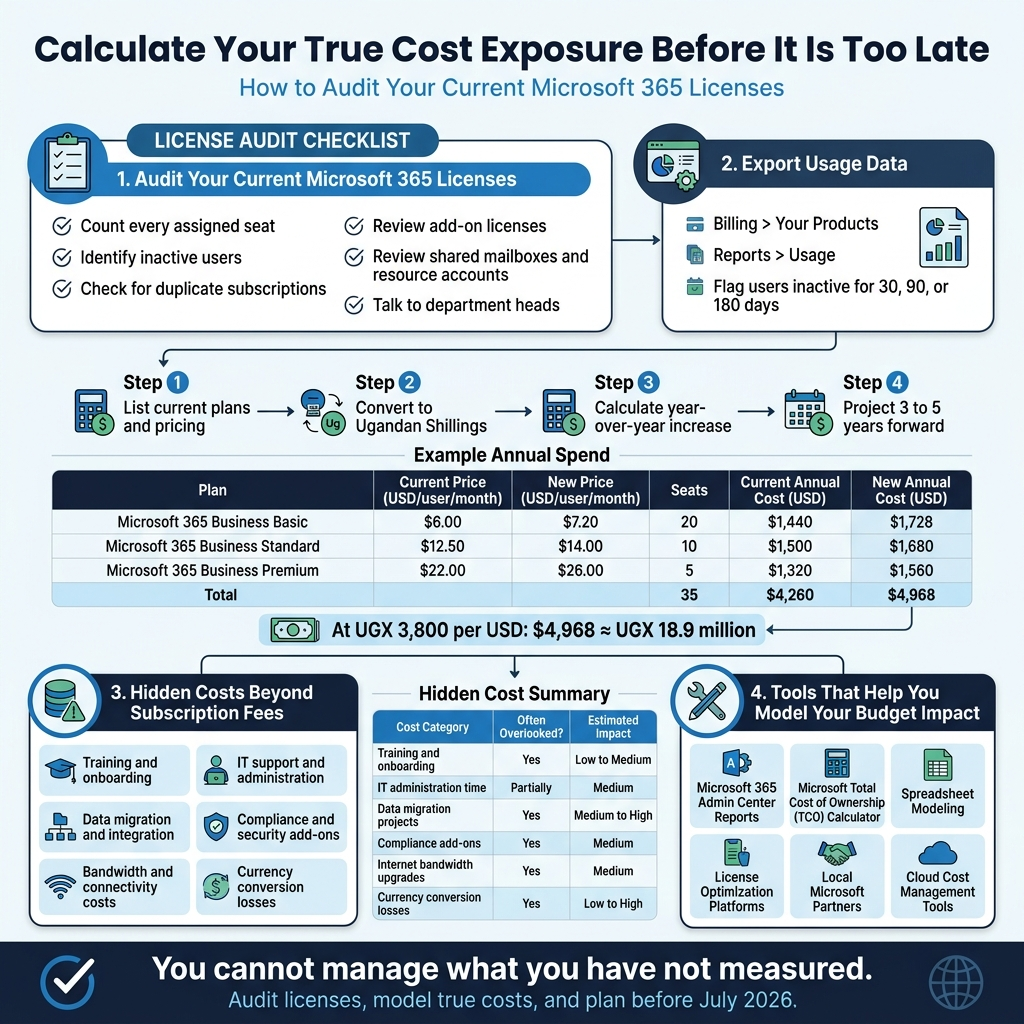
How to Audit Your Current Microsoft 365 Licenses
Before you can figure out how much the Microsoft 365 price increase is going to hurt your business, you need to know exactly what you are paying for right now. Most Ugandan businesses are surprised when they actually sit down and count their licenses. There are almost always more than expected, and a good chunk of them are either underused or completely forgotten.
Start by pulling up your Microsoft 365 admin center. If you have admin access, go to Billing > Your Products and you will see every active subscription tied to your tenant. Write down the plan type, number of seats, and the billing cycle for each one. Do not stop there though. Many businesses have licenses scattered across multiple accounts, especially if they have changed IT providers over the years or acquired other businesses.
Here is a practical checklist to work through during your audit:
- Count every assigned seat — not just the ones people actively use, but every seat that has been assigned to a user account
- Identify inactive users — former employees, contractors, or temporary staff who no longer need access but still have active licenses
- Check for duplicate subscriptions — some businesses accidentally pay for the same feature through two different plans
- Look at add-on licenses — things like Microsoft Defender, Power BI Pro, Project Online, or Visio often get added and then forgotten
- Review shared mailboxes and resource accounts — these sometimes get a full license when they do not need one
- Talk to department heads — ask them honestly which tools their teams actually open every week
When you are auditing your Microsoft 365 subscription in Uganda, it helps to export your license report from the admin center. Go to Reports > Usage and download the Microsoft 365 Apps usage report. This shows you which users have not opened any Office application in the past 30, 90, or 180 days. If someone has not touched Word, Excel, Outlook, or Teams in three months, that is a seat worth investigating.
For smaller businesses without a dedicated IT person, Microsoft also offers the Microsoft 365 Lighthouse tool for managed service partners, or you can ask your IT provider to run a license utilization report on your behalf.
Estimating Your New Annual Spend After the Increase
Once you know your exact license count, you can start putting real numbers to what July 2026 is going to cost you. Microsoft has confirmed price increases across several plan tiers, and the impact on Microsoft 365 cost for small businesses in Uganda is going to be felt in Ugandan shillings, which means the exchange rate adds another layer of pain on top of the base price increase.
Here is a straightforward way to calculate your new annual spend:
Step 1: List your current plans and per-seat pricing
| Plan | Current Price (USD/user/month) | New Price (USD/user/month) | Seats | Current Annual Cost (USD) | New Annual Cost (USD) |
|---|---|---|---|---|---|
| Microsoft 365 Business Basic | $6.00 | $7.20 | 20 | $1,440 | $1,728 |
| Microsoft 365 Business Standard | $12.50 | $14.00 | 10 | $1,500 | $1,680 |
| Microsoft 365 Business Premium | $22.00 | $26.00 | 5 | $1,320 | $1,560 |
| Total | 35 | $4,260 | $4,968 |
Note: Prices used here are for illustration. Confirm current and updated prices directly with Microsoft or your local partner.
Step 2: Convert to Ugandan Shillings
Take your new annual cost in USD and multiply by the current exchange rate. At an average rate of UGX 3,800 per USD (which has been fluctuating), that $4,968 annual bill becomes roughly UGX 18.9 million. If the shilling weakens further — which has happened repeatedly over the past few years — your real cost goes even higher without Microsoft changing a single thing.
Step 3: Calculate the year-over-year increase
Subtract your current annual cost from your projected new cost. In the example above, that is an extra $708 per year in USD terms, which is UGX 2.7 million at that exchange rate. For a small business in Kampala already watching every shilling, that is not a rounding error.
Step 4: Project three to five years forward
Do not just calculate the impact for one year. Microsoft’s pricing history shows incremental increases over time. If you assume even a modest 5% increase every two years beyond 2026, your costs compound significantly. Build that into your planning so you are not caught off guard again.
Identifying Hidden Costs Beyond Subscription Fees
The subscription fee is just the beginning. When Ugandan businesses calculate their real Microsoft 365 cost, they often miss several costs that sit quietly in the background and only become visible when the bill arrives or something breaks.
Training and Onboarding Costs
Every time Microsoft rolls out a major update or when new employees join, someone has to spend time learning the tools. If you are paying an external trainer or absorbing the productivity dip while staff figure out new features, that is a real cost. Microsoft frequently updates its interface and adds features, and not everyone adapts quickly.
IT Support and Administration
Someone has to manage your Microsoft 365 subscription. Whether that is an in-house IT person or an outsourced managed service provider, there are hours being spent on license management, security settings, user provisioning, and troubleshooting. In Uganda, many small businesses pay a monthly retainer to an IT support company, and a portion of that retainer is going toward managing cloud software pricing and configurations.
Data Migration and Integration
If you ever need to move data between plans, migrate from an older system, or integrate Microsoft 365 with local accounting or ERP software, that costs money. These projects are not always expensive, but they are rarely free, and they often take longer than expected.
Compliance and Security Add-Ons
Businesses in regulated sectors like banking, insurance, or healthcare in Uganda are starting to face more pressure around data protection and compliance. Microsoft 365 has compliance tools, but the more advanced ones — like Microsoft Purview or advanced eDiscovery — only come with higher-tier plans or paid add-ons. If your current plan does not include them and you need them, you are looking at additional spend.
Bandwidth and Connectivity Costs
This one is specific to Uganda and much of East Africa. Microsoft 365 is a cloud-based platform, which means it relies heavily on consistent internet connectivity. Heavy use of Teams calls, SharePoint, and OneDrive sync can push up your monthly internet bill, especially if you are scaling up usage. If you are running on a shared or limited connection and productivity demands increase, you may need to upgrade your bandwidth — and that is another line item.
Hidden Cost Summary
| Cost Category | Often Overlooked? | Estimated Impact |
|---|---|---|
| Training and onboarding | Yes | Low to Medium |
| IT administration time | Partially | Medium |
| Data migration projects | Yes | Medium to High |
| Compliance add-ons | Yes | Medium |
| Internet bandwidth upgrades | Yes (Uganda-specific) | Medium |
| Currency conversion losses | Yes | Low to High (variable) |
Tools That Help You Model Your Budget Impact
You do not have to do all of this on a spreadsheet alone. Several tools can help you get a clearer picture of your Microsoft 365 pricing strategy and total cost of ownership before the 2026 changes hit.
Microsoft 365 Admin Center Reports
Already mentioned in the audit section, but worth emphasizing here for budgeting purposes. The usage reports in the admin center give you actual consumption data that you can use to right-size your licenses before renewal. If you are paying for 50 seats but only 35 people are active users, you have an immediate savings opportunity.
Microsoft Total Cost of Ownership (TCO) Calculator
Microsoft offers a TCO calculator on its website that compares the cost of running on-premises infrastructure versus Microsoft 365. While it is built primarily to convince you to move to the cloud, you can reverse-engineer it to understand what components of your current spend are essential versus optional. It also helps when comparing Microsoft 365 alternatives in Africa, because it forces you to list out all the associated costs, not just the subscription price.
Spreadsheet Modeling (Simple but Effective)
For most small businesses in Uganda, a well-built spreadsheet is still the most accessible tool. Build a model that includes:
- Current license count and cost per user
- Projected new pricing after the increase
- Exchange rate assumptions (use a conservative rate, not today’s best rate)
- A 3% to 5% annual inflation buffer
- Bandwidth and support cost projections
- One-time migration or training costs if you are considering switching plans
Use three scenarios: best case (shilling stays stable, no further increases), base case (moderate weakening and one further increase), and worst case (significant currency depreciation and another price hike). This gives you a realistic range to plan around.
License Optimization Platforms
Tools like Zylo, Torii, or Cleanshelf are SaaS management platforms that connect to your Microsoft tenant and give you visibility into license utilization across your organization. They are more commonly used by larger companies, but some have pricing tiers that work for medium-sized businesses. They automatically flag unused licenses, track spending trends, and can help you manage renewals before auto-billing kicks in.
Local Microsoft Partners
Do not underestimate the value of sitting down with a certified Microsoft partner operating in Uganda. Many of them have access to pricing tools and volume licensing calculators that are not publicly available. They can also help you identify whether a Microsoft 365 subscription in Uganda through an Enterprise Agreement, CSP (Cloud Solution Provider) arrangement, or direct subscription gives you the best rate for your specific situation.
Cloud Cost Management Tools
If your business is also using Azure alongside Microsoft 365, tools like Azure Cost Management + Billing give you a unified view of all Microsoft cloud spending. This matters because some businesses start using Azure services through Teams integrations or Power Platform, and those costs can sneak up quickly.
The bottom line across all of this: you cannot manage what you have not measured. Before July 2026 arrives and the new pricing locks in, taking the time to audit your licenses, model your true costs, and account for every hidden expense puts you in a position to make smart decisions rather than reactive ones. Whether that means trimming unused seats, renegotiating your contract, shifting plans, or seriously exploring Microsoft 365 alternatives in Africa — none of those conversations can happen effectively without solid numbers in front of you. IT cost management in Uganda has always required more creativity than in larger markets, and the 2026 price increase makes that creativity more important than ever.
Smart Strategies to Reduce the Financial Blow
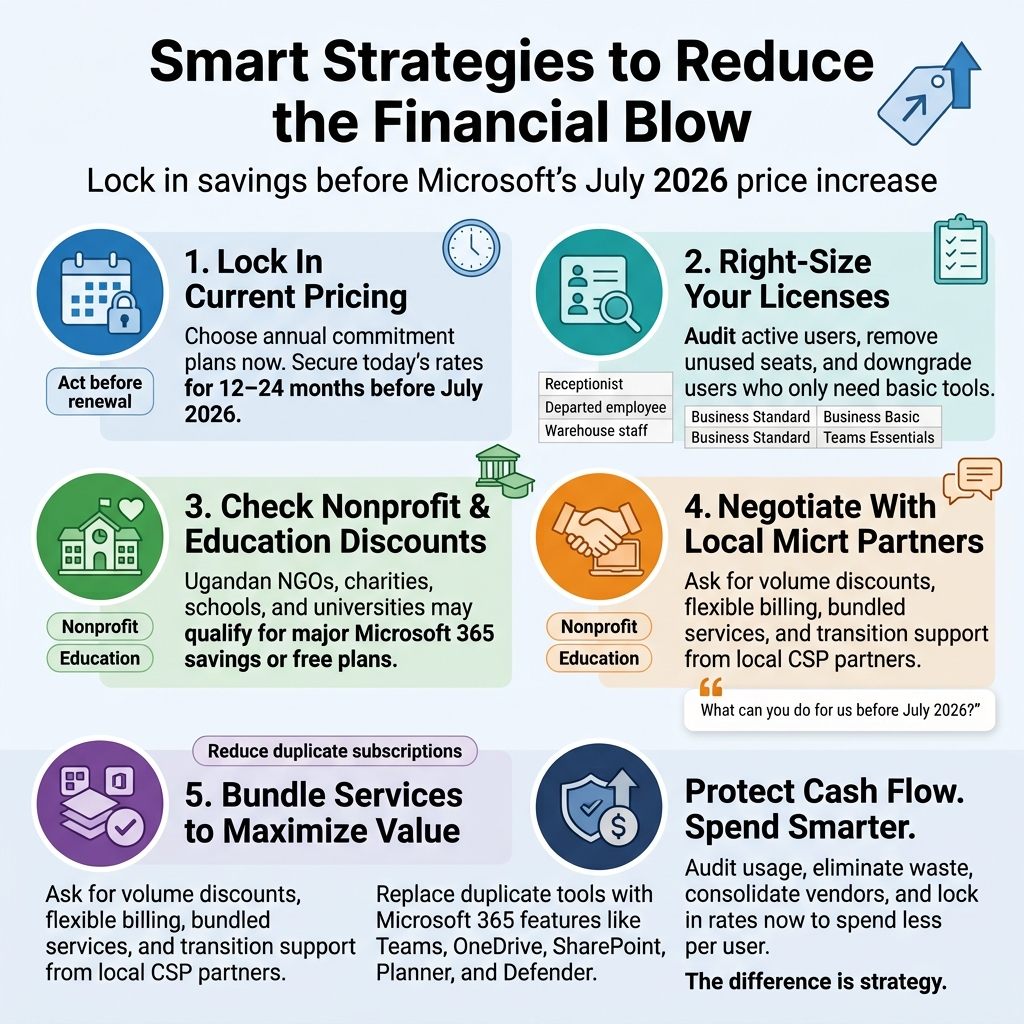
Lock In Current Pricing With Annual Commitment Plans Now
Time is genuinely working against you here. Microsoft’s July 2026 price increase is confirmed, and one of the most straightforward ways to protect your business is to commit to an annual plan before the new rates kick in. If you are currently on a monthly rolling subscription, you are already paying a premium compared to annual commitment pricing, and once July 2026 arrives, that gap widens even further.
Here is how the logic works: when you lock into an annual commitment plan before the price adjustment, you secure today’s rates for the full duration of that agreement. Depending on your renewal date and how you structure the contract, you could potentially shield your business from the increase for 12 to 24 months. That is real money staying in your account instead of going to Microsoft.
Steps to act on this now:
- Contact your Microsoft partner or reseller immediately and ask specifically about annual commitment pricing available before July 2026
- Review your current subscription end date and negotiate an early renewal if you are within 90 days of expiry
- Ask your partner about multi-year agreements, which sometimes come with additional rate protection
- Get everything documented in writing before the price change announcement goes live in your region
For Ugandan businesses managing tight cash flows, the trade-off of committing to an annual payment upfront versus absorbing a permanent price increase is almost always worth it. The math favors locking in. Do it now while the window is still open.
Right-Size Your Licenses by Removing Unused Seats
This is one of the most overlooked cost-saving strategies in IT management across Uganda, and honestly, it is money sitting on the table right now. Many businesses pay for Microsoft 365 seats that belong to employees who have left, roles that were consolidated, or departments that simply do not need a full Microsoft 365 Business Standard license.
Before the price increase hits, audit every single license you are paying for. You might be surprised at what you find.
How to run a proper license audit:
- Pull a full list of active users from your Microsoft 365 admin center
- Cross-reference with your current HR records and active employee list
- Flag any accounts that have not logged in within the last 30 to 60 days
- Identify users who only need email and basic collaboration versus those who need the full Office suite
Common license mismatches Ugandan businesses make:
| Scenario | What They’re Paying For | What They Actually Need |
|---|---|---|
| Receptionist who only checks email | Microsoft 365 Business Standard | Microsoft 365 Business Basic |
| Field sales rep with no desktop | Microsoft 365 Business Standard | Microsoft 365 Apps for Business |
| Contractor with temporary access | Full annual license | Month-to-month or guest access |
| Departed employee not yet removed | Any paid license | Nothing – delete the account |
| Warehouse staff using only Teams | Business Standard | Microsoft Teams Essentials |
Downgrading even five or ten users from Business Standard to Business Basic can save a meaningful amount every month, especially when you are converting those savings to Uganda shillings and factoring in exchange rate exposure. Multiply those savings over 12 months and across a team of 30 to 50 people, and you are looking at a budget that can be redirected to other operational needs.
The right-sizing exercise also puts you in a much better negotiating position with your Microsoft partner, because you walk into the conversation with data rather than guesswork.
Explore Microsoft Nonprofit and Education Discounts
A significant number of Ugandan organizations are leaving serious money on the table by not claiming the Microsoft licensing discounts they are already eligible for. Microsoft runs dedicated pricing programs for nonprofits and educational institutions that can reduce costs dramatically, and the application process is simpler than most people assume.
Microsoft for Nonprofits:
If your organization is a registered NGO, charity, or nonprofit operating in Uganda, you may qualify for Microsoft 365 Nonprofit Business Basic at no cost for up to 300 users, or Microsoft 365 Nonprofit Business Premium at heavily discounted rates. The eligibility requirements include:
- Recognition as a nonprofit under Ugandan law
- Organization must not be a government entity
- Must not be a hospital or healthcare organization (different program applies)
- Validation through TechSoup or a similar approved partner
The savings here are not small adjustments — they are transformational for organizations operating on donor funding or limited budgets. A Ugandan NGO with 50 staff members could potentially cut their entire Microsoft 365 spend to near zero or reduce it by 70 to 80 percent.
Microsoft for Education:
Schools, universities, and educational training institutions in Uganda qualify for Microsoft 365 A1, which is free for both faculty and students and includes Teams, SharePoint, Exchange, and the web versions of Office apps. Institutions wanting desktop Office applications can access A3 and A5 plans at discounted rates.
If your institution is currently paying full commercial pricing for Microsoft 365 and you have not verified your eligibility for education licensing, do that today. The process involves verifying your institution’s status through Microsoft’s education portal, but local Microsoft partners in Uganda can walk you through it quickly.
Negotiate Better Terms Through Local Microsoft Partners
Many Ugandan businesses assume that Microsoft pricing is fixed and non-negotiable. That assumption costs them money. The reality is that Microsoft sells through a tiered partner network, and local partners — particularly those with Cloud Solution Provider (CSP) status — have more flexibility than most customers realize.
Working with a local Microsoft partner in Uganda rather than purchasing directly or through a large international reseller gives you several advantages:
What you can actually negotiate:
- Volume discounts: If you have 20 or more seats, partners can often apply volume pricing that is not advertised publicly
- Flexible billing terms: Monthly versus annual billing, payment in Uganda shillings versus USD, and structured payment schedules can all be discussed
- Bundled services: Partners can package Microsoft 365 with local IT support, onboarding, and training at a combined rate that is better value than buying each component separately
- Renewal credits: Some partners offer service credits or free implementation support during renewals as an incentive to retain your business
- Transition assistance: If you are moving from one license tier to another, a good partner will help you do it without paying double during the transition period
How to approach the conversation:
Do your homework before sitting down with a partner. Know your current seat count, your actual usage data, which features your team actually uses, and what your annual Microsoft spend looks like in both USD and UGX. Come prepared with that information and make it clear you are evaluating multiple options. Partners respond to buyers who are informed and considering alternatives.
Ask specifically: “What can you do for us on pricing given our commitment level and our willingness to sign an annual agreement before July 2026?”
You will often find flexibility that was never advertised.
Bundle Services to Maximize Value Per Shilling Spent
One of the smartest moves a Ugandan business can make right now is to consolidate IT spending into fewer vendors and extract maximum value from the tools already included in your Microsoft 365 subscription. Many businesses are unknowingly paying for third-party tools that Microsoft 365 already includes.
Common duplicate spending Ugandan businesses should eliminate:
| Tool You’re Paying For Separately | Microsoft 365 Equivalent | Included In Plan |
|---|---|---|
| Zoom or Google Meet | Microsoft Teams | Business Basic and above |
| Dropbox or Google Drive | OneDrive and SharePoint | Business Basic and above |
| Slack | Microsoft Teams Channels | Business Basic and above |
| External project management tools | Microsoft Planner and To Do | Business Basic and above |
| Third-party antivirus | Microsoft Defender | Business Premium |
| Email archiving solution | Exchange Online Archiving | Business Premium |
| Password manager | Microsoft Authenticator + SSPR | Business Premium |
| Basic intranet platform | SharePoint Online | Business Basic and above |
If you are on Microsoft 365 Business Premium and still paying for a third-party antivirus, a separate video conferencing tool, and an external file storage solution, you are doubling up on costs unnecessarily. Consolidating onto tools already inside your Microsoft 365 subscription does not just reduce costs — it simplifies your IT stack, reduces the number of vendor relationships to manage, and often improves security because everything is integrated.
A practical bundling audit for Ugandan businesses:
- List every SaaS subscription your business currently pays for
- Map each one against Microsoft 365 features included in your current plan
- Identify overlaps and calculate the monthly cost of tools you can eliminate
- Phase out redundant tools during their next renewal cycle
- Train your team on the Microsoft 365 equivalents so adoption actually happens
The key to making bundling work is adoption. Tools your team does not use deliver zero value. Budget a small amount for training — even a half-day Teams workshop or a SharePoint orientation — and the savings from eliminating redundant subscriptions will cover that cost multiple times over.
Think about Microsoft 365 cost for small businesses in Uganda this way: the price per seat is going up, but the value per seat can go up too if you are actually using what you are already paying for. Businesses that audit their usage, eliminate waste, consolidate vendors, and lock in rates before July 2026 will come out of this price change in a far stronger position than those who do nothing and simply absorb the increase.
The difference between a business that manages IT costs strategically and one that does not is not talent or size — it is the habit of reviewing spending regularly and making deliberate decisions rather than letting subscriptions renew automatically without scrutiny. These strategies work. The businesses across Uganda that apply them will spend less per user, get more value from what they pay for, and enter 2027 with IT cost management practices that serve them well beyond this single price adjustment.
Evaluate Alternatives That Could Save Your Business Money
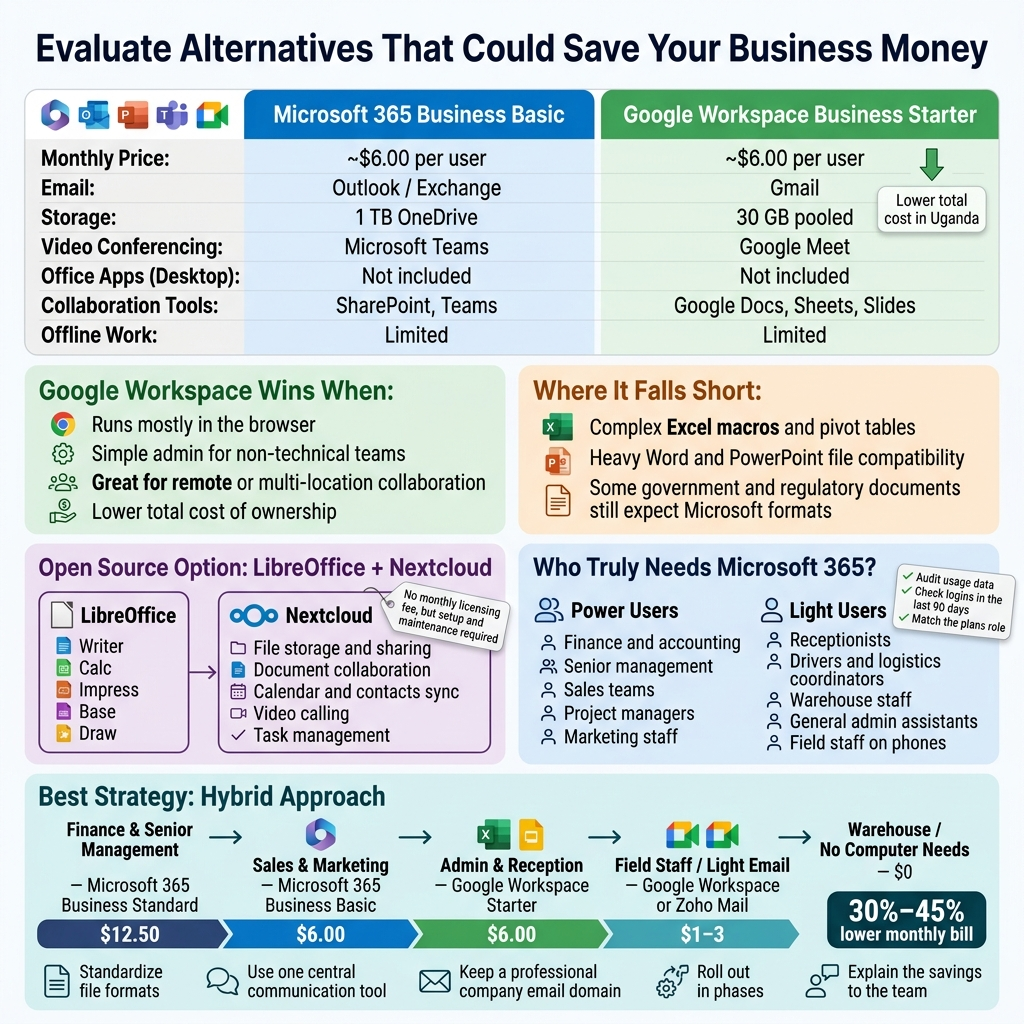
Comparing Google Workspace as a Cost-Effective Option
When Microsoft 365 prices go up, Google Workspace almost always enters the conversation — and for good reason. For many Ugandan businesses, especially small and medium-sized enterprises dealing with tight margins and currency pressure, Google Workspace offers a genuinely competitive package at a price point that can make a real difference at the end of the month.
Here is a straightforward comparison to help you see where the numbers land:
| Feature | Microsoft 365 Business Basic | Google Workspace Business Starter |
|---|---|---|
| Monthly Price (USD) | ~$6.00 per user | ~$6.00 per user |
| Outlook / Exchange | Gmail | |
| Storage | 1 TB OneDrive | 30 GB pooled |
| Video Conferencing | Microsoft Teams | Google Meet |
| Office Apps (Desktop) | Not included (Basic) | Not included (Starter) |
| Collaboration Tools | SharePoint, Teams | Google Docs, Sheets, Slides |
| Offline Work | Limited on Basic | Limited on Starter |
At the entry level, the pricing looks similar, but the Microsoft 365 price increase in 2026 shifts this balance. When you factor in the Uganda shilling exchange rate and local payment challenges, even a small USD difference multiplies quickly across your team.
Where Google Workspace genuinely wins for Ugandan businesses:
- Lighter infrastructure requirements. Google Workspace runs almost entirely in the browser. You do not need high-spec machines for your staff to work productively, which matters when hardware budgets are stretched.
- Simpler administration. The Google Admin Console is far more approachable for a non-technical business owner or office manager who does not have a dedicated IT team.
- Reliable collaboration for remote or multi-location teams. Google Docs, Sheets, and Slides handle real-time collaboration smoothly, which is helpful for businesses operating across different towns or regions in Uganda.
- Lower total cost of ownership. When you combine subscription savings with reduced IT support needs, the total bill often comes out lower over 12 months.
Where Google Workspace falls short:
- Teams deeply embedded in Excel with complex macros or pivot tables will feel the limitation of Google Sheets quickly.
- Businesses working with clients or partners who send heavy Word and PowerPoint files may face formatting headaches.
- Some government and regulatory processes in Uganda still expect Microsoft Office formatted documents.
The honest answer is that Google Workspace works extremely well for businesses whose day-to-day work revolves around email, documents, spreadsheets, and meetings. If your team does not depend on advanced Excel features, Access databases, or deep Teams integrations, making the switch could bring meaningful savings on your Microsoft 365 subscription Uganda costs without disrupting productivity.
Assessing Open Source Tools Like LibreOffice and Nextcloud
Open source tools sit at the opposite end of the spectrum from cloud subscriptions — they carry no monthly licensing fee, which sounds incredibly attractive when you are looking at a rising Microsoft 365 cost for small businesses. But there is a real story behind that “free” label that Ugandan business owners need to understand before committing.
LibreOffice is the most mature open source alternative to Microsoft Office. It includes:
- Writer — equivalent to Microsoft Word
- Calc — equivalent to Microsoft Excel
- Impress — equivalent to Microsoft PowerPoint
- Base — a database tool similar to Microsoft Access
- Draw — for diagrams and basic graphic work
For businesses whose staff primarily type documents, prepare reports, and work on basic spreadsheets, LibreOffice handles day-to-day tasks without any issues. Schools, NGOs, and small businesses across Africa have been running on LibreOffice for years with no real problems.
The challenges worth knowing about:
- Training time. Staff accustomed to Microsoft Office will need adjustment time. The interface is different, keyboard shortcuts vary, and some workflows change. Budget a few weeks for the team to settle in.
- File compatibility. LibreOffice opens and saves Microsoft formats, but complex formatting in Word or Excel files sometimes shifts during conversion. For businesses regularly exchanging files externally, this creates friction.
- No built-in cloud collaboration. LibreOffice is a desktop application. If your team needs to co-edit documents in real time, you need to pair it with another tool.
That is where Nextcloud comes in. Nextcloud is an open source cloud storage and collaboration platform. Think of it as a self-hosted version of OneDrive combined with some SharePoint functionality. A Ugandan business can set up Nextcloud on a local server or a rented cloud server, and the team gets:
- File storage and sharing
- Document collaboration (with Nextcloud Office, powered by LibreOffice)
- Calendar and contacts sync
- Video calling (with Talk)
- Task management
The real cost of Nextcloud is not licensing — it is setup, hosting, and maintenance. You will need either a competent IT person internally or a reliable local IT partner to set things up and keep them running. For businesses in Kampala with access to good IT support, this is a viable path. For businesses in smaller towns with limited IT resources, managing Nextcloud independently can become a headache.
A practical way to think about open source for your business:
| Business Profile | LibreOffice + Nextcloud Fit |
|---|---|
| Solo operator or micro-business | Excellent fit — very low cost |
| Small team with basic document needs | Good fit with some training |
| Business exchanging complex files with external partners | Partial fit — test carefully |
| Business needing advanced Excel/Teams integration | Poor fit |
| NGO or school with IT support | Strong fit |
Open source tools genuinely represent a path to reduce Microsoft 365 costs, but they require honest self-assessment. The savings are real. The trade-offs are also real. Going in with clear eyes about both gives you the best chance of a smooth transition.
Deciding Which Teams Truly Need Microsoft 365 Features
One of the most practical and often overlooked approaches to managing Microsoft 365 pricing strategy within your business is not switching everyone away from Microsoft 365 — it is identifying who actually needs it.
Most businesses in Uganda pay for Microsoft 365 seats uniformly across the entire organization. The accountant, the receptionist, the warehouse manager, and the CEO all get the same subscription. But in reality, the depth of Microsoft 365 usage varies dramatically between those roles.
Start by asking these honest questions for each role in your business:
- Does this person regularly use Word features beyond basic document creation?
- Do they work with complex Excel spreadsheets with formulas, pivot tables, or macros?
- Do they actively participate in Microsoft Teams meetings or use Teams for internal communication?
- Do they use SharePoint for document management or collaboration?
- Do they use Outlook for managing high-volume email with calendar integration?
Run through your staff list with these questions. You will almost certainly discover two distinct groups:
Power Users — People who genuinely need the full Microsoft 365 experience. These typically include:
- Finance and accounting staff
- Senior management
- Sales teams with client-facing document needs
- Project managers running complex team workflows
- Marketing staff creating detailed presentations
Light Users — People whose daily work does not depend on advanced Microsoft 365 features. These often include:
- Receptionists and front desk staff
- Drivers and logistics coordinators
- Warehouse or inventory staff
- General administrative assistants doing basic data entry
- Field staff checking email on phones
For light users, a cheaper alternative — whether Google Workspace, a basic email plan, or even a free tier tool — can handle their actual needs perfectly well. You do not need to pay a full Microsoft 365 Uganda subscription price for someone whose entire job involves sending five emails a day and filling in a simple form.
A license audit process to follow:
- Pull your Microsoft 365 admin panel and check actual usage data. Microsoft provides usage analytics showing who is actively using which apps.
- Flag anyone who has not logged into key apps (Teams, SharePoint, advanced Outlook features) in the last 90 days.
- Talk to department heads about actual workflows rather than assumed needs.
- Identify roles that could be served by a lower-cost Microsoft 365 plan (like Microsoft 365 Business Basic vs. Business Standard) rather than the full suite.
Downgrading a portion of your users from Business Standard to Business Basic, or moving light users to a non-Microsoft solution entirely, can cut your overall subscription bill significantly — and that is before the 2026 price increase even lands.
Running a Hybrid Approach to Cut Costs Without Losing Productivity
The cleanest answer for most Ugandan businesses is not a hard choice between “keep everything Microsoft” or “switch everything to alternatives.” The smartest path is a deliberately designed hybrid model — keeping Microsoft 365 where it genuinely earns its cost and replacing it with cheaper tools where it does not.
This approach is already working for businesses across Africa managing IT cost management Uganda challenges, and it is more practical than most business owners initially expect.
What a hybrid model looks like in practice:
| User Group | Recommended Tool | Estimated Monthly Cost (USD) |
|---|---|---|
| Finance & Senior Management | Microsoft 365 Business Standard | $12.50 per user |
| Sales & Marketing | Microsoft 365 Business Basic | $6.00 per user |
| Admin & Reception | Google Workspace Starter | $6.00 per user |
| Field Staff / Light Email Only | Google Workspace or Zoho Mail | $1–3 per user |
| Warehouse / No Computer Needs | No subscription needed | $0 |
For a 20-person business, this kind of segmentation could reduce your total monthly bill by 30–45% compared to giving everyone a full Microsoft 365 Business Standard seat.
Keys to making a hybrid approach work smoothly:
- Standardize file formats. Agree on which file types the whole team will use for shared documents. Google Docs can export to Word; Word can open Google-exported files. Set a clear rule and stick to it.
- Use a central communication tool. Do not let your communication fragment into chaos. If Microsoft Teams remains your primary communication platform for power users, make sure light users on Google Workspace are also accessible through Teams guest access or a shared channel tool.
- Be deliberate about email domains. All staff should retain a professional company email domain regardless of which platform they use. Both Microsoft 365 and Google Workspace support custom domains, so your brand identity stays consistent.
- Plan the transition in phases. Do not move everyone at once. Start with the lowest-risk group — typically field staff or reception — and learn from that before touching finance or management.
- Communicate with your team honestly. Staff resist change when it feels imposed without explanation. Tell them the business reason for the change. When people understand that the savings are going back into salaries, equipment, or growth, they typically get on board.
A hybrid approach also gives you flexibility for the future. If Microsoft 365 prices rise again — and given the trend, that is a reasonable expectation — you have already built the organizational muscle to adapt without panic. You are not locked into a single vendor for your entire technology stack, which is genuinely powerful positioning for a business operating in a market where cloud software pricing Uganda can shift without warning.
The businesses that will manage the 2026 Microsoft 365 price increase best are not the ones who react in July 2026. They are the ones who do the analysis now, make deliberate decisions about which tools serve which roles, and build a Microsoft 365 alternatives Africa strategy that reflects how their business actually operates — not how they assumed it did.
Build a Future-Proof IT Spending Plan for Your Business
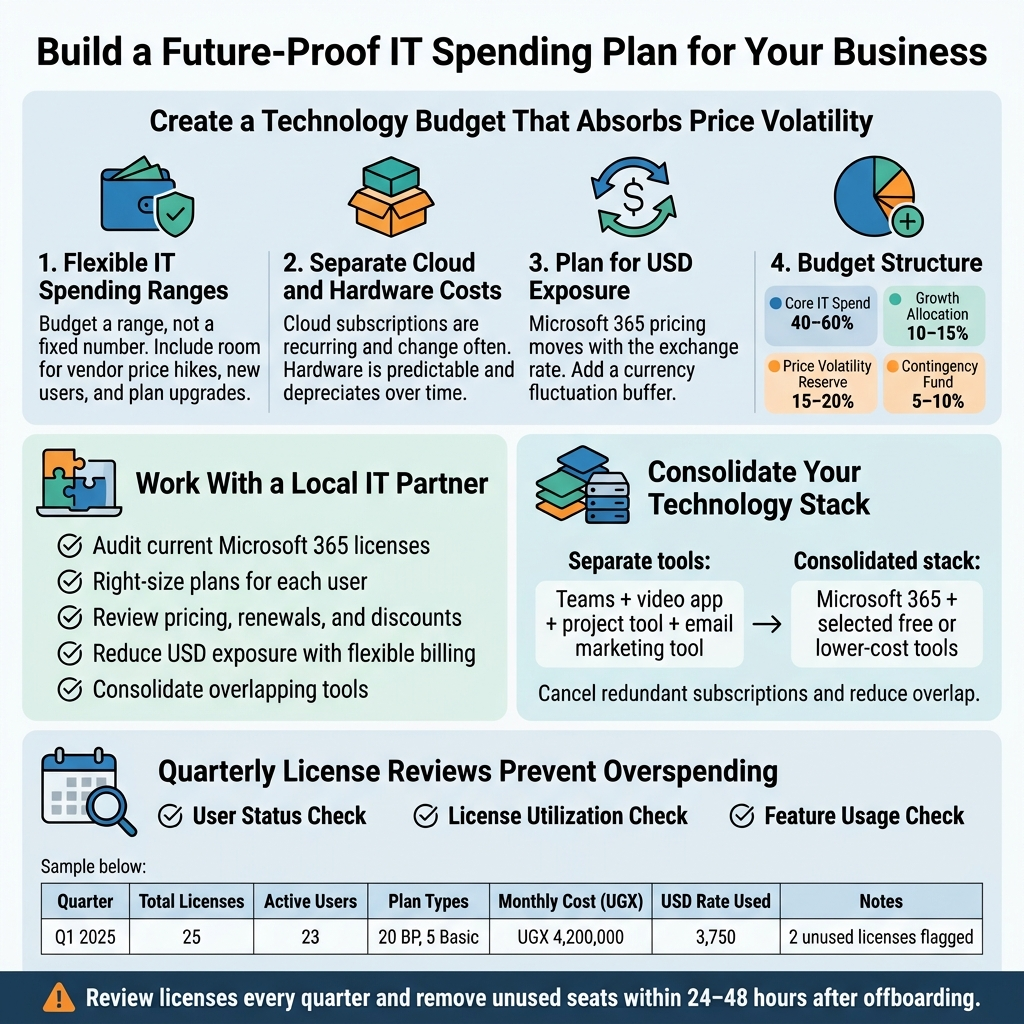
Create a Technology Budget That Absorbs Price Volatility
The Microsoft 365 price increase in 2026 is not going to be the last one. Software vendors have been raising prices steadily over the past decade, and cloud subscription costs are only going to keep climbing. If your business in Uganda is still budgeting for IT the old way — setting a fixed number at the start of the year and hoping nothing changes — you are setting yourself up for repeated financial shocks.
The smarter approach is to build a technology budget that already has room for price movement built into it.
Shift from Fixed IT Budgets to Flexible IT Spending Ranges
Instead of budgeting UGX 12,000,000 for Microsoft 365 subscriptions next year as a hard number, budget a range — say, UGX 12,000,000 to UGX 16,000,000. That upper limit is your price volatility buffer. It accounts for currency fluctuations (since cloud software pricing in Uganda is tied to USD), potential vendor price hikes, and the occasional need to add a user or upgrade a plan unexpectedly.
Many Ugandan businesses, especially small and medium enterprises, treat IT as a fixed operational expense rather than a dynamic one. That mindset works fine when prices are stable, but it completely breaks down when a vendor like Microsoft announces a price increase with just a few months’ notice.
Here is a simple framework for building a more resilient technology budget:
- Core IT Spend: The predictable, locked-in costs like current Microsoft 365 subscriptions, internet connectivity, and hardware maintenance contracts.
- Growth Allocation: A percentage (typically 10–15%) set aside for scaling — new hires, expanded storage, or additional software tools.
- Price Volatility Reserve: A buffer of 15–20% on top of your current software subscription costs specifically to absorb vendor price increases without triggering a budget crisis.
- Contingency Fund: A small pool (5–10%) for unexpected technology needs — a server failure, a cybersecurity incident, or an urgent software upgrade.
This structure means that when Microsoft raises prices or the Uganda shilling weakens against the dollar, you are not scrambling to find money from other departments. You have already planned for it.
Separate Cloud Subscription Costs from Hardware Costs
One of the most practical things you can do when planning IT spending in Uganda is to separate your cloud subscription costs from your hardware and infrastructure costs in your budget categories. These two categories behave very differently.
Hardware costs are largely predictable and depreciate over time. You buy a laptop, you know it will last three to five years, and you plan accordingly. Cloud subscription costs, on the other hand, are recurring, vendor-controlled, and subject to change based on decisions made in Redmond, Washington — not Kampala.
When you separate them clearly, you get a much better picture of where your IT money actually goes, and it becomes easier to identify which part of the budget is getting squeezed when a price increase hits.
Plan for USD Exposure in Your Cloud Budget
This point deserves specific attention for Ugandan businesses. Microsoft 365 pricing in Uganda is ultimately denominated in US dollars. Even if your local reseller quotes you in Ugandan shillings, the underlying cost moves with the exchange rate.
When the shilling weakens — which happens periodically — your Microsoft 365 cost for small businesses in Uganda effectively goes up even without any formal price increase from Microsoft. Add an actual price increase on top of that, and the combined impact can be significant.
Budget with this in mind. If you are currently spending UGX 50,000 per user per month on Microsoft 365 subscriptions in Uganda, do not just account for Microsoft’s announced price increase. Also build in a 10–15% currency fluctuation buffer, because the shilling-to-dollar rate a year from now is not something anyone can predict with certainty.
Work With a Local IT Partner to Optimize Your Stack
Most Ugandan businesses that struggle with IT costs share a common pattern: they make software and subscription decisions independently, without expert input, and then they pay for it — literally. They over-license, they use the wrong plans, they miss available discounts, and they keep paying for tools that nobody actually uses.
A good local IT partner changes all of that. And in the context of the Microsoft 365 price increase in 2026, having the right partner in your corner can directly affect how much you end up paying.
What a Local IT Partner Actually Does for Your Costs
When people hear “IT partner,” they sometimes think of someone who just fixes computers when things break. That is one part of it, but the real value — especially around cloud software pricing in Uganda — is strategic and financial.
A capable local IT partner will:
- Audit your current Microsoft 365 subscriptions and identify which users are on plans that are too expensive for what they actually do.
- Right-size your licensing — moving administrative staff, reception teams, or field workers onto lower-tier plans that still meet their needs but cost significantly less.
- Navigate the Microsoft licensing ecosystem on your behalf, including identifying whether your business qualifies for nonprofit pricing, education pricing, or SMB-specific plans that are cheaper than standard commercial rates.
- Manage your renewal timeline so you are not caught renewing at a bad time when the shilling is weak or when a price increase is just around the corner.
- Advise on hybrid approaches — combining Microsoft 365 with free or lower-cost tools where appropriate to reduce your overall dependence on any single vendor.
The Reseller Relationship Matters More Than You Think
In Uganda, Microsoft 365 subscriptions are typically sold through local resellers and cloud solution providers. The reseller you choose matters. Some resellers are simply order-takers — they process your subscription and move on. Others are genuine partners who actively help you manage your IT cost management in Uganda over time.
Ask potential resellers the following before committing to a relationship:
| Question | What You Are Really Testing |
|---|---|
| Can you audit our current licenses and tell us where we are over-spending? | Their willingness to give honest advice, not just sell more |
| Do you proactively notify us about upcoming price changes? | Their commitment to being a long-term partner |
| Can you help us compare Microsoft 365 with alternatives? | Whether they prioritize your business needs or just vendor commissions |
| Do you offer flexible billing in Ugandan shillings? | Their ability to reduce your USD exposure |
| What support do you provide after the sale? | Their actual service model |
A reseller who helps you optimize and right-size your stack will often save you more money than the margin they earn on your subscription. The best IT partnerships in Uganda are built on that kind of mutual value.
Consolidate Your Technology Stack
One of the most overlooked opportunities for IT cost management in Uganda is stack consolidation. Many businesses are paying for multiple tools that overlap in functionality.
For example, a business might be paying for:
- Microsoft 365 (which includes Teams for communication)
- A separate video conferencing subscription
- A third-party project management tool
- A standalone email marketing tool
When you audit this carefully, you often find that Microsoft 365 already covers several of these use cases through tools like Teams, Planner, and SharePoint. Consolidating onto what you already pay for — and canceling redundant subscriptions — can offset much of the Microsoft 365 price increase impact.
A local IT partner with strong knowledge of the Microsoft 365 ecosystem can map your current tools against what is included in your existing subscription and tell you exactly what you can cut.
Set Up Regular License Reviews to Avoid Overspending
License creep is one of the most expensive and preventable problems in business IT spending. It happens quietly. An employee joins and gets a Microsoft 365 Business Premium license. Another person takes parental leave. A third person leaves the company. Months later, you are still paying for seats that nobody is actively using, and nobody noticed because the payment happens automatically every month.
For Ugandan businesses managing Microsoft 365 subscriptions, this is a very real and very common problem. And with Microsoft 365 pricing set to increase in 2026, every unused or mis-allocated license becomes even more expensive to carry.
Build a Quarterly License Review Into Your Calendar
The fix is straightforward, but it only works if you make it a habit. Set up a quarterly license review — ideally in January, April, July, and October — where you or your IT partner goes through the following checklist:
User Status Check:
- Which users have been inactive for 30 days or more?
- Are there any former employees still on your tenant?
- Are there contractors or temporary staff whose access should have been removed?
License Utilization Check:
- Which users on Business Premium or E3 plans are only using email? Could they be moved to a cheaper plan?
- Are there users who need a Microsoft 365 license but are currently using a full paid subscription when a free or lower-tier option would work?
- Are any shared mailboxes incorrectly assigned full user licenses?
Feature Usage Check:
- Which Microsoft 365 features (Teams, Planner, SharePoint, Power BI) are actually being used?
- Are there departments or teams paying for add-ons they have never activated?
Use Microsoft’s Built-In Reporting Tools
Microsoft 365 includes usage reporting dashboards in the Admin Center that most Ugandan businesses never look at. These reports show you:
- Active versus inactive users by product
- Which apps are being used (and how often)
- Storage consumption by user
- Teams activity levels across your organization
Getting into the habit of reviewing these reports — even once a quarter — will consistently surface savings opportunities. If you have ten users who have not opened Outlook, Teams, or any Microsoft 365 app in the last 60 days, that is ten licenses worth of monthly spend that needs to be examined immediately.
Track the Total Cost of Your Microsoft 365 Subscription Over Time
Most businesses know roughly what they pay per month for Microsoft 365. Very few track how that number has changed over time and what is driving those changes.
Set up a simple tracking system — even a spreadsheet — that logs the following each quarter:
| Quarter | Total Licenses | Active Users | Plan Types | Monthly Cost (UGX) | USD Rate Used | Notes |
|---|---|---|---|---|---|---|
| Q1 2025 | 25 | 23 | 20 BP, 5 Basic | UGX 4,200,000 | 3,750 | 2 unused licenses flagged |
| Q2 2025 | 23 | 22 | 19 BP, 4 Basic | UGX 3,900,000 | 3,780 | Reduced after review |
| Q3 2025 | 24 | 24 | 19 BP, 5 Basic | UGX 4,100,000 | 3,800 | New hire added |
This simple record does several things. It makes the cost of Microsoft 365 subscriptions in Uganda visible and tangible. It shows you whether your active user count justifies your license count. It helps you spot the impact of currency movements on your cloud software pricing in Uganda. And it gives you data to work with when planning for the Microsoft 365 price increase in 2026.
Build License Reviews Into HR Offboarding Processes
The most reliable way to stop paying for licenses belonging to people who no longer work for you is to make license removal part of your HR offboarding checklist — not an IT task that happens “when someone remembers.”
When an employee resigns or is let go, the following should happen within 24 to 48 hours:
- Microsoft 365 account disabled
- License reassessed — either reallocated to a new hire or removed from the subscription
- Data from the departing user’s account backed up and archived if needed
This process alone can save a small business with moderate staff turnover thousands of shillings per month. At Microsoft 365 Business Premium pricing levels, even one or two unused licenses add up to meaningful money over a full year — and that is before the 2026 price increase kicks in.
Affordable Microsoft 365 plans are not always about choosing a cheaper tier. Sometimes they are about making sure you are only paying for what you actually need, at the tier that actually fits each person on your team. A consistent review rhythm is what makes that happen.
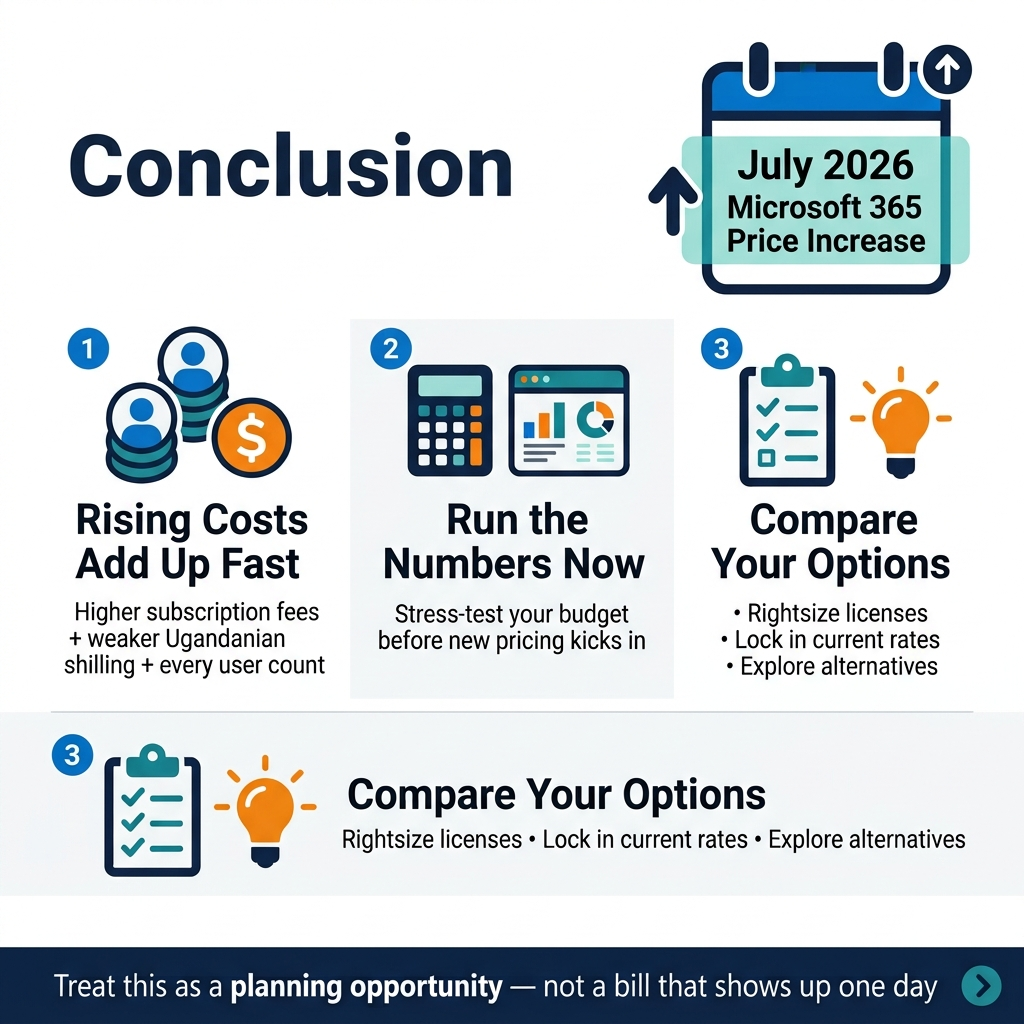
The Microsoft 365 price increase coming in July 2026 is not something Ugandan businesses can afford to ignore. Between the rising subscription costs, the weakening shilling, and the way these charges stack up across every user in your organization, the financial hit could be significant if you do nothing. The good news is that you now have enough time to run the numbers, stress-test your budget, and make smarter decisions before the new pricing kicks in.
Start by figuring out exactly what this change will cost your business, then explore every option available to you, whether that means rightsizing your licenses, locking in current rates, or seriously looking at alternatives. The businesses that come out ahead will be the ones that treat this as a planning opportunity rather than a bill that just shows up one day. Take action now while you still have room to move.

Tech Evangelist and Business Developer.
I love connecting with nature